PowerFlex Management Platform - 폴더에 있는 vCLS 데이터 저장소로 인해 기존 리소스 그룹 추가 실패
Summary: PFxM(PowerFlex Manager)이 vSphere 폴더에 있는 vCLS 데이터 저장소를 감지할 수 없기 때문에 기존 리소스 그룹 추가 작업이 실패합니다.
This article applies to
This article does not apply to
This article is not tied to any specific product.
Not all product versions are identified in this article.
Symptoms
리소스 그룹의 배포 상태가 오류입니다. 이는 리소스 그룹 배포(기존 항목 추가 또는 신규 배포)가 실패했음을 의미합니다.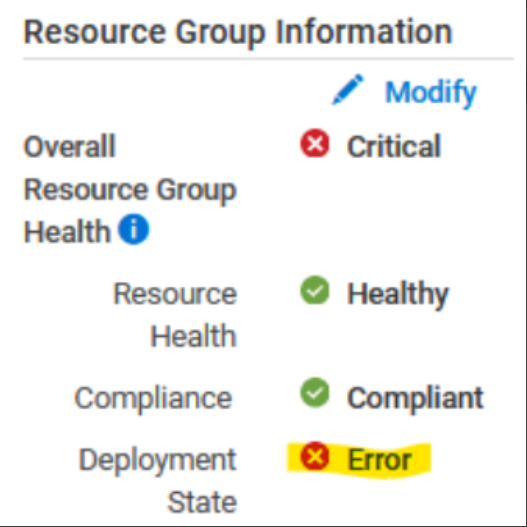
아래 오류는 리소스 그룹의 데이터 저장소가 vCenter/데이터 센터에 속하지 않음을 나타냅니다.
문제를 검증하려면 Thin-Deployer 포드를 입력하고 rackserver-<servicetag_123> device_name> 디렉토리에 <로그인합니다.
-
Thin-deployer 포드를 입력합니다.
x=$(kubectl get pods -n powerflex|grep -i thin|awk '{print $1}'); kubectl exec -it -n powerflex $x -- bash -
device_name> 디렉토리를 <입력합니다.
cd /opt/Dell/ASM/device/<device_name>
-
살펴보기
rackserver-<servicetag_123>Log - 데이터 저장소를 찾을 수 없음을 나타냅니다.Error: datastore object powerflex-TESTCLUSTER1-ds-2 not found Error: /Stage[main]/Asm::Resource_wrapper/Vc_vcls_datastore[TESTCLUSTER1]/ensure: change from 'absent' to 'present' failed: datastore object powerflex-TESTCLUSTER1-ds-2 not found
데이터 저장소가 여전히 vCenter 인벤토리 파일 인벤토리/rs-vc.boston.ee.com.json에 표시될 수 있습니다.
  {"name"=>"powerflex-TESTCLUSTER1-ds-2",
             "id"=>"datastore-120788",
             "type"=>"Datastore",
             "attributes"=>{"is_local"=>false, "free_space"=>12297699328, "mount_dir"=>"/vmfs/volumes/62e1db72-18264b5c-a653-b8599fc367db",
"volume_name"=>"powerflex-TESTCLUSTER1-ds-2", "capacity"=>15.75, "scsi_device_id"=>"eui.0be0ca503685ed0fea3112de00000004", "vendor"=>"EMC"},
             "children"=>[],
             "path"=>""},
영향
기존 리소스 그룹/서비스를 추가할 수 없습니다.
Cause
PFxM의 제한으로 인해 vCenter 폴더 내에 있는 vCLS 데이터 저장소를 볼 수 없습니다.
이 문제는 PFxM이 vCenter의 폴더를 재귀적으로 검색할 수 없기 때문에 발생합니다.
Resolution
vSphere 데이터 저장소 보기에서 리소스 그룹과 연결된 vCLS 데이터 저장소를 폴더 밖으로 데이터 센터로 이동합니다.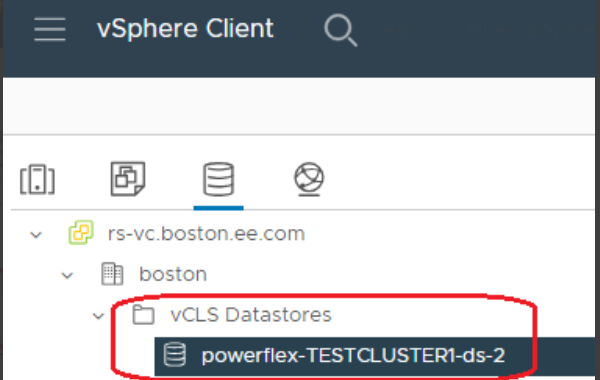
영향을 받는 버전
PFMP 4.5.x
수정된 버전
PFMP 4.8 시리즈
Affected Products
PowerFlex rack RCM SoftwareArticle Properties
Article Number: 000225335
Article Type: Solution
Last Modified: 25 Nov 2024
Version: 3
Find answers to your questions from other Dell users
Support Services
Check if your device is covered by Support Services.