GPS Does Not Work on Dell Pro Rugged 13 RA13250 or Dell Pro Rugged 14 RB14250
Summary: Learn what to do when the GPS does not work, and Device Manager is missing the u-blox Universal GNSS and the GPS USB Serial Port entries.
This article applies to
This article does not apply to
This article is not tied to any specific product.
Not all product versions are identified in this article.
Symptoms
The GPS may stop working on a Dell Pro Rugged 13 RA13250 or Dell Pro Rugged 14 RB14250. When Device Manager is checked, the u-blox Universal GNSS and the GPS USB Serial Port entries are missing. The example image below shows the entries that are missing when this issue occurs. Under Ports, GPS USB Serial Port (COMx) is missing. In this example, x changes to a numerical COM port assignment. In the example image, it is COM3. Under Sensors, u-blox Universal GNSS is missing.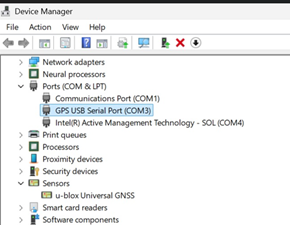
Affected Platforms:
- Dell Pro Rugged 13 RA13250
- Dell Pro Rugged 14 RB14250
Cause
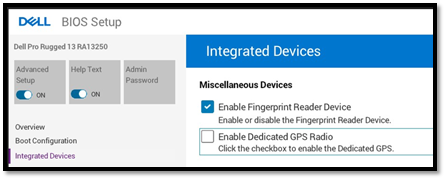
The Enable Dedicated GPS Radio setting in the BIOS is not selected.
Resolution
- Press F2 at computer startup to enter the BIOS Setup menu.
- Turn ON the Advanced Setup to show advanced settings.
- Go to Integrated Devices.
- Under Miscellaneous Devices, select the Enable Dedicated GPS Radio option.
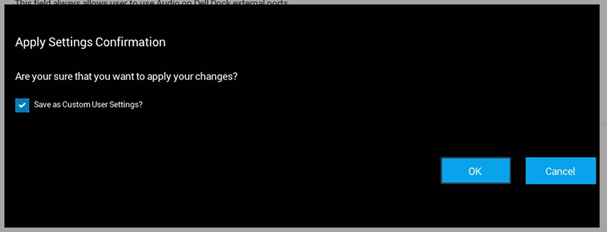
- Click APPLY CHANGES.

- In the confirmation prompt, click OK to apply the changes.
- Click EXIT in the lower-right corner to reboot the computer.

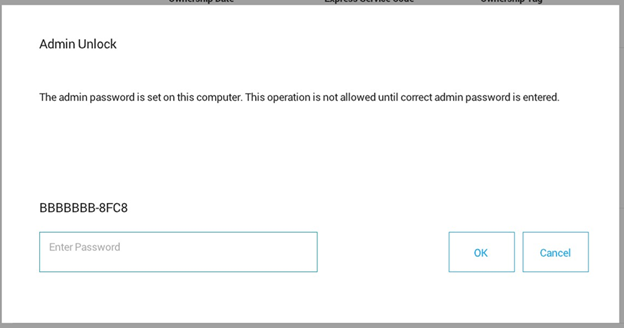
Note: If the Admin Password is locked, unlock it before proceeding.
- Click the Admin Password button.

- Enter the admin password.
- Click OK.
Affected Products
Dell Pro Rugged 13 RA13250, Dell Pro Rugged 14 RB14250Article Properties
Article Number: 000323549
Article Type: Solution
Last Modified: 15 Sept 2025
Version: 3
Find answers to your questions from other Dell users
Support Services
Check if your device is covered by Support Services.