Dell Desktops Intermittently Reboot After Changing Watchdog Timer Setting in BIOS
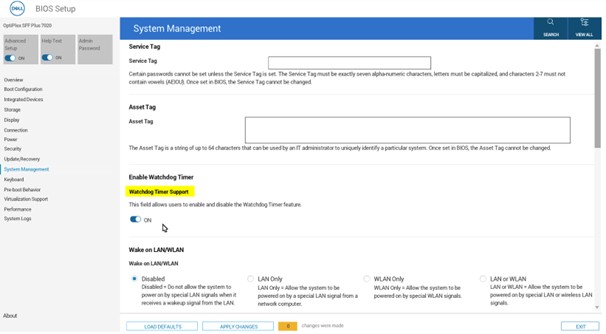
Summary: This article provides information about Dell desktops restarting automatically after modifying the Watchdog Timer support in BIOS.
This article applies to
This article does not apply to
This article is not tied to any specific product.
Not all product versions are identified in this article.
Symptoms
Affected Platforms:
- Dell Pro 24 All-in-One
- Dell Pro Max
- Dell Pro Micro
- Dell Pro Slim
- Dell Pro Tower
- OptiPlex
- Precision Desktops
Note: This article affects any desktop with the Watchdog Timer Support setting enabled in the BIOS.
Cause
The Watchdog Timer driver is not installed after enabling the Watchdog Timer Support setting in BIOS.
Resolution
Users should download and install the Watchdog Timer driver from the Dell website (go to the Drivers & Download page of the computer that the Watchdog Timer Support setting is being enabled on), following Watchdog Timer Support activation in the BIOS, to prevent automatic restarts.
Affected Products
Dell Pro All-in-One, Dell Pro Max Slim, Dell Pro Max Tower, Dell Pro Micro, Dell Pro Slim, Dell Pro Tower, OptiPlex, Fixed WorkstationsArticle Properties
Article Number: 000361683
Article Type: Solution
Last Modified: 26 Aug 2025
Version: 1
Find answers to your questions from other Dell users
Support Services
Check if your device is covered by Support Services.