如何使用 USB-C 线缆连接戴尔显示器
Summary: 了解在使用 USB-C 线缆连接戴尔显示器时如何建立良好的连接。
This article applies to
This article does not apply to
This article is not tied to any specific product.
Not all product versions are identified in this article.
Instructions
某些戴尔显示器可能使用 USB-C 线缆进行连接。使用较短的线缆和不正确的布线可能会使 USB-C 接头出现压力,尤其是在调整显示器期间。这可能会导致针脚弯曲、端口松动甚至端口损坏等问题。避免在电缆对端口施加压力时连接电缆。下图显示了端口承压和线缆松弛不足的示例。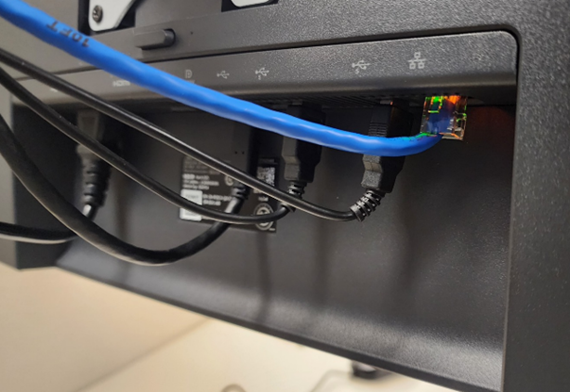
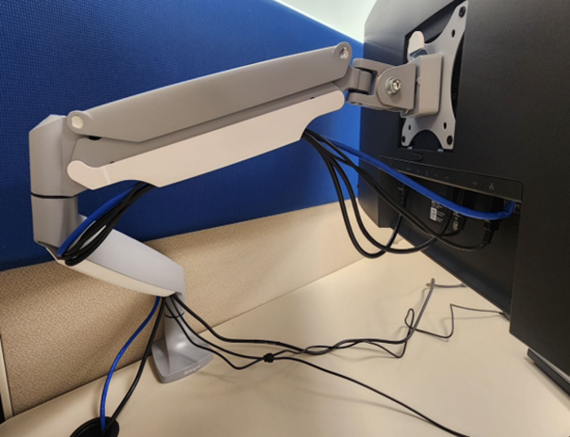
受影响的显示器:
- 戴尔 27 Plus 4K USB-C 显示器 S2725QC
- 戴尔 P2425E
- Dell P2425HE
- 戴尔 Pro 34 Plus USB-C Hub 显示器P3425WE
- Dell U2424HE
- 戴尔 U2724D
通过壁挂式或桌面安装臂通道布置线缆时,请在连接器和臂架通道之间预留至少 40 厘米(15.75 英寸)的线缆长度。这可确保显示器有足够的松弛度进行调整,包括倾斜、侧转和沿枢轴调整。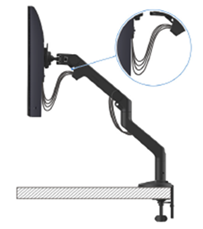
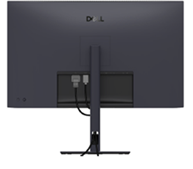
如果 USB-C 线缆较短,请将其直接连接到计算机,不要穿过臂架或显示器支架上的插槽。
Affected Products
Dell P2425E, Dell P2425HE, Dell Pro 34 Plus USB-C Hub Monitor P3425WE, Dell 27 Plus 4K USB-C Monitor S2725QC, Dell U2424HE, Dell U2724DArticle Properties
Article Number: 000373015
Article Type: How To
Last Modified: 23 Sept 2025
Version: 1
Find answers to your questions from other Dell users
Support Services
Check if your device is covered by Support Services.