修复戴尔 P2424HT 显示器上的触控功能问题
Summary: 解决 Dell P2424HT 显示器上的触控功能问题。确保使用 USB-C、USB-A、DisplayPort (DP) 或 HDMI 正确连接线缆,以使触控功能正常工作。
This article applies to
This article does not apply to
This article is not tied to any specific product.
Not all product versions are identified in this article.
Symptoms
受影响的产品:
- 戴尔 2424HT
Cause
由于布线问题,触控功能可能无法正常工作。
Resolution
要使触控功能正常工作,必须通过以下三种方法之一连接计算机和显示器。
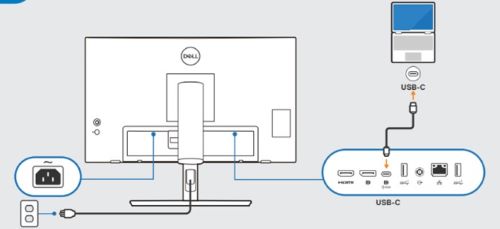
要使用 USB-C 转 USB-C 线缆,请按照以下步骤操作:
- 计算机与P2424HT之间的 USB-C 转 USB-C 线缆连接。
提醒:USB-C 连接器接口必须插入到位。
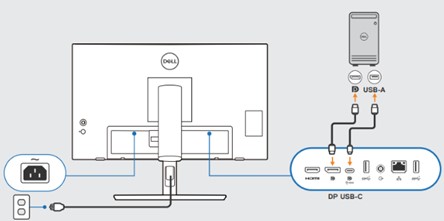
要使用 USB-A 转 USB-C 线缆和 DP 线缆,请按照以下步骤操作:
- 计算机上的 USB-A 连接与P2424HT上的 USB-C 连接
- 计算机与P2424HT之间的 DP 线缆连接
提醒:必须将所有线缆和连接器接口插入到位。
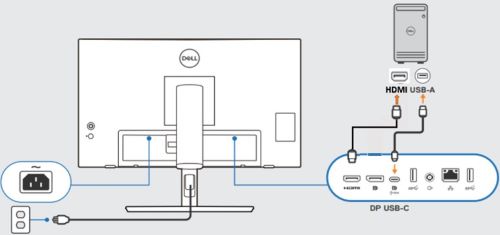
要使用 USB-A 转 USB-C 线缆和 HDMI 线缆,请按照以下步骤操作:
- 计算机上的 USB-A 连接与P2424HT上的 USB-C 连接
- 计算机与P2424HT之间的 HDMI 线缆连接
提醒:必须将所有线缆和连接器接口插入到位。
Affected Products
Dell Pro P 24 Touch USB-C Hub Monitor P2424HTArticle Properties
Article Number: 000225948
Article Type: Solution
Last Modified: 21 May 2026
Version: 5
Find answers to your questions from other Dell users
Support Services
Check if your device is covered by Support Services.