NetWorker: Niepowodzenie tworzenia kopii zapasowej bootstrap i poleceń Authc w klastrowanym serwerze Linux po uaktualnieniu do wersji 19.7.0.3 lub 19.8.0.2 i wcześniejszych
Summary: Serwer NetWorker jest wdrażany na klastrowanym serwerze Linux NetWorker. Po uaktualnieniu oprogramowania NetWorker do wersji 19.7.0.3 lub 19.8.0.2 lub wcześniejszej kopia zapasowa bootstrap ochrony serwera nie powiedzie się. Polecenia usługi uwierzytelniania (nsrlogin, authc_config, authc_mgmt) również nie powiodły się, ponieważ zwrócony błąd jest taki, że usługa uwierzytelniania nie jest dostępna z błędem HTTP 404 (nie znaleziono). ...
This article applies to
This article does not apply to
This article is not tied to any specific product.
Not all product versions are identified in this article.
Symptoms
Serwer NetWorker jest wdrażany w klastrze Red Hat Pacemaker (pcs) High Availability.
Oprogramowanie NetWorker zostało uaktualnione do 19.7.0.4.
Uruchomienie usługi NetWorker kończy się pomyślnie, wszystkie zasoby klastra są wyświetlane jako "uruchomione" w jednym z węzłów klastra:
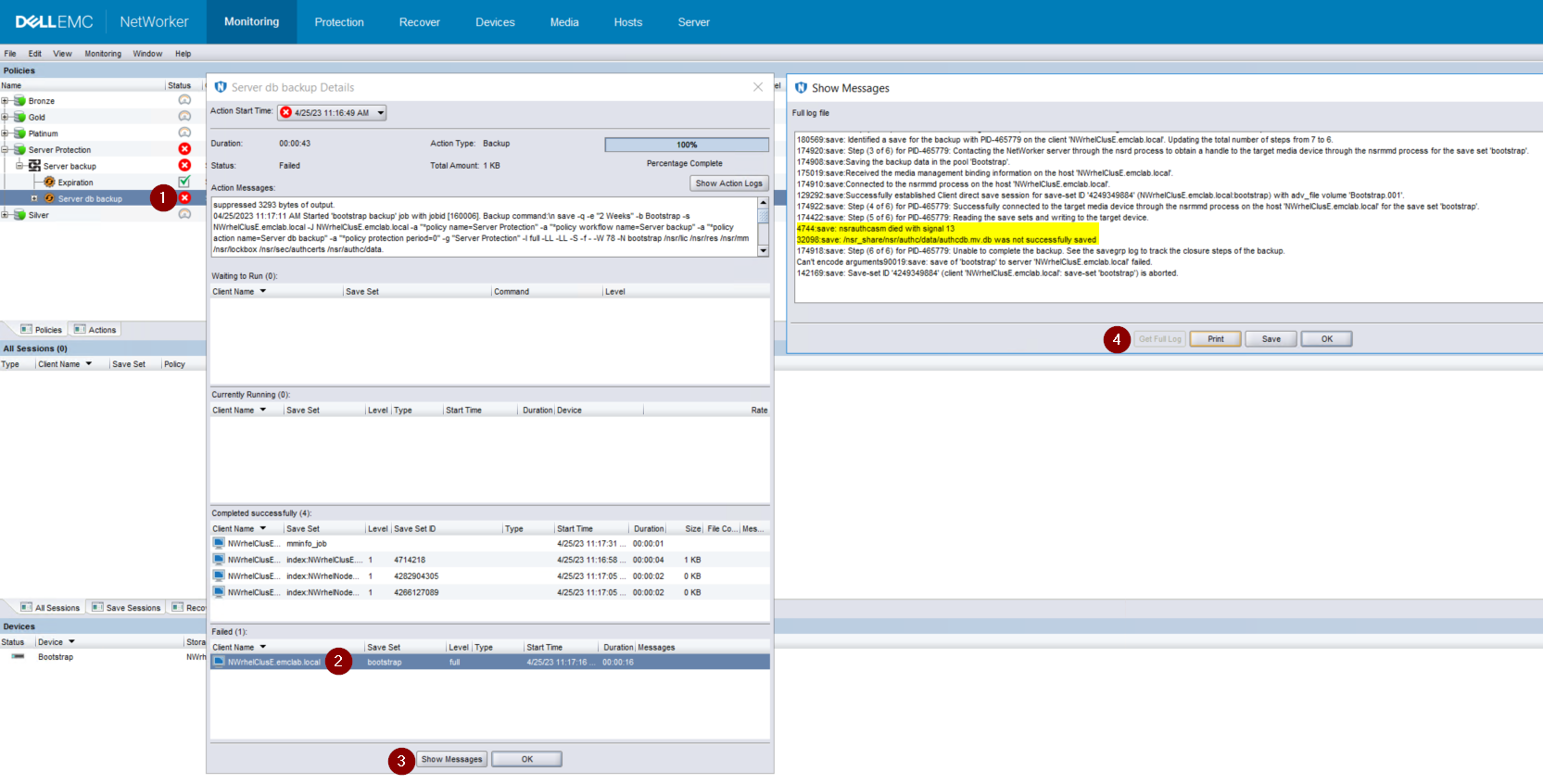
Rysunek 1. Kopia zapasowa Bootstrap nie może wykonać kopii zapasowej authcdb
Oprogramowanie NetWorker zostało uaktualnione do 19.7.0.4.
Uruchomienie usługi NetWorker kończy się pomyślnie, wszystkie zasoby klastra są wyświetlane jako "uruchomione" w jednym z węzłów klastra:
root@NWrhelNodeG:~# pcs resource * Resource Group: NW_group: * fs (ocf::heartbeat:Filesystem): Started NWrhelNodeG.emclab.local * ip (ocf::heartbeat:IPaddr): Started NWrhelNodeG.emclab.local * nws (ocf::EMC_NetWorker:Server): Started NWrhelNodeG.emclab.localPolecenie nsrlogin kończy się niepowodzeniem z błędem HTTP 404 (nie znaleziono):
[admin@NWrhelNodeG linux_x86_64]$ nsrlogin -u Administrator 130136:nsrlogin: Please enter password: 117849:nsrlogin: Authentication library error: GET failed with HTTP-ERROR: 404 Server Message : Could not parse server-response from json string Server Message : Make sure that server is runningKopia zapasowa bootstrap "Server Protection" nie może utworzyć kopii zapasowej authcdb:
Rysunek 1. Kopia zapasowa Bootstrap nie może wykonać kopii zapasowej authcdb
Cause
Zmiany w authc podczas uaktualniania nie zostały zatwierdzone do klastra współużytkowanego authcdb. Podczas procesu aktualizacji zasób NWS komputera jest wyłączony lub zasób klastra PCS zostaje całkowicie zatrzymany. Jeśli NWS nie jest uruchomiony, katalog /nsr jest symbolicznie połączony (wskazujący) z /nsr. NetWorker.local zamiast /nsr_share.
/Nsr. NetWorker.local jest katalogiem fizycznym /nsr i zawiera tylko foldery związane z klientem. z o.o. Folder NetWorker.local/authc istnieje, ale nie zawiera żadnych plików specyficznych dla authcdb serwera NetWorker. Znajduje się w katalogu /nsr_share/nsr/authc.
Po uaktualnieniu NetWorker firma authc oczekuje "wersji B" plików authc, ale widzi "wersję A" plików przed aktualizacją.
/Nsr. NetWorker.local jest katalogiem fizycznym /nsr i zawiera tylko foldery związane z klientem. z o.o. Folder NetWorker.local/authc istnieje, ale nie zawiera żadnych plików specyficznych dla authcdb serwera NetWorker. Znajduje się w katalogu /nsr_share/nsr/authc.
Po uaktualnieniu NetWorker firma authc oczekuje "wersji B" plików authc, ale widzi "wersję A" plików przed aktualizacją.
Resolution
Uaktualnij networker do jednej z następujących wersji (lub nowszych):
Jeśli używasz wersji 19.8.0.4 lub 19.9.0.2 lub nowszej, wykonaj następujące czynności:
Próby Nsrlogin i kopie zapasowe bootstrap powinny zakończyć się pomyślnie.
- 19.8.0.4
- 19.9.0.2
Jeśli używasz wersji 19.8.0.4 lub 19.9.0.2 lub nowszej, wykonaj następujące czynności:
- W każdym węźle klastra zmień nazwę właściwości /opt/nsr/authc-server/conf/h2_db.properties:
mv /opt/nsr/authc-server/conf/h2_db.properties /opt/nsr/authc-server/conf/h2_db.properties.bak
- W każdym węźle uruchom ponownie plik /opt/nsr/authc-server/scripts/authc_configure.sh, aby ponownie skonfigurować authc. Nie powoduje to usunięcia żadnych ustawień ani konfiguracji uprzednio wykonanych w authc.
W aktywnym węźle wygląda to następująco:
W przypadku węzłów pasywnych wygląda to następująco:
root@NWrhelNodeH:~# /opt/nsr/authc-server/scripts/authc_configure.sh

Specify the directory where the Java Standard Edition Runtime Environment (JRE) software is installed [/opt/nre/java/latest]:

The installation process will install an Apache Tomcat instance. For optimum security, EMC NetWorker Authentication Service will use a non-root user (nsrtomcat) to start the Apache Tomcat instance. If your system has special user security requirements, ensure that proper operational permissions are granted to this non-root user (nsrtomcat).
Please refer to NetWorker Installation Guide.

WARNING: Port 9090 is already in use.

Do you wish to specify a different port number [y]? n

The Apache Tomcat will use "NWrhelNodeH.emclab.local" as the host name. The Apache Tomcat will use "9090" as the port number.

The NetWorker Authentication Service requires a keystore file to configure encryption and to provide SSL support.

EMC recommends that you specify a keystore password that has a minimum of six characters.

Do you want to use the existing keystore /nsr/authc/conf/authc.keystore [y]?

Specify password for the existing keystore:
The install will use the existing certificate "emcauthctomcat" for Apache Tomcat.
The install will use the existing certificate "emcauthcsaml" for Authentication Service.

Creating the installation log in /opt/nsr/authc-server/logs/install.log.

Performing initialization. Please wait...

The installation completed successfully.
W przypadku węzłów pasywnych wygląda to następująco:
root@NWrhelNodeG:~# /opt/nsr/authc-server/scripts/authc_configure.sh

Specify the directory where the Java Standard Edition Runtime Environment (JRE) software is installed [/opt/nre/java/latest]:

The installation process will install an Apache Tomcat instance. For optimum security, EMC NetWorker Authentication Service will use a non-root user (nsrtomcat) to start the Apache Tomcat instance. If your system has special user security requirements, ensure that proper operational permissions are granted to this non-root user (nsrtomcat).
Please refer to NetWorker Installation Guide.

The Apache Tomcat will use "NWrhelNodeG.emclab.local" as the host name. The Apache Tomcat will use "9090" as the port number.

The NetWorker Authentication Service requires a keystore file to configure encryption and to provide SSL support.

EMC recommends that you specify a keystore password that has a minimum of six characters.

Do you want to use the existing keystore /nsr/authc/conf/authc.keystore [y]?

Specify password for the existing keystore:
The install will use the existing certificate "emcauthctomcat" for Apache Tomcat.
The install will use the existing certificate "emcauthcsaml" for Authentication Service.

The NetWorker Authentication Service defines automatically an administrator user account named administrator in the NetWorker Authentication Service local database. This account is specific to the administration of the NetWorker Authentication Service, and is not related to other administrator accounts on this system.

*******************************************************************************************
Password criteria: Minimum required characters - 9 and Maximum allowed characters - 126 Minimum [alphabetic - 2, Uppercase - 1, Lowercase - 1, Numeric - 1, Special character - 1]
********************************************************************************************

Specify an initial password for administrator:
Confirm the password:

Creating the installation log in /opt/nsr/authc-server/logs/install.log.

Performing initialization. Please wait...

The installation completed successfully.
UWAGA: W węźle pasywnym zostanie wyświetlony monit o utworzenie nowego hasła do konta administratora NetWorker. Nie oznacza to, że istniejące hasło zostało utracone. Dzieje się tak, ponieważ authcdb używany przez klaster znajduje się w katalogu /nsr_share/nsr/authc, który istnieje tylko w aktywnym węźle. Kiedy węzeł pasywny staje się nowym aktywnym węzłem, używa współużytkowanego authcdb. Skrypt authc_configure.sh jest uruchamiany w każdym węźle w celu utworzenia właściwości /opt/nsr/authc-server/conf/h2_db.properties, które są lokalne dla każdego węzła.
- Uruchom ponownie zasób NWS:
pcs resource restart nws
- Sprawdź, czy zasób NWS został uruchomiony:
pcs resource

root@NWrhelNodeH:~# pcs resource
   * Resource Group: NW_group:
      * fs (ocf::heartbeat:Filesystem): Started
NWrhelNodeH.emclab.local
      * ip (ocf::heartbeat:IPaddr): Started
NWrhelNodeH.emclab.local
      * nws (ocf::EMC_NetWorker:Server): Started
NWrhelNodeH.emclab.local
Próby Nsrlogin i kopie zapasowe bootstrap powinny zakończyć się pomyślnie.
Affected Products
NetWorkerProducts
NetWorker Family, NetWorker SeriesArticle Properties
Article Number: 000212755
Article Type: Solution
Last Modified: 12 Apr 2024
Version: 6
Find answers to your questions from other Dell users
Support Services
Check if your device is covered by Support Services.