NetWorker: Команди Bootstrap Backup і Authc завершуються помилкою на кластерному сервері Linux після оновлення до 19.7.0.3 або 19.8.0.2 і попередніх версій
Summary: Сервер NetWorker розгорнутий на кластерному сервері Linux NetWorker. Після оновлення версії NetWorker до 19.7.0.3 або 19.8.0.2 і раніше резервне копіювання початкового завантаження Server Protection не вдається. Команди служби автентифікації (nsrlogin, authc_config, authc_mgmt) також зазнають невдачі, повертається помилка, яка полягає в тому, що служба автентифікації недоступна з помилкою HTTP 404 (не знайдено). ...
This article applies to
This article does not apply to
This article is not tied to any specific product.
Not all product versions are identified in this article.
Symptoms
Сервер NetWorker розгорнутий на кластері високої доступності Red Hat Pacemaker (pcs).
NetWorker оновлено до версії 19.7.0.4.
Запуск сервісу NetWorker успішний, всі ресурси кластера відображаються як «запущені» на одному з вузлів кластера:
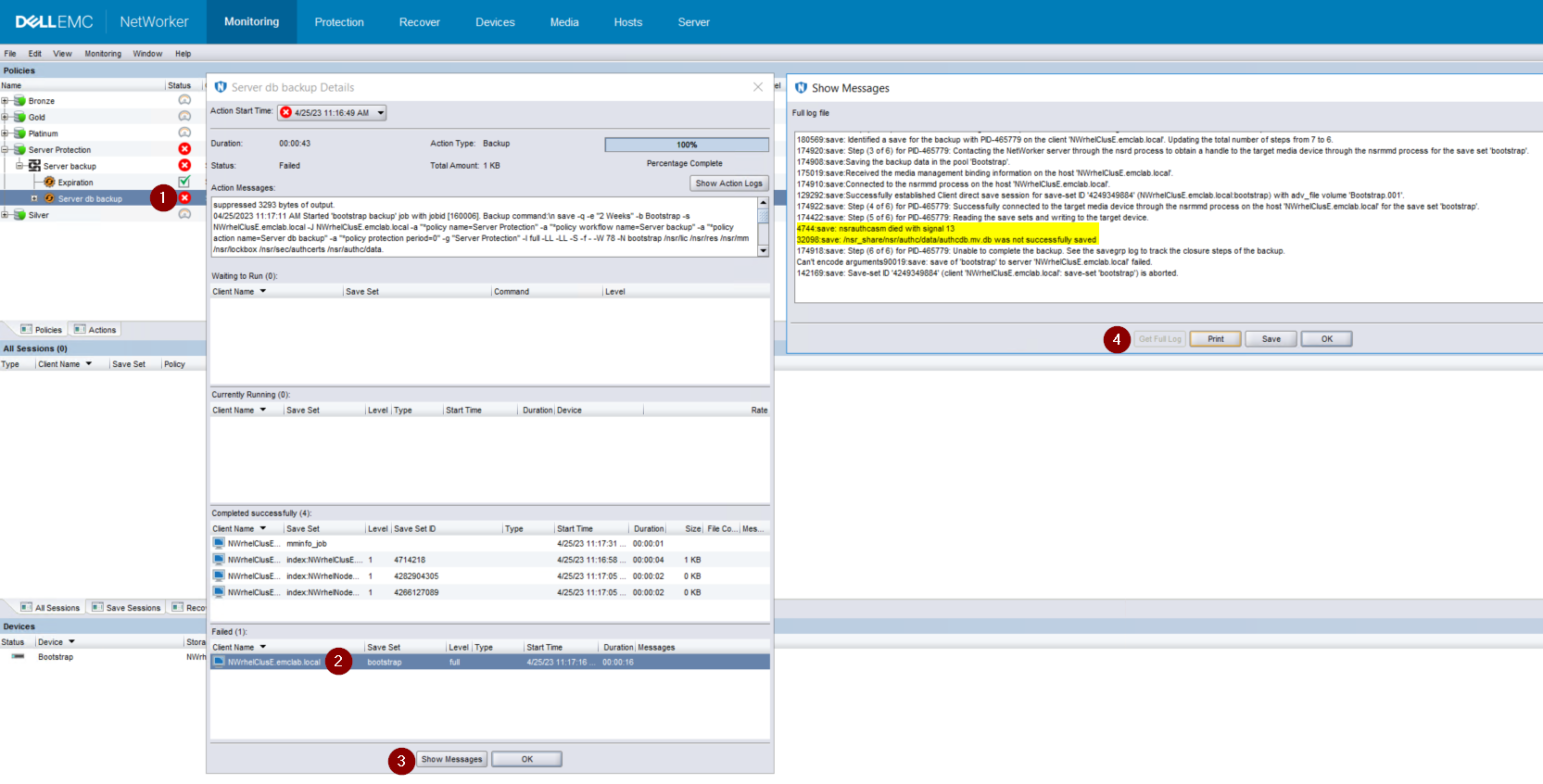
Малюнок 1: Резервне копіювання Bootstrap не вдається створити резервну копію authcdb
NetWorker оновлено до версії 19.7.0.4.
Запуск сервісу NetWorker успішний, всі ресурси кластера відображаються як «запущені» на одному з вузлів кластера:
root@NWrhelNodeG:~# pcs resource * Resource Group: NW_group: * fs (ocf::heartbeat:Filesystem): Started NWrhelNodeG.emclab.local * ip (ocf::heartbeat:IPaddr): Started NWrhelNodeG.emclab.local * nws (ocf::EMC_NetWorker:Server): Started NWrhelNodeG.emclab.localnsrlogin завершує роботу з помилкою HTTP 404 (не знайдено):
[admin@NWrhelNodeG linux_x86_64]$ nsrlogin -u Administrator 130136:nsrlogin: Please enter password: 117849:nsrlogin: Authentication library error: GET failed with HTTP-ERROR: 404 Server Message : Could not parse server-response from json string Server Message : Make sure that server is runningРезервна копія початкового завантаження «Захист сервера» не може створити резервну копію authcdb:
Малюнок 1: Резервне копіювання Bootstrap не вдається створити резервну копію authcdb
Cause
Зміни в authc під час оновлення не були зафіксовані в кластері спільного authcdb. Під час процесу оновлення ресурс PCS NWS вимикається або ресурс кластера PCS повністю зупиняється. Коли NWS не запущено, каталог /nsr символічно пов'язаний (вказує) на /nsr. NetWorker.local замість /nsr_share.
/НСР. NetWorker.local — це фізичний каталог вузлів /nsr, який містить лише папки, пов'язані з клієнтом. А /нср. Папка NetWorker.local/authc існує, але вона не містить жодних файлів, специфічних для authcdb сервера NetWorker, вона розташована в папці /nsr_share/nsr/authc.
Після оновлення NetWorker, authc очікує "версію B" файлів authc, але бачить "версію A" файлів до оновлення.
/НСР. NetWorker.local — це фізичний каталог вузлів /nsr, який містить лише папки, пов'язані з клієнтом. А /нср. Папка NetWorker.local/authc існує, але вона не містить жодних файлів, специфічних для authcdb сервера NetWorker, вона розташована в папці /nsr_share/nsr/authc.
Після оновлення NetWorker, authc очікує "версію B" файлів authc, але бачить "версію A" файлів до оновлення.
Resolution
Оновіть NetWorker до одного з наступних релізів (або пізніших):
Якщо ви використовуєте 19.8.0.4 або 19.9.0.2 або новіші, виконайте такі дії:
Спроби nsrlogin і резервне копіювання початкового завантаження мають бути успішними.
- 19.8.0.4
- 19.9.0.2
Якщо ви використовуєте 19.8.0.4 або 19.9.0.2 або новіші, виконайте такі дії:
- На кожному вузлі кластера перейменуйте /opt/nsr/authc-server/conf/h2_db.properties:
mv /opt/nsr/authc-server/conf/h2_db.properties /opt/nsr/authc-server/conf/h2_db.properties.bak
- На кожному вузлі повторно запустіть /opt/nsr/authc-server/scripts/authc_configure.sh, щоб переналаштувати authc. Це не вилучає жодних параметрів або конфігурацій, які раніше було зроблено в authc.
На активному вузлі це виглядає приблизно так:
На пасивних вузлах це виглядає приблизно так:
root@NWrhelNodeH:~# /opt/nsr/authc-server/scripts/authc_configure.sh

Specify the directory where the Java Standard Edition Runtime Environment (JRE) software is installed [/opt/nre/java/latest]:

The installation process will install an Apache Tomcat instance. For optimum security, EMC NetWorker Authentication Service will use a non-root user (nsrtomcat) to start the Apache Tomcat instance. If your system has special user security requirements, ensure that proper operational permissions are granted to this non-root user (nsrtomcat).
Please refer to NetWorker Installation Guide.

WARNING: Port 9090 is already in use.

Do you wish to specify a different port number [y]? n

The Apache Tomcat will use "NWrhelNodeH.emclab.local" as the host name. The Apache Tomcat will use "9090" as the port number.

The NetWorker Authentication Service requires a keystore file to configure encryption and to provide SSL support.

EMC recommends that you specify a keystore password that has a minimum of six characters.

Do you want to use the existing keystore /nsr/authc/conf/authc.keystore [y]?

Specify password for the existing keystore:
The install will use the existing certificate "emcauthctomcat" for Apache Tomcat.
The install will use the existing certificate "emcauthcsaml" for Authentication Service.

Creating the installation log in /opt/nsr/authc-server/logs/install.log.

Performing initialization. Please wait...

The installation completed successfully.
На пасивних вузлах це виглядає приблизно так:
root@NWrhelNodeG:~# /opt/nsr/authc-server/scripts/authc_configure.sh

Specify the directory where the Java Standard Edition Runtime Environment (JRE) software is installed [/opt/nre/java/latest]:

The installation process will install an Apache Tomcat instance. For optimum security, EMC NetWorker Authentication Service will use a non-root user (nsrtomcat) to start the Apache Tomcat instance. If your system has special user security requirements, ensure that proper operational permissions are granted to this non-root user (nsrtomcat).
Please refer to NetWorker Installation Guide.

The Apache Tomcat will use "NWrhelNodeG.emclab.local" as the host name. The Apache Tomcat will use "9090" as the port number.

The NetWorker Authentication Service requires a keystore file to configure encryption and to provide SSL support.

EMC recommends that you specify a keystore password that has a minimum of six characters.

Do you want to use the existing keystore /nsr/authc/conf/authc.keystore [y]?

Specify password for the existing keystore:
The install will use the existing certificate "emcauthctomcat" for Apache Tomcat.
The install will use the existing certificate "emcauthcsaml" for Authentication Service.

The NetWorker Authentication Service defines automatically an administrator user account named administrator in the NetWorker Authentication Service local database. This account is specific to the administration of the NetWorker Authentication Service, and is not related to other administrator accounts on this system.

*******************************************************************************************
Password criteria: Minimum required characters - 9 and Maximum allowed characters - 126 Minimum [alphabetic - 2, Uppercase - 1, Lowercase - 1, Numeric - 1, Special character - 1]
********************************************************************************************

Specify an initial password for administrator:
Confirm the password:

Creating the installation log in /opt/nsr/authc-server/logs/install.log.

Performing initialization. Please wait...

The installation completed successfully.
ПРИМІТКА: На пасивному вузлі вам буде запропоновано створити новий пароль для облікового запису адміністратора NetWorker. Це не означає, що існуючий пароль втрачено. Це відбувається тому, що authcdb, який використовується кластером, знаходиться в /nsr_share/nsr/authc, який існує лише на активному вузлі. Коли пасивний вузол стає новим активним вузлом, він використовує спільну authcdb. Сценарій authc_configure.sh запускається на кожному вузлі для повторного створення /opt/nsr/authc-server/conf/h2_db.properties, який є локальним для кожного вузла.
- Перезапустіть ресурс NWS:
pcs resource restart nws
- Підтвердьте, що ресурс NWS запустився:
pcs resource

root@NWrhelNodeH:~# pcs resource
   * Resource Group: NW_group:
      * fs (ocf::heartbeat:Filesystem): Started
NWrhelNodeH.emclab.local
      * ip (ocf::heartbeat:IPaddr): Started
NWrhelNodeH.emclab.local
      * nws (ocf::EMC_NetWorker:Server): Started
NWrhelNodeH.emclab.local
Спроби nsrlogin і резервне копіювання початкового завантаження мають бути успішними.
Affected Products
NetWorkerProducts
NetWorker Family, NetWorker SeriesArticle Properties
Article Number: 000212755
Article Type: Solution
Last Modified: 12 Apr 2024
Version: 6
Find answers to your questions from other Dell users
Support Services
Check if your device is covered by Support Services.