NetWorker:升級至 19.7.0.3 或 19.8.0.2 和先前版本後,叢集 Linux 伺服器上的啟動程式備份和 Authc 命令失敗
Summary: NetWorker 伺服器部署在叢集的 Linux NetWorker 伺服器上。將 NetWorker 版本升級到 19.7.0.3 或 19.8.0.2 及之前版本後,Server Protection 啟動程式備份失敗。驗證服務命令 (nsrlogin、authc_config、authc_mgmt) 也會失敗,傳回的錯誤是無法使用驗證服務,並顯示 HTTP 錯誤 404 (找不到)。 ...
This article applies to
This article does not apply to
This article is not tied to any specific product.
Not all product versions are identified in this article.
Symptoms
NetWorker 伺服器部署在 Red Hat Pacemaker (pcs) 高可用性叢集上。
NetWorker 已升級至 19.7.0.4。
NetWorker 服務啟動成功,其中一個叢集節點上的所有叢集資源都顯示為「started」:
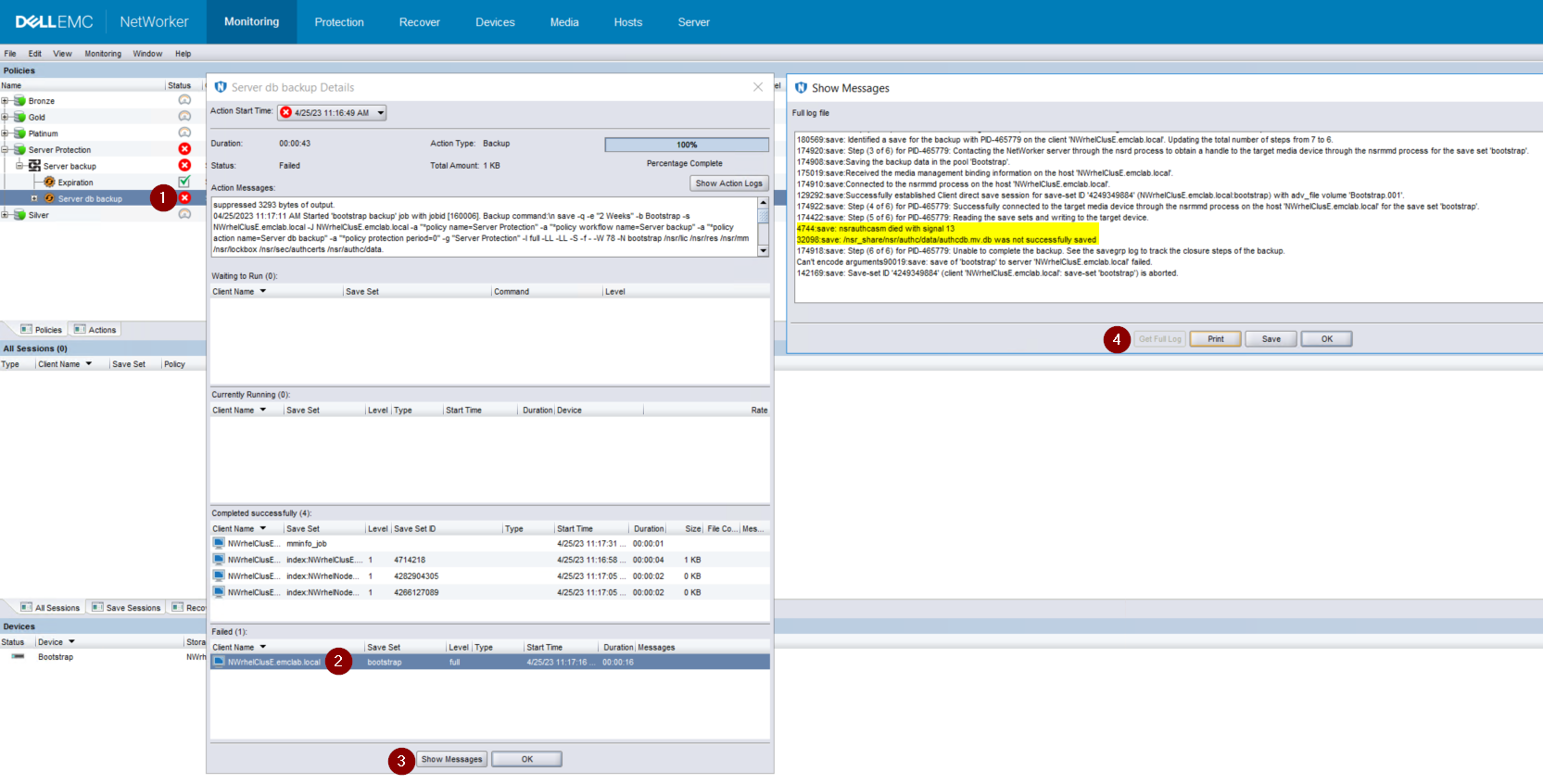
圖 1:啟動程式備份無法備份 authcdb
NetWorker 已升級至 19.7.0.4。
NetWorker 服務啟動成功,其中一個叢集節點上的所有叢集資源都顯示為「started」:
root@NWrhelNodeG:~# pcs resource * Resource Group: NW_group: * fs (ocf::heartbeat:Filesystem): Started NWrhelNodeG.emclab.local * ip (ocf::heartbeat:IPaddr): Started NWrhelNodeG.emclab.local * nws (ocf::EMC_NetWorker:Server): Started NWrhelNodeG.emclab.localnsrlogin 命令失敗,並顯示 HTTP 錯誤 404 (找不到):
[admin@NWrhelNodeG linux_x86_64]$ nsrlogin -u Administrator 130136:nsrlogin: Please enter password: 117849:nsrlogin: Authentication library error: GET failed with HTTP-ERROR: 404 Server Message : Could not parse server-response from json string Server Message : Make sure that server is running「Server Protection」啟動程式備份無法備份 authcdb:
圖 1:啟動程式備份無法備份 authcdb
Cause
升級期間對 authc 的變更未承諾為叢集共用 authcdb。在升級過程中,PCs NWS 資源已停用,或 PCS 叢集資源已完全停止。當 NWS 未執行時,/nsr 目錄會以符號方式連結 (指向) 至 /nsr。NetWorker.local 而非 /nsr_share。
/nsr。NetWorker.local 是實體節點 /nsr 目錄,僅包含用戶端相關資料夾。A /nsr。NetWorker.local/authc 資料夾存在,但未包含任何 NetWorker 伺服器 authcdb 專屬的檔案,此檔案位於 /nsr_share/nsr/authc 之下。
NetWorker 升級後,authc 預期會看到 authc 檔案的「B 版」,但在升級前看到檔案的「版本 A」。
/nsr。NetWorker.local 是實體節點 /nsr 目錄,僅包含用戶端相關資料夾。A /nsr。NetWorker.local/authc 資料夾存在,但未包含任何 NetWorker 伺服器 authcdb 專屬的檔案,此檔案位於 /nsr_share/nsr/authc 之下。
NetWorker 升級後,authc 預期會看到 authc 檔案的「B 版」,但在升級前看到檔案的「版本 A」。
Resolution
將 NetWorker 升級到下列其中一個版本 (或更新版本):
如果您使用的是 19.8.0.4 或 19.9.0.2 及更新版本,請執行下列步驟:
Nsrlogin 嘗試和啟動程式備份應會成功。
- 19.8.0.4
- 19.9.0.2
如果您使用的是 19.8.0.4 或 19.9.0.2 及更新版本,請執行下列步驟:
- 在叢集中的每個節點上,重新命名 /opt/nsr/authc-server/conf/h2_db.properties:
mv /opt/nsr/authc-server/conf/h2_db.properties /opt/nsr/authc-server/conf/h2_db.properties.bak
- 在每個節點上,重新執行 /opt/nsr/authc-server/scripts/authc_configure.sh以重新設定 authc。這不會刪除先前在 authc 中完成的任何設定或組態。
在使用中的節點上,看起來類似:
在被動節點上,看起來類似:
root@NWrhelNodeH:~# /opt/nsr/authc-server/scripts/authc_configure.sh

Specify the directory where the Java Standard Edition Runtime Environment (JRE) software is installed [/opt/nre/java/latest]:

The installation process will install an Apache Tomcat instance. For optimum security, EMC NetWorker Authentication Service will use a non-root user (nsrtomcat) to start the Apache Tomcat instance. If your system has special user security requirements, ensure that proper operational permissions are granted to this non-root user (nsrtomcat).
Please refer to NetWorker Installation Guide.

WARNING: Port 9090 is already in use.

Do you wish to specify a different port number [y]? n

The Apache Tomcat will use "NWrhelNodeH.emclab.local" as the host name. The Apache Tomcat will use "9090" as the port number.

The NetWorker Authentication Service requires a keystore file to configure encryption and to provide SSL support.

EMC recommends that you specify a keystore password that has a minimum of six characters.

Do you want to use the existing keystore /nsr/authc/conf/authc.keystore [y]?

Specify password for the existing keystore:
The install will use the existing certificate "emcauthctomcat" for Apache Tomcat.
The install will use the existing certificate "emcauthcsaml" for Authentication Service.

Creating the installation log in /opt/nsr/authc-server/logs/install.log.

Performing initialization. Please wait...

The installation completed successfully.
在被動節點上,看起來類似:
root@NWrhelNodeG:~# /opt/nsr/authc-server/scripts/authc_configure.sh

Specify the directory where the Java Standard Edition Runtime Environment (JRE) software is installed [/opt/nre/java/latest]:

The installation process will install an Apache Tomcat instance. For optimum security, EMC NetWorker Authentication Service will use a non-root user (nsrtomcat) to start the Apache Tomcat instance. If your system has special user security requirements, ensure that proper operational permissions are granted to this non-root user (nsrtomcat).
Please refer to NetWorker Installation Guide.

The Apache Tomcat will use "NWrhelNodeG.emclab.local" as the host name. The Apache Tomcat will use "9090" as the port number.

The NetWorker Authentication Service requires a keystore file to configure encryption and to provide SSL support.

EMC recommends that you specify a keystore password that has a minimum of six characters.

Do you want to use the existing keystore /nsr/authc/conf/authc.keystore [y]?

Specify password for the existing keystore:
The install will use the existing certificate "emcauthctomcat" for Apache Tomcat.
The install will use the existing certificate "emcauthcsaml" for Authentication Service.

The NetWorker Authentication Service defines automatically an administrator user account named administrator in the NetWorker Authentication Service local database. This account is specific to the administration of the NetWorker Authentication Service, and is not related to other administrator accounts on this system.

*******************************************************************************************
Password criteria: Minimum required characters - 9 and Maximum allowed characters - 126 Minimum [alphabetic - 2, Uppercase - 1, Lowercase - 1, Numeric - 1, Special character - 1]
********************************************************************************************

Specify an initial password for administrator:
Confirm the password:

Creating the installation log in /opt/nsr/authc-server/logs/install.log.

Performing initialization. Please wait...

The installation completed successfully.
注意:在被動節點上,系統會提示您為 NetWorker 系統管理員帳戶建立新密碼。這並不表示現有密碼已遺失。發生這種情況是因為叢集所使用的 authcdb 位於 /nsr_share/nsr/authc 下,且僅存在於使用中的節點上。當被動節點成為新的主動節點時,它會使用共用 authcdb。在每個節點上執行authc_configure.sh腳本檔,以重新建立每個節點的本機 /opt/nsr/authc-server/conf/h2_db.properties。
- 重新啟動 NWS 資源:
pcs resource restart nws
- 確認 NWS 資源已啟動:
pcs resource

root@NWrhelNodeH:~# pcs resource
   * Resource Group: NW_group:
      * fs (ocf::heartbeat:Filesystem): Started
NWrhelNodeH.emclab.local
      * ip (ocf::heartbeat:IPaddr): Started
NWrhelNodeH.emclab.local
      * nws (ocf::EMC_NetWorker:Server): Started
NWrhelNodeH.emclab.local
Nsrlogin 嘗試和啟動程式備份應會成功。
Affected Products
NetWorkerProducts
NetWorker Family, NetWorker SeriesArticle Properties
Article Number: 000212755
Article Type: Solution
Last Modified: 12 Apr 2024
Version: 6
Find answers to your questions from other Dell users
Support Services
Check if your device is covered by Support Services.