NVP-vProxy:当文件路径超过 186 个字符时,无法浏览以进行文件级恢复 (FLR)
Summary: 在浏览超过 186 个字符的文件/文件夹路径时,在执行虚拟机 FLR“Error 200”时出现。
This article applies to
This article does not apply to
This article is not tied to any specific product.
Not all product versions are identified in this article.
Symptoms
NetWorker VMware Protection (NVP) with vProxy 用于备份和恢复。尝试浏览虚拟机 (VM) 以获取文件级恢复 (FLR) 功能时,观察到浏览失败:
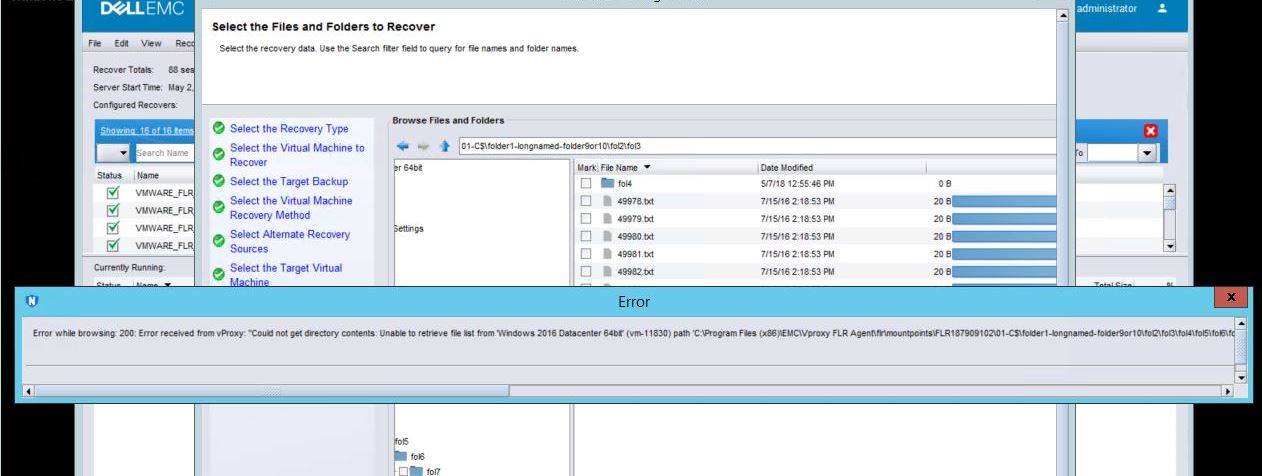
图 1:当文件系统路径超过 186 个字符时,NMC FLR 恢复向导报告“在浏览 200 时出错”。
- 如果使用 NetWorker Management Console (NMC),则在执行虚拟机 FLR 和文件路径超过 186 个字符时,您会看到以下错误。
图 1:当文件系统路径超过 186 个字符时,NMC FLR 恢复向导报告“在浏览 200 时出错”。
- 如果使用 FLR Web UI,则不会看到任何内容

图 2:如果文件夹路径超过 186 个字符,NetWorker Data Protection Restore Client 不会显示任何内容“无文件”。
仅当要浏览的路径在“C:\”后超过 186 个字符时,才会影响浏览。例如:“C:\folder1-longnamed-folder9or10\fol2\fol3\fol4\fol5\fol6\fol7\fol8\fol9-longlonglomglonglon;ngnamemanemnamenamenamenamenamnamsdiiiiiiiiiii123456789101112131415161718192021\o\9.txt“
NetWorker 服务器是 19.6.0.0 或更低版本。
Cause
使用的 API 调用中的已知限制。
Resolution
升级到 NetWorker 19.6.0.1 或更高版本以进行修复。NetWorker 可从以下网站下载:
https://www.dell.com/support/home/product-support/product/networker/drivers解决 方案:
您可以手动浏览文件系统以复制内容。为此,请启动您的 FLR 请求,该请求会将文件系统装载到目标虚拟机上。然后,在目标虚拟机上,使用 Windows 资源管理器打开安装位置并浏览装载点。安装位置为:“C:\Program Files (x86)\EMC\vProxy FLR Agent\flr\mountpoints\ID\00-X$”
例如:“C:\Program Files (x86)\EMC\vProxy FLR Agent\flr\mountpoints\FLR186731658\00-C$”
https://www.dell.com/support/home/product-support/product/networker/drivers解决 方案:
您可以手动浏览文件系统以复制内容。为此,请启动您的 FLR 请求,该请求会将文件系统装载到目标虚拟机上。然后,在目标虚拟机上,使用 Windows 资源管理器打开安装位置并浏览装载点。安装位置为:“C:\Program Files (x86)\EMC\vProxy FLR Agent\flr\mountpoints\ID\00-X$”
例如:“C:\Program Files (x86)\EMC\vProxy FLR Agent\flr\mountpoints\FLR186731658\00-C$”
Affected Products
NetWorkerProducts
NetWorkerArticle Properties
Article Number: 000031695
Article Type: Solution
Last Modified: 30 Apr 2025
Version: 5
Find answers to your questions from other Dell users
Support Services
Check if your device is covered by Support Services.