Data Domain DD6400: DD6400에 교체 디스크 추가
Resumen: 이 문서는 DD6400 모델에 교체 디스크를 추가하는 방법에 대한 참조로 사용됩니다.
Este artículo se aplica a
Este artículo no se aplica a
Este artículo no está vinculado a ningún producto específico.
No se identifican todas las versiones del producto en este artículo.
Instrucciones
알 수 없는 "U"가 표시된 교체용 디스크가 있는 다른 Data Domain 제품은 "disk unfail"이 되어 스페어로 만들 수 있습니다. DD6400과 같은 스토리지 풀 제품은 "storage add" 명령만 수락하여 시스템에 새 디스크를 추가합니다.
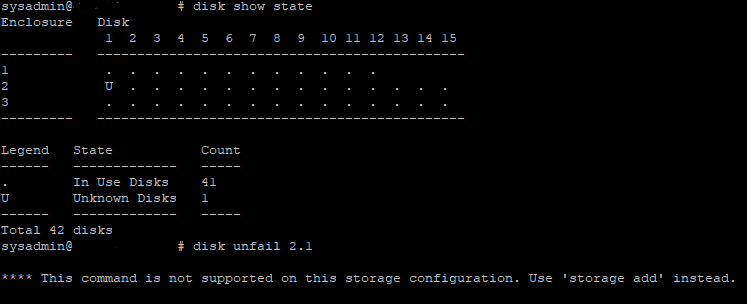
그림 1: Data Domain CLI - 디스크 표시 상태, 디스크 연결 해제
그림 1: Data Domain CLI - 디스크 표시 상태, 디스크 연결 해제
- 다음은 DD6400에 교체 운영 체제(1.1 및 1.2) 또는 데이터 디스크를 추가하는 CLI 명령입니다.
- 스토리지 add force disk 명령을 실행하여 교체 디스크를 시스템에 추가합니다. 여기서 디스크는 교체 디스크의 수입니다.
# storage add force disk 2.1

The 'storage add force' command will make the disk available to the
        filesystem. Any existing data on this will be lost.
        Are you sure? (yes|no) [no]: yes

Checking storage requirements...done
Adding disk 2.1 to the system...done

Updating system information...done

Disk 2.1 successfully added to the system
- 다음 명령을 사용하여 Data Domain 시스템이 디스크 드라이브를 인식하는지 확인합니다. 명령 표시에서 디스크 상태는 스페어 또는 재구성이어야 합니다.
# disk show state

Enclosure   Disk
             1  2  3  4  5  6  7  8  9  10 11 12 13 14 15
---------   ----------------------------------------------
1            .  .  .  .  .  .  .  .  .  .  .  .
2            v  .  .  .  .  .  .  .  .  .  .  .  .  .  .
---------   ----------------------------------------------

Legend   State             Count
------   ---------------   -----
.        In Use Disks      26
v        Available Disks   1
------   ---------------   -----
Total 27 disks

Estimated total time remaining for reconstruction (minutes) 874
- 다음은 DD6400 캐시 계층(1.3 및 1.4)에 교체 디스크를 추가하는 CLI 명령입니다.
- storage add disk 1. 명령을 실행하여 디스크를 캐시 계층에 다시 추가합니다. 여기서 는 하드웨어 장애 알림 메시지의 디스크 수입니다.
- filesys expand 명령을 실행하여 새 캐시 디스크를 사용 중인 것으로 설정합니다.
Productos afectados
DD6400 ApplianceProductos
Data DomainPropiedades del artículo
Número del artículo: 000214343
Tipo de artículo: How To
Última modificación: 18 may 2026
Versión: 5
Encuentre respuestas a sus preguntas de otros usuarios de Dell
Servicios de soporte
Compruebe si el dispositivo está cubierto por los servicios de soporte.