Data Domain: IDPA Certificate replacement "OpenSSL Error. Error changing password for PKCS12 file."
Yhteenveto: DD certificate replacement may fail when uploading a PKCS12 certificate file using the DD CLI or GUI.
Oireet
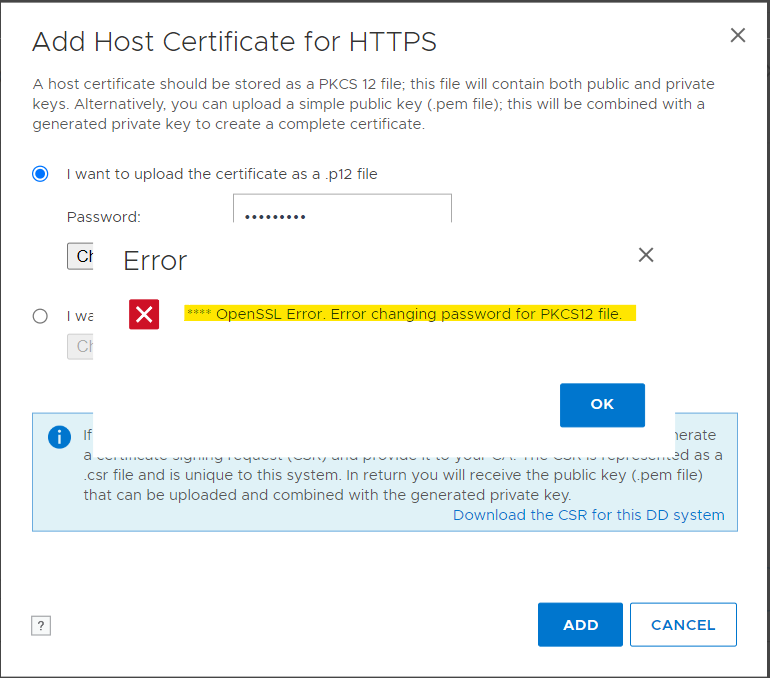
When attempting to upload a PKCS12 certificate file through either the Data Domain command-line interface (CLI) or GUI may fail with the following error message:
**** OpenSSL Error. Error changing password for PKCS12 file
Syy
This issue occurs because Data Domain only supports the pbeWithSHA1And3-KeyTripleDES-CBC (PBE-SHA1-3DES) encryption algorithm.
To verify the PKCS12 file encryption algorithm, copy the file to an ACM machine and run:
# openssl pkcs12 -info -in keystore.p12 -noout
Replace keystore.p12 with pkcs12 file name. A sample output looks like the following. If the output does not show PBE-SHA1-3DES, then DD does not supported it:
Enter Import Password: xxxx
MAC Iteration 1024
MAC verified OK
PKCS7 Data
Shrouded Keybag: PBES2, PBKDF2, DES-EDE3-CBC, Iteration 1024, PRF hmacWithSHA1
PKCS7 Encrypted data: PBES2, PBKDF2, DES-EDE3-CBC, Iteration 1024, PRF hmacWithSHA1
Certificate bag
Tarkkuus
Workaround
As a workaround, copy this noncompliant PKCS12 file to an ACM machine, then convert the PKCS12 file to a compliant file using the following steps:
Step 1: Export the key pair from the noncompliant PKCS12 keystore file to a PEM format file named temp.pem:
openssl pkcs12 -in nonCompliantkeystore.p12 -out temp.pem
Step 2: Convert the temp.pem keypair file to a compliant PKCS12 file with PBE-SHA1-3DES algorithm:
openssl pkcs12 -export -in temp.pem -out Compliantkeystore.p12 -name "new" -macalg SHA256 -keypbe PBE-SHA1-3DES -certpbe PBE-SHA1-3DES -passout pass:Idpa_1234
Step 3: (Optional) Validate the converted file algorithm:
openssl pkcs12 -info -in Compliantkeystore.p12 -noout
Resolution
This issue has been addressed in the following DDOS versions:
- 8.4.0.0 and later
- 8.3.1.10 and later
- 7.10.1.70 and later
- 7.13.1.40 and later
The fix updates the encryption method used for PKCS#12 files, transitioning from PBE-SHA1-3DES to AES-256-CBC. To resolve the issue, ensure that the DD is running one of the versions listed above.