Dell Unity: Zugriff auf die Unity-Managementoberfläche über https://FQDN oder https://ip.address nicht möglich (vom Nutzer korrigierbar)
Résumé: Zugriff auf die Unity-Managementschnittstelle über https://FQDN oder https://ip.address nicht möglich Der Zugriff auf Unity erfolgt über https://FQDN/?casHome=LOCAL und https://ip.address/?casHome=LOCAL ...
Cet article concerne
Cet article ne concerne pas
Cet article n’est associé à aucun produit spécifique.
Toutes les versions du produit ne sont pas identifiées dans cet article.
Symptômes
Der Zugriff auf die Unity-Managementschnittstelle kann nicht über https://FQDN oder https://ip.address
Der Zugriff auf Unity erfolgt über https://FQDN/?casHome=LOCAL und https://ip.address/?casHome=LOCAL
Der Zugriff auf Unity erfolgt über https://FQDN/?casHome=LOCAL und https://ip.address/?casHome=LOCAL
Cause
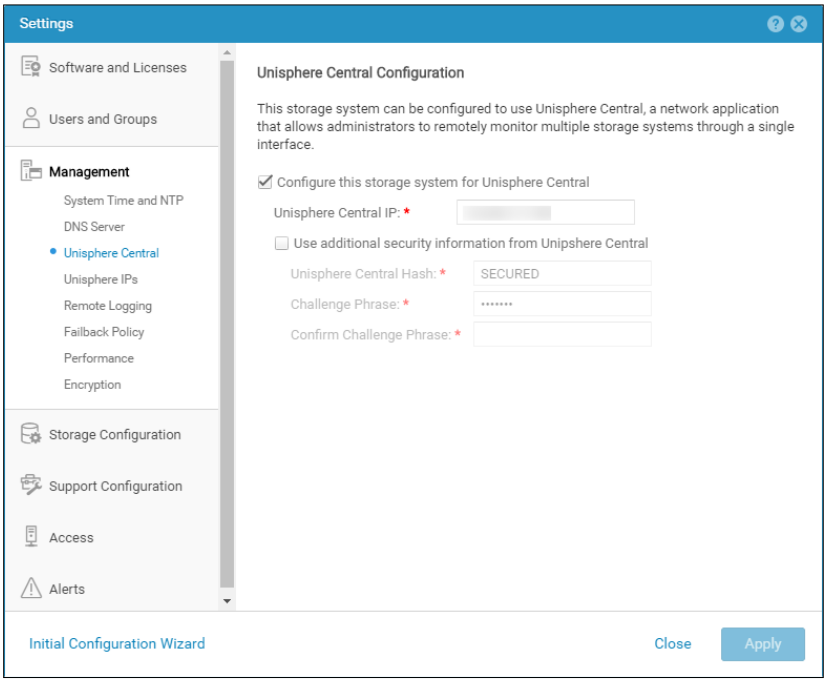
Unisphere Central ist auf Unity aktiviert, obwohl Unisphere Central nicht verwendet wird.
Résolution
Aktivieren Sie "Configure this storage system for Unisphere Central" (Dieses Speichersystem nur für Unisphere Central konfigurieren), wenn Unisphere Central verwendet wird. Wenn dies nicht der Lage ist, entfernen Sie die Überprüfung, mit der Unisphere Central aktiviert wird.
Produits concernés
Dell EMC UnityPropriétés de l’article
Numéro d’article: 000205133
Type d’article: Solution
Dernière modification: 12 déc. 2025
Version: 5
Trouvez des réponses à vos questions auprès d’autres utilisateurs Dell
Services de support
Vérifiez si votre appareil est couvert par les services de support.