EQLXPerf not started
Résumé: The service EQLXPerf not starting in operation system.
Cet article concerne
Cet article ne concerne pas
Cet article n’est associé à aucun produit spécifique.
Toutes les versions du produit ne sont pas identifiées dans cet article.
Symptômes
Service EQLXPerf not starting and generating Event ID: 1023 in system event Logs in Operation System.
Trying to start it manually, this error will be displayed after a few seconds:
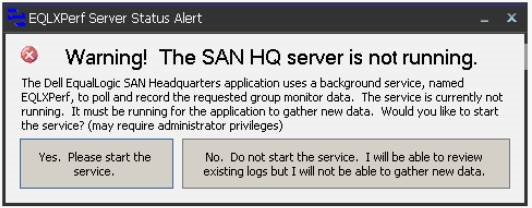
In the Operating System Event Logs, the event ID: 1023 is recorded. There is already a listener on IP endpoint 0.0.0.0:8000.

Trying to start it manually, this error will be displayed after a few seconds:
In the Operating System Event Logs, the event ID: 1023 is recorded. There is already a listener on IP endpoint 0.0.0.0:8000.
Résolution
Use the Command netstat -an in prompt to verify the ports and programs running.

After, search in the archive for 0.0.0.0:8000 and verify the state.
If the state is LISTENING, another application is already using this port.
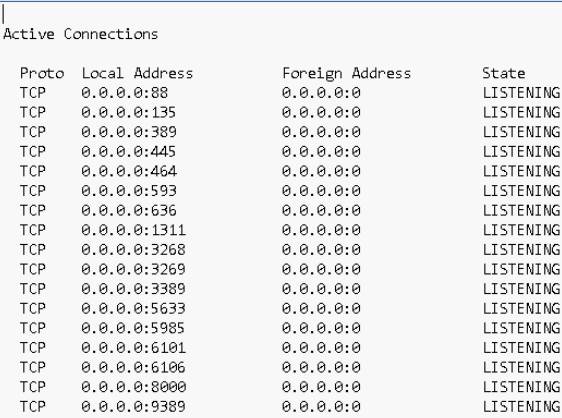
In this case we must change the port of San HeadQuarters or the application that is using port 8000.
To change the port in San Headquarters access the option:
Settings -> Server Settings.
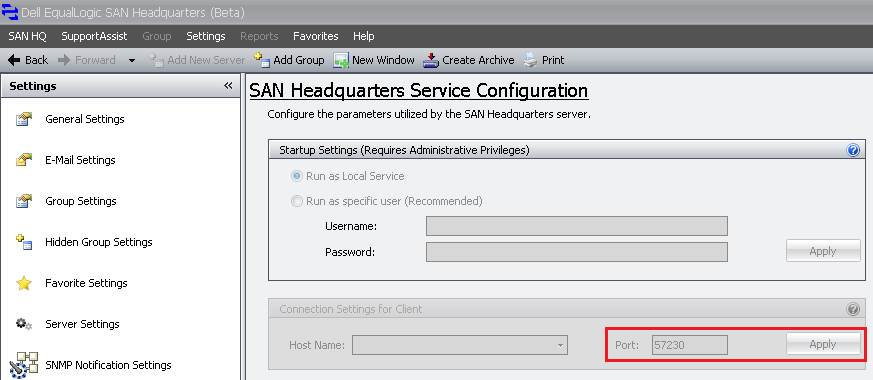
After changing the port, start the EQLXPerf service in the Operatig System.
After, search in the archive for 0.0.0.0:8000 and verify the state.
If the state is LISTENING, another application is already using this port.
In this case we must change the port of San HeadQuarters or the application that is using port 8000.
To change the port in San Headquarters access the option:
Settings -> Server Settings.
After changing the port, start the EQLXPerf service in the Operatig System.
Produits concernés
Legacy Storage ModelsPropriétés de l’article
Numéro d’article: 000136708
Type d’article: Solution
Dernière modification: 10 avr. 2021
Version: 3
Trouvez des réponses à vos questions auprès d’autres utilisateurs Dell
Services de support
Vérifiez si votre appareil est couvert par les services de support.