Dell Networking Edge GatewayのWindowsの購入時のセットアップ エラー
Résumé: Windowsの実行中にEdge Gatewayを起動すると、設定不要のセットアップでエラーが発生する場合があります。
Cet article concerne
Cet article ne concerne pas
Cet article n’est associé à aucun produit spécifique.
Toutes les versions du produit ne sont pas identifiées dans cet article.
Symptômes
Windowsを実行しているEdge Gatewayを初めて起動する場合、初期セットアップを行うことはできません。このような場合、デバイスに次のエラーが表示されることがあります。

Cause
このエラー メッセージは、特定のレジストリー ビットに誤ってフラグが設定された結果です。
Résolution
このエラーから回復するには、次の手順を実行します。
- 「Shift」+「F10」キーを使用してコマンドプロンプトを開きます
- 次のように入力して、「レジストリー エディター」を起動します。「regedit」と入力し、Enterを押します。
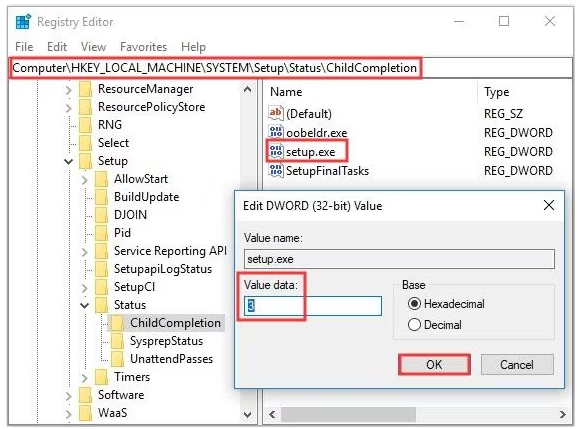
- regeditで、次のオブジェクトに移動します
-
HKEY_LOCAL_MACHINE\SYSTEM\Setup\Status\ChildCompletion
- setup.exeの編集
- [Value Data]を1から3に変更
-
- 編集が完了したら、[OK]をクリックして変更を保存します
- Regeditを閉じ、次のコマンドを使用して、コマンド プロンプトからシステムを再起動します。
-
shutdown /r
-
Produits concernés
Dell Edge Gateway 3200, Dell Edge Gateway 5200Propriétés de l’article
Numéro d’article: 000226062
Type d’article: Solution
Dernière modification: 05 juin 2025
Version: 3
Trouvez des réponses à vos questions auprès d’autres utilisateurs Dell
Services de support
Vérifiez si votre appareil est couvert par les services de support.