Dell Networking Edge Gateway Windows 开箱即用设置错误
Résumé: 有时,在运行 Windows 时为 Edge Gateway 开机可能会导致开箱即用设置出错。
Cet article concerne
Cet article ne concerne pas
Cet article n’est associé à aucun produit spécifique.
Toutes les versions du produit ne sont pas identifiées dans cet article.
Symptômes
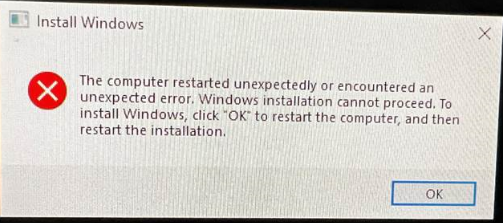
首次启动运行 Windows 的 Edge Gateway 时,将无法执行初始设置。在这种情况下,设备可能会显示以下错误:
Cause
此错误消息是由于某个注册表位被错误标记的结果。
Résolution
要从此错误中恢复,请执行以下操作:
- 使用“Shift”+“F10”键打开命令提示符
- 通过键入以下命令启动“Registry Editor”:输入“regedit”,然后按 Enter 键。
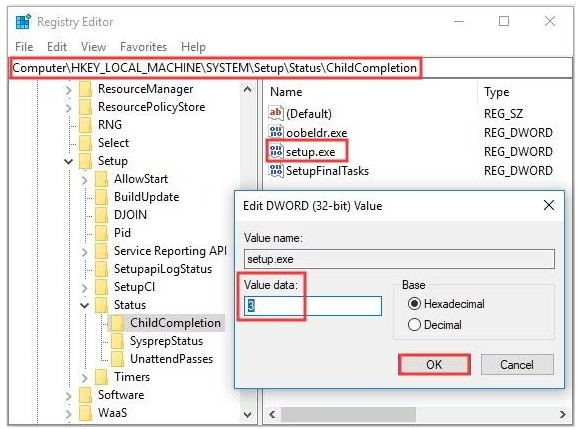
- 在 regedit 中,导航到以下对象
-
HKEY_LOCAL_MACHINE\SYSTEM\Setup\Status\ChildCompletion
- 编辑setup.exe
- 将“Value Data”从 1 更改为 3
-
- 编辑完成后,单击“OK”保存更改
- 使用以下命令从命令提示符关闭注册表编辑器并重新启动系统:
-
shutdown /r
-
Produits concernés
Dell Edge Gateway 3200, Dell Edge Gateway 5200Propriétés de l’article
Numéro d’article: 000226062
Type d’article: Solution
Dernière modification: 05 juin 2025
Version: 3
Trouvez des réponses à vos questions auprès d’autres utilisateurs Dell
Services de support
Vérifiez si votre appareil est couvert par les services de support.