Avamar: How to gather logs for troubleshooting VMware image backup issues
Summary: This article describes how to gather logs when troubleshooting Avamar VMware image backup issues.
Ez a cikk a következő(k)re vonatkozik:
Ez a cikk nem vonatkozik a következő(k)re:
Ez a cikk nem kapcsolódik egyetlen konkrét termékhez sem.
Ez a cikk nem azonosítja az összes termékverziót.
Instructions
This article describes various methods for gathering logs for investigating Avamar VMimage client backup issues.
Method 1:
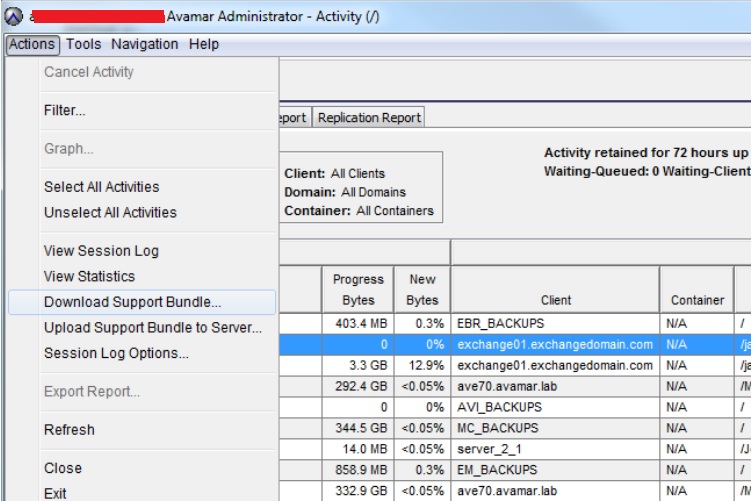
Method 1:
- Open the Avamar Administrator Interface.
- Select Activity, then Activity Monitor Tab.
- Locate the Virtual Machine (VM) client whose backup experienced an issue.
- Double-click the activity row. An Activity Session Window appears.
- Click the Export button on the bottom to export the complete log for the backup.
- Open the Avamar Administrator Interface.
- Select Activity, then the Activity Monitor Tab.
- Locate the VM client whose backup experienced an issue.
- Select Menu, then Actions.
- Select Download Support Bundle to download the complete log.
Additional Information
To enable debug logging for VM image backups.
Method 1:
- Open the Avamar Administrator interface.
- Open the manual backup and restore wizard window.
- Select More Options.
- In the Backup Command-Line Options window, select the More button.
- Add the debug information as shown below.
[avvcbimage]debug
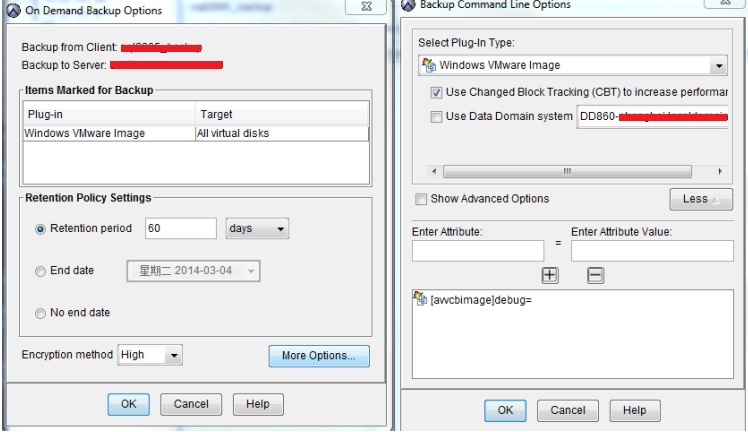
Method 2:
Open an SSH session to the Avamar Proxy Server.
- Switch to the directory:
/usr/local/avamarclient/var-proxy-1. - Edit the avvcbimage.cmd file.
- Add a line with --debug at the end of the file.
- Save the file.

To enable the debug mode for all instances under the current Avamar proxy server.
- Go to
/usr/local/avamarclient/var. - Edit the avvcbimageAll.cmd file.
- Remove the # char before the --debug to enable the debug mode.

Érintett termékek
AvamarTermékek
Avamar, Avamar Client for VMwareTermék tulajdonságai
Article Number: 000023300
Article Type: How To
Utoljára módosítva: 06 febr. 2025
Version: 5
Választ kaphat kérdéseire más Dell-felhasználóktól
Támogatási szolgáltatások
Ellenőrizze, hogy a készüléke rendelkezik-e támogatási szolgáltatással.