Dell Security Management Server Virtual Server 記錄命令
Riepilogo: 本文概述 Dell Security Management Server Virtual (先前稱為 Dell Data Protection |Virtual Edition Server) 「View Logs」功能表畫面。
Questo articolo si applica a
Questo articolo non si applica a
Questo articolo non è legato a un prodotto specifico.
Non tutte le versioni del prodotto sono identificate in questo articolo.
Sintomi
受影響的產品:
- Dell Security Management Server Virtual
- Dell Data Protection | Virtual Edition
Causa
不適用
Risoluzione
Dell Security Management Server Virtual 可讓 Server Administrator 快速存取記錄檔以進行故障診斷。在 GNU Nano 畫面中,您可以檢查 Dell Security Management Server Virtual View 記錄 並選取 系統記錄、 伺服器記錄,或 Databasesecustomizer log 是查看伺服器問題並加以解決。
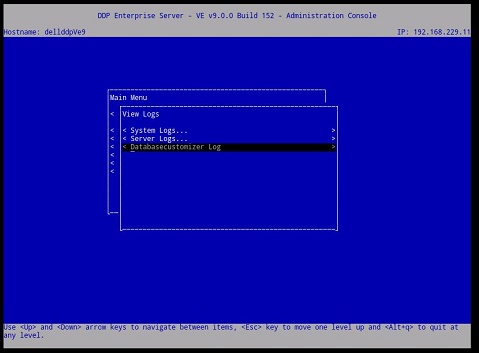
圖 1:(僅限英文)Virtual Edition Server 的檢視記錄選單
選取記錄後,它會在 GNU Nano 文字編輯器中開啟。
GNU Nano 是適合在 UNIX 中工作的文字編輯器,因為它不依賴滑鼠,但仍有許多實用的功能。
大多數的 nano 命令是按住 Ctrl 鍵 (即控制鍵),然後按下另一個按鍵。在此文字中,控制鍵是使用 ^ (例如, ^G 表示按住 CTRL 鍵,然後按下 g 鍵)。大部分重要的 Dell 安全性管理伺服器虛擬命令列于下圖 2。
例如,輸入 ^G GNU nano 說明功能表的 (CTRL+G)。
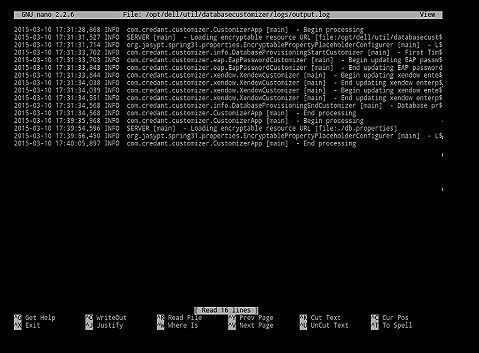
圖 2:(僅限英文)Virtual Edition GNU Nano 使用者介面
最常使用的命令:
| 常用的命令 | 鍵盤組合 |
|---|---|
| 取得說明 | Crtl G |
| 退出 | Crtl X |
| 在哪裡 | Crtl W |
| 登出 | Crtl O |
| 前置頁面 | Crtl Y |
| Cur Pos | Crtl C |
其他可用命令:
- 證明 = Crtl J
- 讀取檔案 = Crtl R
- 剪取文字 = Crtl K
- UnCut Text = Crtl U
- 拼寫 = Crtl T
如要聯絡支援部門,請參閱 Dell Data Security 國際支援電話號碼。
請前往 TechDirect,以線上產生技術支援要求。
如需更多深入見解與資源,請加入 Dell 安全性社群論壇。
Prodotti interessati
Dell EncryptionProprietà dell'articolo
Numero articolo: 000130664
Tipo di articolo: Solution
Ultima modifica: 08 mar 2023
Versione: 8
Trova risposta alle tue domande dagli altri utenti Dell
Support Services
Verifica che il dispositivo sia coperto dai Servizi di supporto.