Latitude 3300: Vejledning til tastaturfunktioner
Riepilogo: Følgende vejledning viser de tilgængelige tastaturgenveje og de funktioner, som de udfører på en bærbar Dell Latitude 3300-pc.
Questo articolo si applica a
Questo articolo non si applica a
Questo articolo non è legato a un prodotto specifico.
Non tutte le versioni del prodotto sono identificate in questo articolo.
Sintomi
Tastaturgenvejsfunktioner
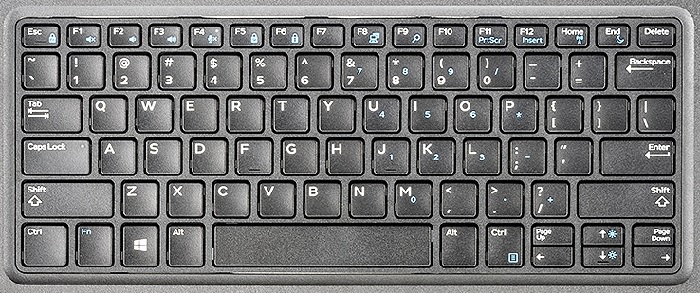
Følgende tabel er en liste over funktioner af genvejstastekombinationer på bærbare Latitude 3300-computere.
Causa
| Taster | Primær funktion | Sekundær funktion (FN +-tast) |
|---|---|---|
| Fn + Esc | Esc |
Slår Fn-tastlås til og fra |
| Fn + F1 |
Slå lyd fra |
F1 |
| Fn + F2 |
Lydstyrke ned |
F2 |
| Fn + F3 |
Lydstyrke op |
F3 |
| Fn + F4 |
Slå mikrofon fra |
F4 |
| Fn + F5 |
Num Lock |
F5 |
| Fn + F6 | Scroll Lock | F6 |
| Fn + F8 |
Skift skærm (Win + P). |
F8 |
| Fn + F9 | Søg | F9 |
| Fn + F11 |
Print Screen |
F11 |
| Fn + F12 |
Indsæt |
F12 |
| Fn + Home | Slå WiFi til og fra | Start |
| Fn + CTRL |
Åbn programmenuen |
CTRL |
| Fn + End | Dvale | End |
| Fn + Pil op | Øg lysstyrke | Pil op |
| Fn + Pil ned | Reducer lysstyrke | Pil ned |
Bemærk: Tastaturtegn kan variere afhængigt af tastatursprogkonfigurationen. Taster, der bruges til genveje, er de samme for alle sprogkonfigurationer.
Risoluzione
 Gå til vores vidensbase med tastaturer for at få flere ressourcer og oplysninger.
 Du kan få flere artikler og oplysninger på vores supportside for berøringsplade.
 Du kan også finde flere artikler og oplysninger på vores supportside for mus.
Prodotti interessati
Latitude 3300Proprietà dell'articolo
Numero articolo: 000130930
Tipo di articolo: Solution
Ultima modifica: 19 apr 2026
Versione: 6
Trova risposta alle tue domande dagli altri utenti Dell
Support Services
Verifica che il dispositivo sia coperto dai Servizi di supporto.