Sådan installeres operativsystemet i ONIE over FTP/HTTP/TFTP Dell EMC Networking N3000EP-ON-switche
Riepilogo: Sådan installeres operativsystemet på ONIE over FTP, HTTP, TFTP Dell EMC Networking N3000EP-ON-switche
Questo articolo si applica a
Questo articolo non si applica a
Questo articolo non è legato a un prodotto specifico.
Non tutte le versioni del prodotto sono identificate in questo articolo.
Sintomi
Denne artikel beskriver, hvordan du installerer Dell OS (O6) eller tredje del af operativsystemet fra ONIE i N3000EP-ON-switche vha. FTP/HTTP eller TFTP.
Indholdsfortegnelse
Forudsætninger
Fysisk placering af konsol og Out of Band Management-port
, der logger på ONIE over konsol
Konfigurerer IP-adresse til Out of Band Management-port
Installer softwaren fra FTP/HTTP/TFTP-serverens
eksempeloutput
Forudsætninger
Denne artikel antager, at der er korrekt forbindelse mellem switchadministrationsgrænsefladen og FTP/HTTP/TFTP-serveren
Fysisk placering af konsol og Out of Band Management-port
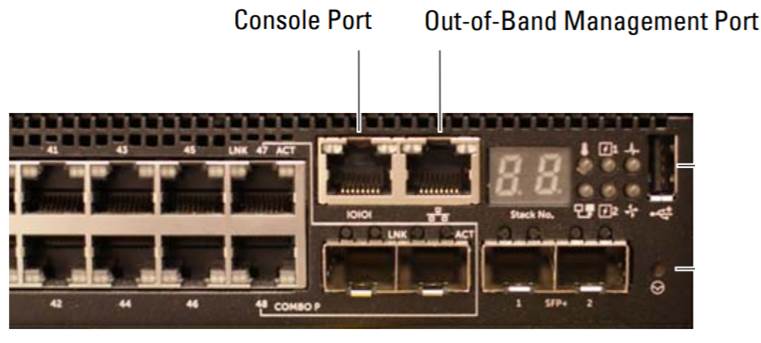
Log på ONIE over console
Procedure
1. Tilslut et serielt kabel til switchens serielle konsolport.
2. Sluk og tænd for switchen
3. Når startmenuen vises, skal du vælge "Vis startmenu", type 2.
4. I startmenuen skal du vælge "BOOT ONIE (Rescue Mode), type 1
Klik her for at få flere oplysninger.
Konfiguration af IP-adresse til Out of Band-administrationsgrænseflade
1. Indtast følgende kommando for at stoppe ONIE-registreringsprocessen, hvis den kører.
ONIE:/ # onie-discovery-stop
2. Hvis der ikke anvendes en DHCP-server. Konfigurer IP-adressen og undernetmasken på administrationsporten, hvor x.x.x.x repræsenterer din interne IP-adresse og y.y.y.y-undernetmaske.
ONIE:/ # ifconfig eth0 x.x.x.x netmask y.y.y.y up
3. Hvis serveren er i et separat undernet, skal du tilføje en standardrute ved hjælp af følgende kommando: Hvor x.x.x.x repræsenterer gatewayens IP-adresse
ONIE:/ # Route tilføj standard gw x.x.x.x.x
Installer softwaren fra FTP/HTTP/TFTP-serveren
Brug nedenstående kommando.
ONIE:/ # onie-nos-install tftp://X.X.X.X/File navn
, hvor X.X.X.X er TFTP-serverens IP-adresse. Vi kan også bruge FTP/HTTP eller TFTP.
Eksempel på output
Overvej, om TFTP-serverens IP-adresse er 192.168.10.254. Switchens OOB skal tildeles IP 192.168.1.2 med subnet 255.255.255.0 og gateway 192.168.1.1
ONIE:/ # onie-discovery-stop
ONIE:/ # ifconfig eth0 192.168.1.2 netmaske 255.255.255.0 op
ONIE:/ # route add default gw 192.168.1.1
ONIE# onie-nos-install tftp://192.168.10.254/cumulus-install-[PLATFORM].bin
Causa
Sådan installeres Dell OS (O6) eller tredje del os fra ONIE i N3000EP-ON-switche ved hjælp af FTP/HTTP eller TFTP.
Risoluzione
Se ovenstående indholdsfortegnelse for konfigurationstrin.
Prodotti interessati
Dell EMC PowerSwitch N3000E-ON Series, SmartFabric OS10 SoftwareProprietà dell'articolo
Numero articolo: 000131853
Tipo di articolo: Solution
Ultima modifica: 11 ott 2023
Versione: 4
Trova risposta alle tue domande dagli altri utenti Dell
Support Services
Verifica che il dispositivo sia coperto dai Servizi di supporto.