Besturingssysteem installeren in ONIE via FTP/HTTP/TFTP Dell EMC Networking N3000EP-ON switches
Riepilogo: Besturingssysteem installeren in ONIE via FTP, HTTP, TFTP Dell EMC Networking N3000EP-ON switches
Questo articolo si applica a
Questo articolo non si applica a
Questo articolo non è legato a un prodotto specifico.
Non tutte le versioni del prodotto sono identificate in questo articolo.
Sintomi
In dit artikel wordt uitgelegd hoe u Dell OS (O6) of het besturingssysteem van het derde deel van ONIE installeert in N3000EP-ON switches met FTP/HTTP of TFTP.
Inhoudsopgave
Voorwaarden
Fysieke locatie van console en Out of Band Management Port
Aanmelden bij ONIE via console
Ip-adres configureren voor Out of Band Management Port
Installeer de software vanaf FTP/HTTP/TFTP-server
Voorbeelduitvoer
Vereisten
In dit artikel wordt ervan uitgegaan dat we een goede verbinding hebben tussen de switchbeheerinterface en de FTP/HTTP/TFTP-server
Fysieke locatie van console en Out of Band Management Port
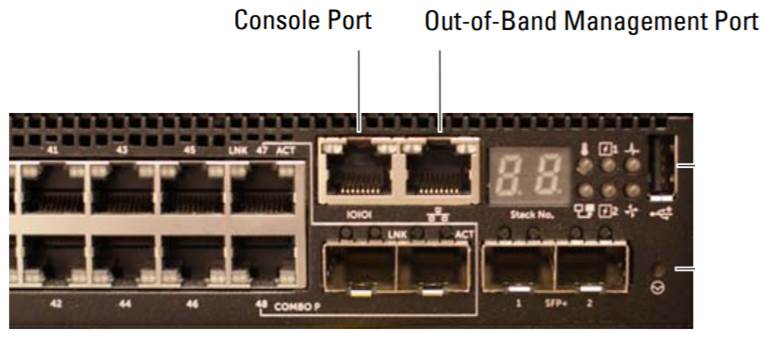
Aanmelden bij ONIE via console
Procedure
1. Sluit een seriële kabel aan op de seriële consolepoort van de switch.
2. Schakel de switch uit en weer in
3. Wanneer het opstartmenu wordt weergegeven om 'Display boot Menu' te selecteren, typ dan 2.
4. In het opstartmenu selecteert u "BOOT ONIE (Rescue Mode), typ 1
Klik hier voor meer informatie.
IP-adres configureren voor out-of-band-beheerinterface
1. Voer de volgende opdracht in om het ONIE-detectieproces te stoppen als het wordt uitgevoerd.
ONIE:/ # onie-discovery-stop
2. Als er geen DHCP-server wordt gebruikt. Configureer het IP-adres en subnetmasker op de beheerpoort, waarbij x.x.x.x uw interne IP-adres en y.y.y.y subnetmasker vertegenwoordigt.
ONIE:/ # ifconfig eth0 x.x.x.x netmask y.y.y.y up
3. Als de server zich in een afzonderlijk subnet bevindt, voegt u een standaardroute toe met behulp van de volgende opdracht: Waarbij x.x.x.x het IP-adres van de gateway vertegenwoordigt
ONIE:/ # route voeg standaard gw x.x.x.x toe
Installeer de software vanaf FTP/HTTP/TFTP-server
Gebruik de onderstaande opdracht.
ONIE:/ # onie-nos-install tftp://X.X.X.X/File name
Where X.X.X.X is the IP address of the TFTP server. We kunnen ook FTP/HTTP of TFTP gebruiken.
Voorbeeldresultaat
Stel dat het IP-adres van de TFTP-server 192.168.10.254. De switch OOB moet IP 192.168.1.2 met subnet 255.255.255.0 en gateway 192.168.1.1 toegewezen krijgen
ONIE:/ # onie-discovery-stop
ONIE:/ # ifconfig eth0 192.168.1.2 netmask 255.255.255.0 up
ONIE:/ # route voeg standaard gw 192.168.1.1 toe
ONIE# onie-nos-install tftp://192.168.10.254/cumulus-install-[PLATFORM].bin
Causa
Dell OS (O6) of besturingssysteem van het derde deel van ONIE installeren in N3000EP-ON switches met FTP/HTTP of TFTP.
Risoluzione
Zie de inhoudsopgave hierboven voor configuratiestappen.
Prodotti interessati
Dell EMC PowerSwitch N3000E-ON Series, SmartFabric OS10 SoftwareProprietà dell'articolo
Numero articolo: 000131853
Tipo di articolo: Solution
Ultima modifica: 11 ott 2023
Versione: 4
Trova risposta alle tue domande dagli altri utenti Dell
Support Services
Verifica che il dispositivo sia coperto dai Servizi di supporto.