Advanced Driver Restore Using Dell Command Update
Riepilogo: This article explains how to initiate an Advanced Driver Restore in the Dell Command Update tool. Advanced Driver Restore provides a one-click installation of drivers. It allows all drivers to be installed following Reinstallation of Windows. Also, it can be used for reinstalling system drivers to fix driver corruption issues. ...
Questo articolo si applica a
Questo articolo non si applica a
Questo articolo non è legato a un prodotto specifico.
Non tutte le versioni del prodotto sono identificate in questo articolo.
Istruzioni
How to use Advanced Driver Restore in Dell Command Update:
- Open up the Dell Command Update application.
- If the settings are enabled to allow the Advance Driver Restore (ADR), you see a section-called Advanced Driver Restore for Windows Reinstallation on the main screen.
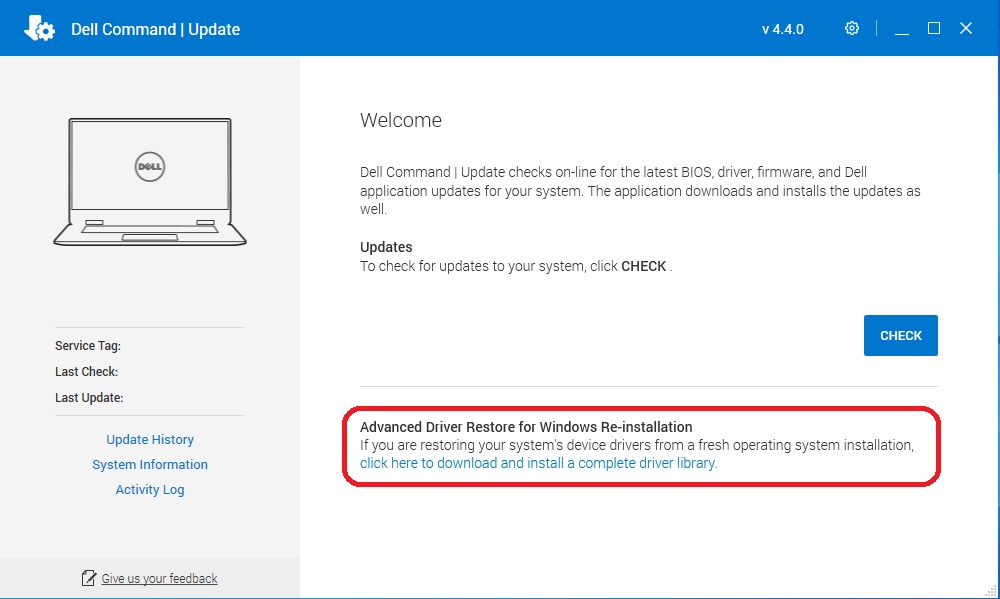
- Click the "click here to download and install a complete driver library."
Note: If it is missing from the menu screen, then follow the section-called Settings to Enable, shown below.
- After the installation is complete, the system must be restarted.
Settings to Enable:
- Run Dell Command Update as admin. In Dell Command Update, select Settings by clicking the gear icon in the upper right corner.
- Select "Advanced Driver Restore" in the left pane.
- Click the slider button "Enable" to ensure that ADR is enabled in the application.
- Dell Technical Support recommends "Download driver library from Dell Support Site (Recommended)"

- Press OK. The option should now be visible as shown in the top of the article.
If these steps do not correct the problem, contact Dell Technical Support.
See these Dell Knowledge Base articles for related information:
Prodotti interessati
OptiPlex, Dell Pro Plus, Latitude, Dell Pro Rugged, XPS, Fixed Workstations, Mobile Workstations, Dell Command | UpdateProprietà dell'articolo
Numero articolo: 000177525
Tipo di articolo: How To
Ultima modifica: 04 set 2025
Versione: 15
Trova risposta alle tue domande dagli altri utenti Dell
Support Services
Verifica che il dispositivo sia coperto dai Servizi di supporto.