Data Domain: How to access the iDRAC v5.10.00.00 UI using hostname after upgrading DDOS
Riepilogo: Summary: iDRAC v5.10.00.00 adds an enhanced security check for accessing iDRAC using a hostname. After the upgrade, you cannot reach the iDRAC using the hostname.
Questo articolo si applica a
Questo articolo non si applica a
Questo articolo non è legato a un prodotto specifico.
Non tutte le versioni del prodotto sono identificate in questo articolo.
Istruzioni
The iDRAC user interface is no longer accessible after upgrading DDOS.
The user sees the error message 400 Bad Request.

There are two ways to work around this issue.
1) Add the hostname with racadm set idrac.webserver.ManualDNSEntry <hostname>
2) Disable the hostname check with racadm set idrac.webserver.HostHeaderCheck 0
Example for adding the hostname:
The user sees the error message 400 Bad Request.
There are two ways to work around this issue.
1) Add the hostname with racadm set idrac.webserver.ManualDNSEntry <hostname>
2) Disable the hostname check with racadm set idrac.webserver.HostHeaderCheck 0
Example for adding the hostname:
- Connect using SSH to the iDRAC interface.
- Using an SSH application such as PuTTY, connect to the iDRAC using the iDRAC IP address and with the root username.
- Run racadm get idrac.webserver
- Notice the ManualDNSEntry is blank
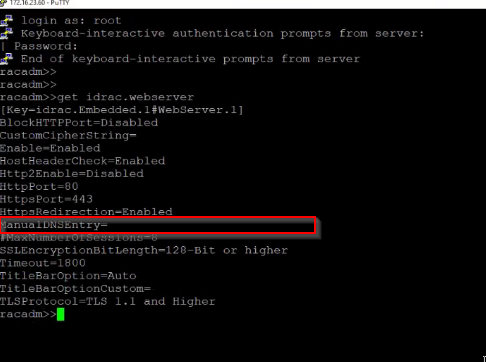
- Notice the ManualDNSEntry is blank
- racadm set idrac.webserver.ManualDNSEntry <hostname>
- Enter the iDRAC hostname in the command

- Run racadm get idrac.webserver
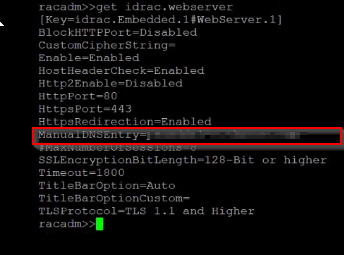
- The ManualDNSEntry should show the hostname.
- You can now access the iDRAC UI using the hostname.
Prodotti interessati
DD3300 Appliance, DD6400 Appliance, DD6900 Appliance, DD9400 Appliance, DD9900 ApplianceProprietà dell'articolo
Numero articolo: 000210557
Tipo di articolo: How To
Ultima modifica: 26 lug 2023
Versione: 5
Trova risposta alle tue domande dagli altri utenti Dell
Support Services
Verifica che il dispositivo sia coperto dai Servizi di supporto.