使用 Switch Embedded Teaming 和 Intel i350 NIC 時,Windows Server 2022 0x7e STOP 錯誤
Riepilogo: 本文說明何時在搭載 Intel i350 網路介面卡 (NIC) 的 Windows Server 2022 Hyper-V 主機上使用交換器內嵌成組 (SET)。如果已啟用虛擬機器佇列 (VMQ),伺服器可能會顯示藍色畫面,並顯示 STOP 0x7E 錯誤 (SYSTEM_THREAD_EXCEPTION_NOT_HANDLED)。
Questo articolo si applica a
Questo articolo non si applica a
Questo articolo non è legato a un prodotto specifico.
Non tutte le versioni del prodotto sono identificate in questo articolo.
Sintomi
請考慮使用具有下列特性的 PowerEdge 伺服器:
- Windows Server 2022 是作業系統,Hyper-V 虛擬化是主要的伺服器角色
- Gigabit Intel i350 網路介面卡 (NIC) 是使用中的主要配接卡
- 在介面卡的進階屬性中,虛擬機器佇列 (VMQ) 設定為 啟用 。
- 交換器內嵌組合 (SET) 用於實作 Hyper-V 虛擬交換器。
在這種情況下,伺服器會顯示藍色畫面並顯示 STOP 錯誤:
0x7E (SYSTEM_THREAD_EXCEPTION_NOT_HANDLED)
當機發生在執行 PowerShell cmdlet 期間,該 cmdlet 使用 Switch Embedded Teaming (SET) 實作 Hyper-V 虛擬交換器。伺服器重新開機後,當機會隨機發生。
Causa
此狀況記錄為預期行為。Intel i350 型 NIC 啟用 VMQ 時,不支援交換器內嵌成組。
這會指出於 Dell 支援網站上驅動程式下載頁面的「已知問題」區段 (驅動程式版本 22.5.0,2023 年 12 月 1 日發佈):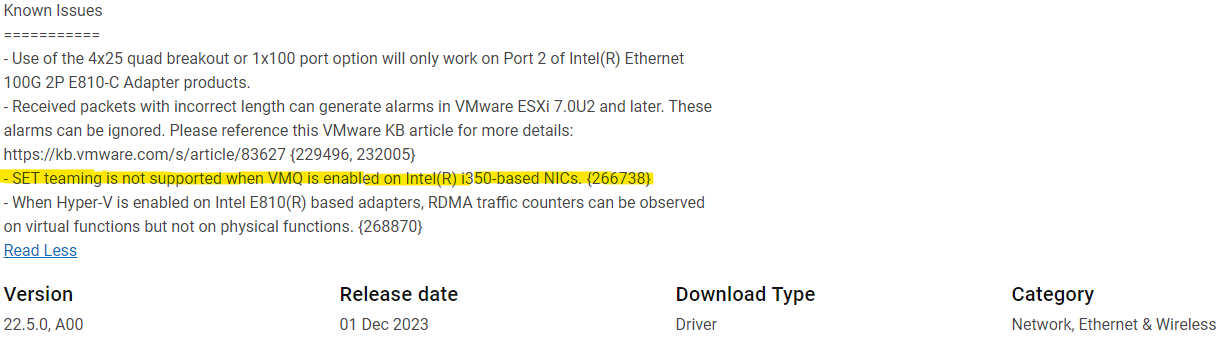
Risoluzione
Intel 表示在 Intel(R) i350 型 NIC 上啟用 VMQ 時,不支援 SET 成組。
如果遇到此問題,會提供下列因應措施作為替代方案:
- 在啟用 SET (實作 Hyper-V 虛擬交換器) 之前,請在 Windows Server 2022 裝置管理員中,於配接卡的進階屬性中停用 VMQ。
- 請勿使用 SET 實現 Hyper-V 虛擬交換器。
Prodotti interessati
Microsoft Windows Server 2022Proprietà dell'articolo
Numero articolo: 000225629
Tipo di articolo: Solution
Ultima modifica: 16 mag 2025
Versione: 6
Trova risposta alle tue domande dagli altri utenti Dell
Support Services
Verifica che il dispositivo sia coperto dai Servizi di supporto.