NetWorker Family: DD Boost device is Marked as suspect
요약: DD Boost device is Marked as suspect, which result in backups not progressing. And Mounting and Unmounting operation for the device fails.
이 문서는 다음에 적용됩니다.
이 문서는 다음에 적용되지 않습니다.
이 문서는 특정 제품과 관련이 없습니다.
모든 제품 버전이 이 문서에 나와 있는 것은 아닙니다.
증상
- NetWorker DD Boost devices are marked as Suspect impacting data protection operations
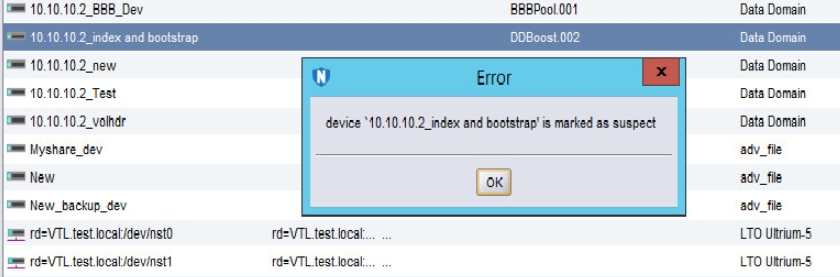
- Any activity on the device such as a "Mount and Unmount" operation fails, stating the following error:
"Device name is Marked as Suspect."
원인
There are multiple causes for the device to be marked as suspect. The Most likely reasons are as follows:
- The NetWorker Server/Storage node losses connection to the DD and conversely.
- The Username/password has changed and the same is not being updated in the "Device Properties."
- The Password for the user has expired.
- The account for the User has been locked from the DD end.
해결
1. Has the ddboost user password been changed recently?
a. If the ddboost user password was changed recently, open the Device properties in NetWorker.
b. Go to the Configuration tab and update the ddboost user password:
b. Go to the Configuration tab and update the ddboost user password:
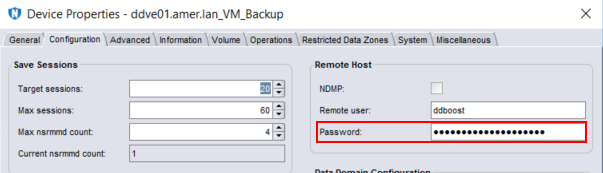
c. Once the password has been updated, click Ok.
NOTE: This process must be repeated for any ddboost device configured using the same ddboost user account.
d. Right-click the device and select disable.
e. Right-click the device and select enable.
f. Mount the device.
2. If the ddboost user password was not changed, ensure that it is not expired or locked.
a. Data Domain: DD Boost user shows locked status.
b. Disable and enable the device from NetWorker.
c. Perform a Mount operation.
b. Disable and enable the device from NetWorker.
c. Perform a Mount operation.
3. Check communication between the NetWorker Server or Storage node:
해당 제품
NetWorker제품
NetWorker Family, Data Domain문서 속성
문서 번호: 000050014
문서 유형: Solution
마지막 수정 시간: 17 4월 2026
버전: 6
다른 Dell 사용자에게 질문에 대한 답변 찾기
지원 서비스
디바이스에 지원 서비스가 적용되는지 확인하십시오.