NetWorker: Azure VM Snapshot restore fails "the source blob does not belong to the same region as the disk"
요약: NetWorker Azure Virtual Machine (VM) Snapshot restore fails, reporting that the source blob does not belong to the same region as the disk.
이 문서는 다음에 적용됩니다.
이 문서는 다음에 적용되지 않습니다.
이 문서는 특정 제품과 관련이 없습니다.
모든 제품 버전이 이 문서에 나와 있는 것은 아닙니다.
증상
Azure VMs are protected using NetWorker Azure VM snapshot protection.
An Azure VM snapshot restore fails with the following error in a Debug 7 (D7) recover log:
208119:nsrazure_recover: Error from url 'https://management.azure.com/subscriptions/SUBSRIPTION_ID/resourceGroups/RESOURCE_GROUP_NAME/providers/Microsoft.Compute/disks/VM-NAME_OsDisk_JOB-NAME_JOBID_TIME-STAMP?api-version=2021-12-01': Response Code: 400 Response Data: {
  "error": {
    "code": "BadRequest",
    "message": "The source blob https://STORAGE-ACCOUNT-NAME.blob.core.windows.net/CONTAINER-NAME/VM-NAME_OsDisk_JOB-NAME_JOBID_TIME-STAMP does not belong to the same region as the disk."
  }
}
..
MM/DD/YY HH:mm:SS nsrazure_recover-D7 restoreDiskFromBlob failed for payload '{
  "location": "REGION-NAME",
  "properties": {
    ...
    },
    "creationData": {
      "createOption": "Import",
      "sourceUri": https://STORAGE-ACCOUNT-NAME.blob.core.windows.net/CONTAINER-NAME/VM-NAME_OsDisk_JOB-NAME_JOBID_TIME-STAMP,
      "storageAccountId": "/subscriptions/SUBSCRIPTION-ID/resourceGroups/RESOURCE-GROUP-NAME/providers/Microsoft.Storage/storageAccounts/STORAGE-ACCOUNT-NAME"
    },
    "diskSizeGB": SIZE
  }
}'
MM/DD/YY HH:mm:SS nsrazure_recover-D6 restoreDiskFromBlob: end
207541:nsrazure_recover: Unable to start recover session for subscription 'SUBSCRIPTION-NAME', resource group 'RESOURCE-GROUP-NAME', storage account 'STORAGE-ACCOUNT-NAME'
원인
The target disk location selected in the restore is in a different Azure region from the Azure blob storage account. For example, the restore target used is southcentralus; however, the Azure storage account specified in the restore resides in eastus2.
The source blob and the target managed disk must be in the same region.
해결
- Log in to the Azure portal.
- Navigate to the Storage Account used during the restore. https://portal.azure.com/#browse/Microsoft.Storage%2FStorageAccounts
- From the Storage Account's Overview tab, check the Location. If the storage account's location does not match the target disk location, identify or create a storage account within the same Azure region. For example:


NOTE: The Storage Account must belong to the Resource Group the VM is being recovered to.
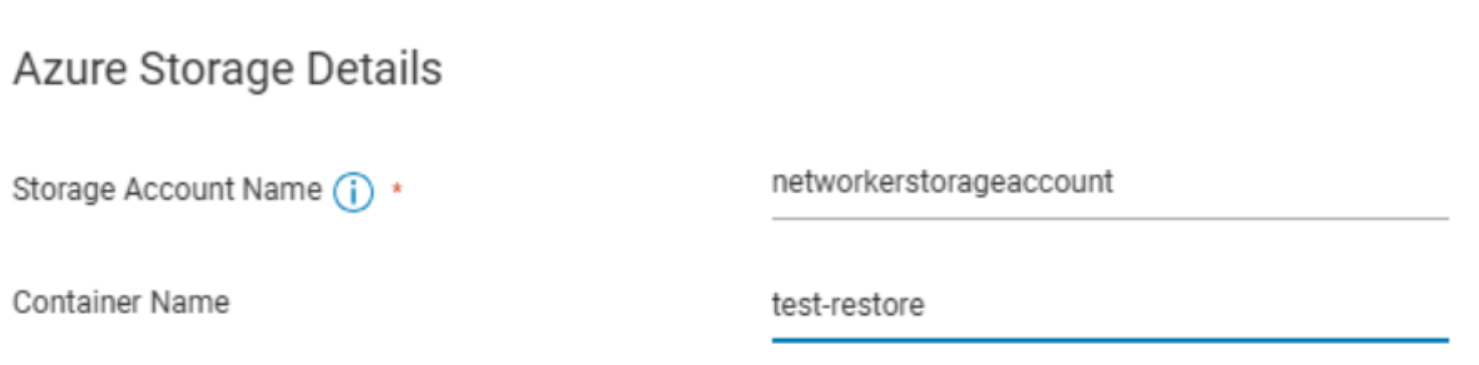
- Perform the Azure restore again using the Azure storage account location that matches the target disk location:
추가 정보
This is a constraint within Azure. When importing through the Azure portal, you must select a Destination Azure region that is available to the storage account. Regions not associated with the storage account cannot be selected.
See: Tutorial: Import data to Blob Storage with the Azure Import/Export service
The NetWorker Azure VM Snapshot Integration Guide states the following for the recover command-line options:
| -L | Specifies the region of the created VM. This option is derived from the information that is collected during the backup. |
Since there is no option in the recover UI, the target region is derived from the backup.
All NetWorker Guides are available through: https://www.dell.com/support/product-details/product/networker/docs
해당 제품
NetWorker제품
NetWorker Family문서 속성
문서 번호: 000339191
문서 유형: Solution
마지막 수정 시간: 02 7월 2025
버전: 1
다른 Dell 사용자에게 질문에 대한 답변 찾기
지원 서비스
디바이스에 지원 서비스가 적용되는지 확인하십시오.