How to Assign an Initial Company Administrator
요약: This article explains how to assign an Initial Company Administrator.
이 문서는 다음에 적용됩니다.
이 문서는 다음에 적용되지 않습니다.
이 문서는 특정 제품과 관련이 없습니다.
모든 제품 버전이 이 문서에 나와 있는 것은 아닙니다.
지침
If you created a service request, it will be processed as soon as possible.
If you need to assign a company administrator, create a service request online. Do not start a chat to assign a company administrator.
Company administrator overview:
Infrastructure and enterprise customers are required to define administrators within their organization online at Dell Support. Organizations with fewer than five employees need to identify at least one company administrator. Organizations with five or more employees need to identify at least three company administrators.
The company administrator role in Dell Support gives applicable users a centralized view of company and contact information affiliated with your organization. Company administrators have full capabilities for managing company profile settings, sites, and contacts for their respective organizations.
For more information on the company administrator role, visit Company Administration - View and Manage Sites & Contacts | Dell US.
How to assign a company administrator:
1. Sign-in to the Manage Company Information area of the online support site.
2. Review the contact list for your organization and decide which users will have a company administrator assignment.
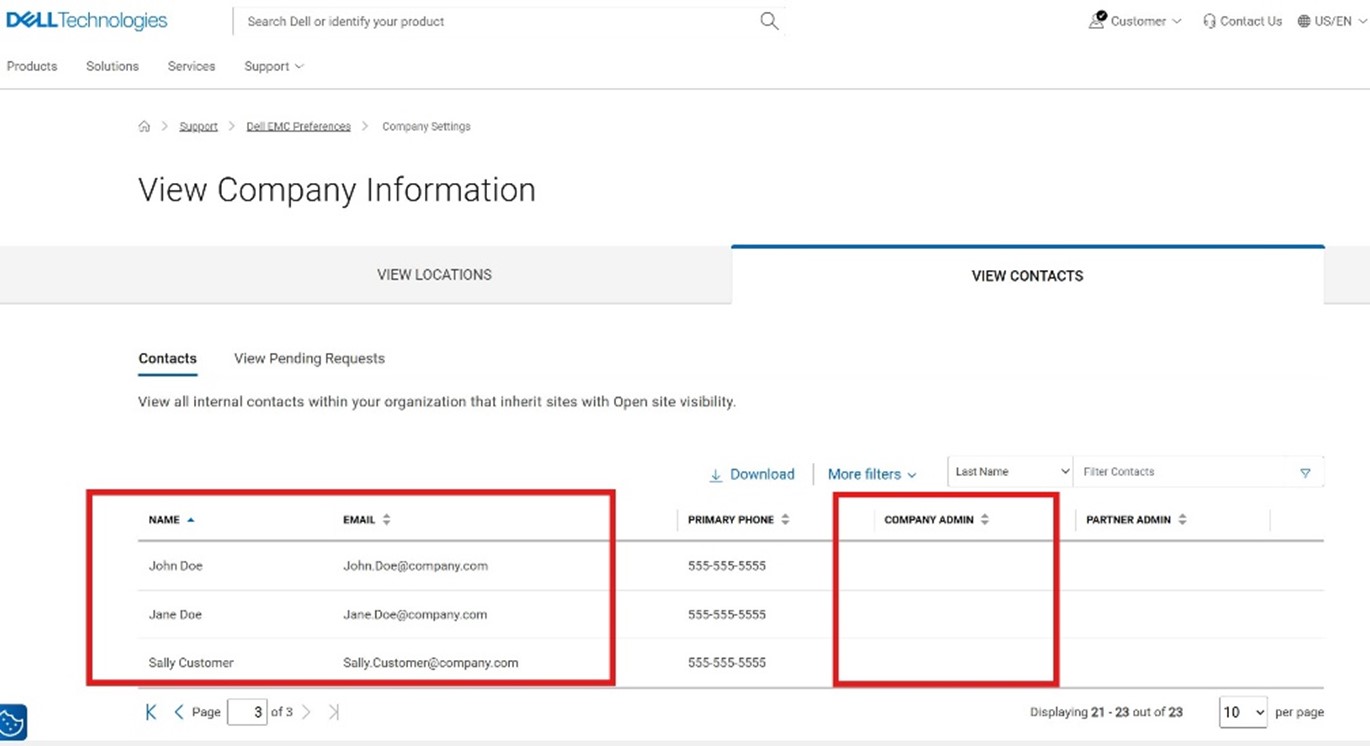
3. Submit a service request via the Administrative Support page.
- Select Enterprise Online Account Help

- Open the Tell Us More menu and select Account Access Issues then select your location.

- In the expanded section, select Create Service Request.

- Provide the names and emails from the reviewed list of contacts for company administrator role assignment. You can assign yourself or a different contact.
Reach out to your business account manager or sign in with your credentials to contact Administrative Support for further assistance.
해당 제품
Data Erase제품
VxBlock and Vblock Systems, CloudLink SecureVM, Enterprise Hybrid Cloud, AX Nodes, PowerFlex rack, VxRail, Container Storage Modules Family, AppSync, Avamar, MirrorView, NetWorker Family, SourceOne, Data Domain, Cloud Tiering Appliance, OptiPlex
, NVMe over Fabrics, PowerPath, PowerSwitch, Datacenter Scalable Solutions, Lifecycle Controllers, Secure Connect Gateway, Virtualization Solutions, Dell EMC Microsoft Storage Spaces Direct Ready Nodes, APEX, Dell EMC vSAN Ready Nodes, NativeEdge Solutions, Atmos, Disk Library, ECS, metro node, ObjectScale, PowerMax, PowerScale, ScaleIO, VMAX, VPLEX, XtremIO, PowerStore, PowerVault, Dell EMC Unity, VNX/VNXe, Ansible Modules, EMCRemote, Storage Integrator, RecoverPoint, Storage Replication Adapter (SRA), Virtual Storage Integrator (VSI), Connectrix, Data Protection Suite Series, Integrated Data Protection Appliance Family, Symmetrix, VMware
...
문서 속성
문서 번호: 000374134
문서 유형: How To
마지막 수정 시간: 14 11월 2025
버전: 7
다른 Dell 사용자에게 질문에 대한 답변 찾기
지원 서비스
디바이스에 지원 서비스가 적용되는지 확인하십시오.