NetWorker: File System Client Backup failing with pseudo_saveset error "Invalid client parallelism parameter"
Sammendrag: This article will help troubleshoot File System Backup Failure.
Denne artikkelen gjelder for
Denne artikkelen gjelder ikke for
Denne artikkelen er ikke knyttet til noe bestemt produkt.
Det er ikke produktversjonene som identifiseres i denne artikkelen.
Symptomer
File System Backup Fails with "Invalid client parallelism parameter".
Action Logs shows the following:
Action Logs shows the following:
181407:save: Step (1 of 5) for PID-4412: Save has been started on the client 'Incorrect_Client_Hostname'.
174412:save: Step (2 of 5) for PID-4412: Running the backup on the client 'Incorrect_Client_Hostname' for the save set 'pseudo_saveset'.
182135:save: Unable to determine the hostname or host alias.
133075:save: new_sdthreadparam_from_path: Invalid client parallelism parameter.
113706:save: save: Call to new_sdthreadparam_from_path to create sd_param is unsuccessful.
--- Job Indications ---
Actual_Client_Hostname:pseudo_saveset: retried 4 times.
Årsak
Unable to determine hostname of client will appear if there is a DNS resolution issue. Invalid client parallelism paramter will return if there is an invalid client parallelism set in the client properties in NetWorker.
Oppløsning
1. Confirm DNS resolution for the client(s) from both the NetWorker server and the client. Forward (FQDN), Reverse, and short-name resolution should return correctly. This is done with the OS nslookup command; however, nsrports can also be used:
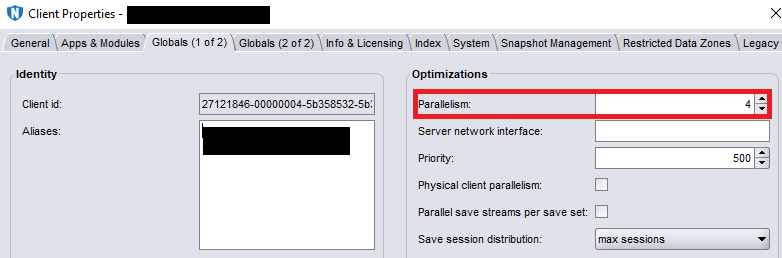
2. The client parallelism is changed from the NMC. Open the client properties and go to the "Globals (1 of 2)" tab:
nsrports -t client_name
Example:
[root@nw_server ~]# nsrports -t client
Forward lookup for client
Query time:              0.001 sec
Canonical name (CNAME):  client.domain.com
Address (A):             10.0.0.10
Connect to port 7938:    Succeeded (0.000 sec)

Reverse lookup for 10.0.0.10
Query time:              0.000 sec
Name:                    client.domain.com
NOTE: The nsrports command also checks client port connectivity on port 7938. Different ports can be checked by adding -p port # to the command.
2. The client parallelism is changed from the NMC. Open the client properties and go to the "Globals (1 of 2)" tab:
NOTE: For most file system clients, the parallelism can be set to 4. For more information on parallelism, see the NetWorker Administration Guide, available through: https://www.dell.com/support/home/product-support/product/networker/docs
Berørte produkter
NetWorkerProdukter
NetWorkerArtikkelegenskaper
Artikkelnummer: 000060645
Artikkeltype: Solution
Sist endret: 27 sep. 2023
Versjon: 3
Få svar på spørsmålene dine fra andre Dell-brukere
Støttetjenester
Sjekk om enheten din er dekket av støttetjenestene.