Avamar: vCloud Director DPE file level restore fails with error "User authentication failed" when logging to the VM using vCD UI.
Sammendrag: vCloud Director DPE file level restore fails with error "User authentication failed" when logging to the VM using the vCD UI. The same type of restore is successful when done using Avamar Administrator or AUI. ...
Denne artikkelen gjelder for
Denne artikkelen gjelder ikke for
Denne artikkelen er ikke knyttet til noe bestemt produkt.
Det er ikke produktversjonene som identifiseres i denne artikkelen.
Symptomer
When initiating an FLR on a VM using the vCD UI and entering the VM credentials, the process fails, and the error message "User authentication failed" is displayed:
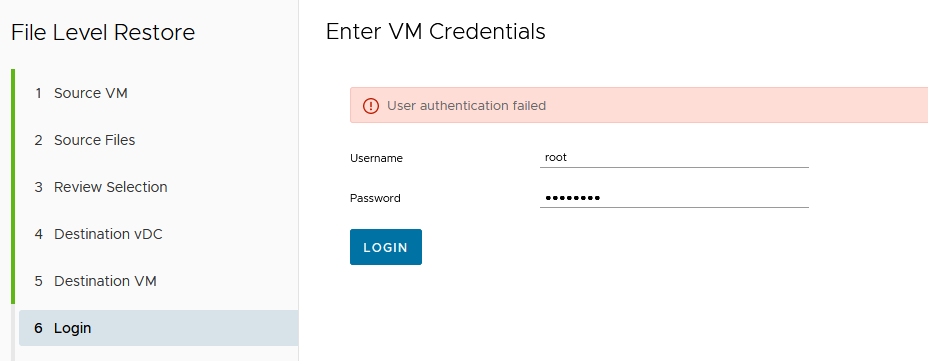
From the DPE side, the authentication error can be identified in SRV logs: /var/log/vcp/srv/vcpserver.log:
The same authentication error can also be observed in the backup gateway logs: /var/log/vcp/bg/<bg_name>/vcpbg.log:
The File Level Recovery (FLR) operation is successful when using the same VM credentials if performed using Avamar AUI or Avamar Administrator directly.
From the DPE side, the authentication error can be identified in SRV logs: /var/log/vcp/srv/vcpserver.log:
2023-04-25 07:50:57,613 [AMQP listener 7] INFO  (AdsClient.java:692) - Started connecting FLR destination VM ...
2023-04-25 07:50:57,625 [AMQP listener 7] INFO  (RestTemplateFactory.java:125) - POST https://sv-2000avu55.ebrc8002.cloud:8443/vcp-ba-ads-ws/flrDestinationBrowseConnection
2023-04-25 07:51:01,341 [eventListenerContainer-1] INFO  (EventListener.java:214) - NOTIFICATION: com/vmware/vcloud/event/task/complete
2023-04-25 07:51:01,363 [AMQP listener 7] ERROR (VcpBaseMessageHandler.java:164) - REQUEST : POST /api/vApp/vapp-17b030c9-c633-4ca3-a245-597ba5e46d7b/vm/vm-3ecd2a2d-6a81-49dd-a79f-ea4815733
96f/connections
2023-04-25 07:51:01,363 [AMQP listener 7] ERROR (VcpBaseMessageHandler.java:165) - HTTP 500 :
com.emc.vcp.service.exceptions.AdsClientException: 11023 : User authentication failed: Invalid guest login
        at com.emc.vcp.ads.client.RestTemplateFactory.handleException(RestTemplateFactory.java:239) ~[classes!/:19.7.0.90]
        at com.emc.vcp.ads.client.AdsClient.connectDestinationVM(AdsClient.java:699) ~[classes!/:19.7.0.90]
        at com.emc.vcp.service.VAppService.onFlrBrowseDestinationConnectionsPOST(VAppService.java:1294) ~[classes!/:19.7.0.90]
        at sun.reflect.NativeMethodAccessorImpl.invoke0(Native Method) ~[?:1.8.0_301]
        at sun.reflect.NativeMethodAccessorImpl.invoke(Unknown Source) ~[?:1.8.0_301]
        at sun.reflect.DelegatingMethodAccessorImpl.invoke(Unknown Source) ~[?:1.8.0_301]
        at java.lang.reflect.Method.invoke(Unknown Source) ~[?:1.8.0_301]
The same authentication error can also be observed in the backup gateway logs: /var/log/vcp/bg/<bg_name>/vcpbg.log:
2023-04-25 07:50:57,748 [https-jsse-nio-8443-exec-1] INFO  (LoggerInterceptor.java:30) - POST: /vcp-ba-ads-ws/flrDestinationBrowseConnection
2023-04-25 07:50:57,808 [https-jsse-nio-8443-exec-1] INFO  (TaskUpdates.java:121) -  Updating Task as running :  Task Status : running, Operation : FLR: Connecting Destination Virtual Machi
ne (3ecd2a2d-6a81-49dd-a79f-ea481573396f), Operation StartTime : 2023-04-25T07:50:49.797Z, Progress : 10, Cancel Requested : false, Error :  null ,
2023-04-25 07:50:58,338 [https-jsse-nio-8443-exec-1] INFO  (QueryVCenter.java:99) - Connections to VCenters: 1
2023-04-25 07:51:00,993 [vcp-ads-1] INFO  (ServiceADS.java:175) -  Running Restore Tracker Task..
2023-04-25 07:51:00,994 [vcp-ads-1] INFO  (AdsServices.java:640) - Restore tracker is empty. No pending restores.
2023-04-25 07:51:01,262 [https-jsse-nio-8443-exec-1] INFO  (TaskUpdates.java:72) -  Updating Task with error :  Task Status : error, Operation : FLR: Connecting Destination Virtual Machine
(3ecd2a2d-6a81-49dd-a79f-ea481573396f), Operation StartTime : 2023-04-25T07:50:49.797Z, Progress : 10, Cancel Requested : false, Error : com.vmware.vcloud.api.rest.schema.ErrorType@319778f7
,
2023-04-25 07:51:01,336 [https-jsse-nio-8443-exec-1] ERROR (AdsServices.java:2111) -
com.vmware.vim25.InvalidGuestLogin: Failed to authenticate with the guest operating system using the supplied credentials.
        at sun.reflect.NativeConstructorAccessorImpl.newInstance0(Native Method) ~[?:1.8.0_301]
        at sun.reflect.NativeConstructorAccessorImpl.newInstance(Unknown Source) ~[?:1.8.0_301]
        at sun.reflect.DelegatingConstructorAccessorImpl.newInstance(Unknown Source) ~[?:1.8.0_301]
        at java.lang.reflect.Constructor.newInstance(Unknown Source) ~[?:1.8.0_301]
        at java.lang.Class.newInstance(Unknown Source) ~[?:1.8.0_301]
        at com.vmware.vim25.ws.XmlGenDom.fromXml(XmlGenDom.java:253) ~[yavijava-6.0.05.jar!/:?]
        at com.vmware.vim25.ws.XmlGenDom.parseSoapFault(XmlGenDom.java:151) ~[yavijava-6.0.05.jar!/:?]
        at com.vmware.vim25.ws.XmlGenDom.fromXML(XmlGenDom.java:109) ~[yavijava-6.0.05.jar!/:?]
        at com.vmware.vim25.ws.SoapClient.unMarshall(SoapClient.java:253) ~[yavijava-6.0.05.jar!/:?]
        at com.vmware.vim25.ws.WSClient.invoke(WSClient.java:96) ~[yavijava-6.0.05.jar!/:?]
        at com.vmware.vim25.ws.VimStub.validateCredentialsInGuest(VimStub.java:4554) ~[yavijava-6.0.05.jar!/:?]
        at com.vmware.vim25.mo.GuestAuthManager.ValidateCredentialsInGuest(GuestAuthManager.java:70) ~[yavijava-6.0.05.jar!/:?]
The File Level Recovery (FLR) operation is successful when using the same VM credentials if performed using Avamar AUI or Avamar Administrator directly.
Årsak
The password contains a plus sign (+), causing the VM authentication failure on vCD UI.
This is a DPE issue, currently under investigation with Engineering.
This is a DPE issue, currently under investigation with Engineering.
Oppløsning
Workaround:
Two potential workarounds are available. Try one or the other:
1. Attempt the FLR directly from Avamar UI.
Two potential workarounds are available. Try one or the other:
1. Attempt the FLR directly from Avamar UI.
2. Change the + character in the VM’s password to another symbol.
Fix:
Contact Dell support and quote this article to check on the current status of the Engineering investigation.Fix:
Berørte produkter
vCloud Director Data Protection ExtensionArtikkelegenskaper
Artikkelnummer: 000214288
Artikkeltype: Solution
Sist endret: 23 aug. 2023
Versjon: 2
Få svar på spørsmålene dine fra andre Dell-brukere
Støttetjenester
Sjekk om enheten din er dekket av støttetjenestene.