NVP-vProxy: How to force NetWorker vProxy to automatically back up to a secondary Storage Node when the primary Storage Node is offline
Podsumowanie: A NetWorker VMware action used for vProxy backups selects a single NetWorker Storage Node. This action does not provide any Storage Node fallback capability. This article shows a small setup where Storage Node fallback is achieved by other means. ...
Ten artykuł dotyczy
Ten artykuł nie dotyczy
Ten artykuł nie jest powiązany z żadnym konkretnym produktem.
Nie wszystkie wersje produktu zostały zidentyfikowane w tym artykule.
Instrukcje
NOTE: This KB is merely informative and intends to show that there might be workarounds that could apply to achieve the fallback mechanism. As this procedure is out of the vProxy current design, it is out of support.
NetWorker VMware Protection (NVP) vProxy backups are saved under the NetWorker vCenter client instance name.
That means, the vCenter client instance controls part of the NetWorker save options.
Example Configuration:
- vCenter name: vAppVM101
- Storage Node One (primary): rhel-6-8
- Storage Node Two (secondary): vm8240
- Destination pool: Data Domain Default pool
And what we want to achieve:
- Backup using the rhel-6-8 NetWorker Storage Node.
- If rhel-6-8 NetWorker Storage Node is down, backup to the secondary Storage Node (vm8240)
- If both Storage Nodes are down, backups fail. Alternatively we could manually select a different destination pool: DDPool1.
How to configure it the fallback Storage Node:
- From the NetWorker Management Console (NMC), Go to Protection->Clients tab and open the client properties of the vCenter server client resource. If there is more than one, select the client instance with "vProxy" set as "Backup type"
- In the "Globals (2 of 2)" tab, under "Backup target disks," type the list of devices (name) that this client can use when saving its data.
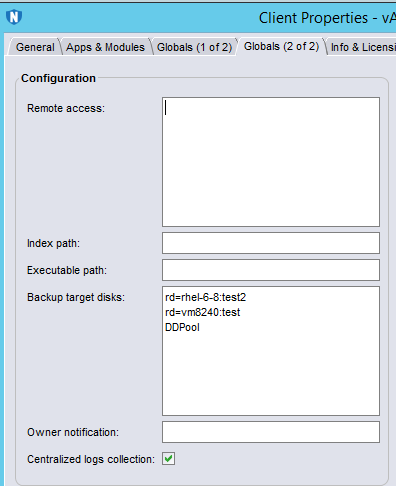 NOTE: "Backup target disks" is an ordered list of disk devices for the client to use when saving its data, without referring to the storage node lists. Only Data Domain devices can be entered for vProxy backup targets. There is also a limit of maximum four devices that can be specified. This only works as a fallback mechanism if the unavailable devices are unmounted.The device names can be found in the Devices->Devices tab:
During backups, the following is observed in the backup logs:
Example:
rd=rhel-6-8@test2 device is mounted. Backup succeeded
rd=rhel-6-8@test2 device is not mounted. Backup succeeded (was saved to rd=vm8240:test device)
Both rd=rhel-6-8:test2 and rd=vm8240:test devices are unmounted: backup failed (it did not use DDPool device, because DDPool is not labeled with the action destination pool).
Produkty, których dotyczy problem
NetWorkerProdukty
NetWorker, NetWorker SeriesWłaściwości artykułu
Numer artykułu: 000013681
Typ artykułu: How To
Ostatnia modyfikacja: 22 sty 2026
Wersja: 4
Znajdź odpowiedzi na swoje pytania u innych użytkowników produktów Dell
Usługi pomocy technicznej
Sprawdź, czy Twoje urządzenie jest objęte usługą pomocy technicznej.