NetWorker: Jak określić przedział czasu w poleceniu gstclreport
Podsumowanie: W tym artykule pokazano, jak ustawić zakres czasu za pomocą polecenia gstclreport na potrzeby generowania raportów konsoli NetWorker Management Console (NMC).
Ten artykuł dotyczy
Ten artykuł nie dotyczy
Ten artykuł nie jest powiązany z żadnym konkretnym produktem.
Nie wszystkie wersje produktu zostały zidentyfikowane w tym artykule.
Instrukcje
Pakiet gstclreport służy do generowania raportów NMC przy użyciu wiersza poleceń na serwerze NetWorker Management Console (NMC).
usage: gstclreport [-h] -r reportname -u username
     [-P password] [-a chartselector] [-c charttype]
     [-f filename] [-n fontfamily] [-o orientation]
     [-v viewtype] [-x exporttype] [-C Category argument]
     [-C "Event Time" argument] [-C "Object Name" argument]
     [-C "Object Type" argument] [-C Operation argument]
     [-C "Server Name" argument] [-C "Server Type" argument]
     [-C "User Name" argument]
where:
    -h                          Print this help message
    -r  reportname      The name of the report to run, or full path name like "/Reports/Users/User List"
    -u  username        Log into GST server with given name
    -P  password        Log into GST server with given password
    -a  chartselector   The set of Y axis to display in a chart
    -c  charttype       The chart type [bar | pie | plot | "stacking bar"]
    -f  filename        The name of the export file
    -n  fontfamily      A font family to override the default(COURIERNEW). Please note if invalid
    -o  orientation     The orientation [portrait | landscape]
    -v  viewtype        The view type [table | chart]
    -x  exporttype      The type of export [ pdf | postscript | html | csv | print]
    -C  Category argument       Where argument is a comma separated list of Categorys
    -C  "Event Time" argument   Where argument is a From and To date. Date & Time format is MM/DD/YY & hh:mm:ss
    -C  "Object Name" argument  Where argument is a single Object Name
    -C  "Object Type" argument  Where argument is a single Object Type
    -C  Operation argument      Where argument is a comma separated list of Operations
    -C  "Server Name" argument  Where argument is a comma separated list of Server Names
    -C  "Server Type" argument  Where argument is a single Server Type
    -C  "User Name" argument    Where argument is a comma separated list of User Names
Różne raporty używają różnych operatorów czasu:
- Wszystkie statystyki zasad, z wyjątkiem szczegółów operacji, używają opcji "WorkflowStart Time". W raporcie Szczegóły akcji używany jest "Czas rozpoczęcia akcji"
- Wszystkie statystyki odzyskiwania używają "Czasu rozpoczęcia".
- Wykorzystanie urządzeń używa "czasu".
- Inspekcja użytkowników korzysta z "czasu zdarzenia".
gstclreport -r "REPORT_PATH -u USER_NAME -P 'PASSWORD' -x REPORT_TYPE -f FILE_NAME -v REPORT_FORMAT -C "OPERATOR" "MONTH DD, YYYY HH:mm AM/PM" "MONTH DD, YYYY HH:mm AM/PM"
lub:
gstclreport -r "REPORT_PATH -u USER_NAME -P 'PASSWORD' -x REPORT_TYPE -f FILE_NAME -v REPORT_FORMAT -C "OPERATOR" "MM/DD/YY HH:mm:SS AM/PM" "MM/DD/YY HH:mm:SS AM/PM"
Przykład:
nve:/opt/lgtonmc/bin # ./gstclreport -r "/Reports/Users/User Audit" -u administrator -P '!Password1' -x pdf -f test  -v table -C "Event Time" "February 13, 2026 12:00 AM" "February 18, 2026 11:59 PM"
java version "17.0.17" 2025-10-21 LTS
Java(TM) SE Runtime Environment (build 17.0.17+8-LTS-360)
Java HotSpot(TM) 64-Bit Server VM (build 17.0.17+8-LTS-360, mixed mode, sharing)
java version "17.0.17" 2025-10-21 LTS
Java(TM) SE Runtime Environment (build 17.0.17+8-LTS-360)
Java HotSpot(TM) 64-Bit Server VM (build 17.0.17+8-LTS-360, mixed mode, sharing)
Generated report "User Audit" as file test.pdf
Raport jest generowany w określonym zakresie czasu: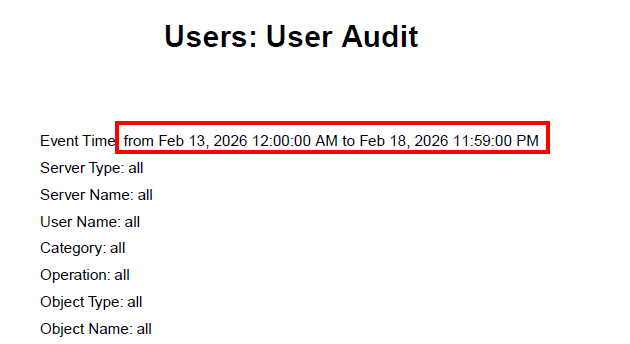
Dodatkowe informacje
Produkty, których dotyczy problem
NetWorkerProdukty
NetWorkerWłaściwości artykułu
Numer artykułu: 000023243
Typ artykułu: How To
Ostatnia modyfikacja: 19 lut 2026
Wersja: 7
Znajdź odpowiedzi na swoje pytania u innych użytkowników produktów Dell
Usługi pomocy technicznej
Sprawdź, czy Twoje urządzenie jest objęte usługą pomocy technicznej.