Data Domain: Procedura resetowania BMC/iDRAC
Podsumowanie: Ten artykuł zawiera instrukcje dotyczące ręcznego resetowania kontrolera Baseboard Management Controller (BMC) lub Integrated Dell Remote Access Controller (iDRAC) w systemach Data Domain i PowerProtect DD. DDOS może automatycznie podjąć próbę zresetowania po wykryciu znanych problemów, ale jeśli alerty będą się powtarzać, może być wymagana ręczna interwencja. ...
Ten artykuł dotyczy
Ten artykuł nie dotyczy
Ten artykuł nie jest powiązany z żadnym konkretnym produktem.
Nie wszystkie wersje produktu zostały zidentyfikowane w tym artykule.
Objawy
Dotyczy:
- Wszystkie systemy Data Domain
Możliwe objawy:
- BMC przestaje odpowiadać.
- Kontroler iDRAC jest w trybie offline lub nieosiągalny.
- Fałszywe lub przejściowe alerty związane z:
- Fanów
- Zasilacze
- Czujniki temperatury
- Wiele czujników jednostki głównej zgłasza jako "Niedostępne", "Nieobecne" lub "Niepowodzenie".
- Wysłany alert
-
EVT-ENVIRONMENT-00039: BMC failure has been detected. File system is unchanged.
-
Przyczyna
BMC lub iDRAC mogą przestać odpowiadać z powodu błędów wewnętrznych lub nadmiernego ruchu, co skutkuje nieaktualnych lub błędnymi alertami. Reset usuwa te warunki i przywraca funkcjonalność czujnika.
Rozwiązanie
Procedura resetowania BMC/iDRAC wszystkich systemów DD:
- Wyłącz system Data Domain, wydając polecenie DD-CLI:
-
#system poweroff
-
- Poczekaj, aż system DD bezpiecznie się wyłączy.
- Odłącz wszystkie kable zasilania prądem zmiennym od jednostki głównej/kontrolera DD.
- Odczekaj 2 minuty.
- Podłącz wszystkie zasilacze i uruchom system, naciskając przycisk zasilania na panelu przednim.
- Jeśli w systemie nadal występują problemy z kontrolerem BMC, skontaktuj się z dostawcą pomocy technicznej.
UWAGA: Procedura "Odprowadzania ładunków" z serwerów Dell PowerEdge:
Data Domain: DD3300/DD6900/DD9400/DD9900 Procedura usuwania ładunków z platformy (resetowanie BMC) .
Data Domain: DD3300/DD6900/DD9400/DD9900 Procedura usuwania ładunków z platformy (resetowanie BMC) .
Alternatywna opcja miękkiego resetu dla systemów PowerProtect DD:
Graficzny interfejs użytkownika (interfejs użytkownika) kontrolera iDRAC umożliwia wykonanie miękkiego resetu:
- Nawiąż połączenie z kontrolerem iDRAC.
- Zaloguj się do interfejsu, wpisując nazwę użytkownika i hasło.
- Wybieranie: Konserwacja > Diagnostyka > Resetowanie kontrolera iDRAC
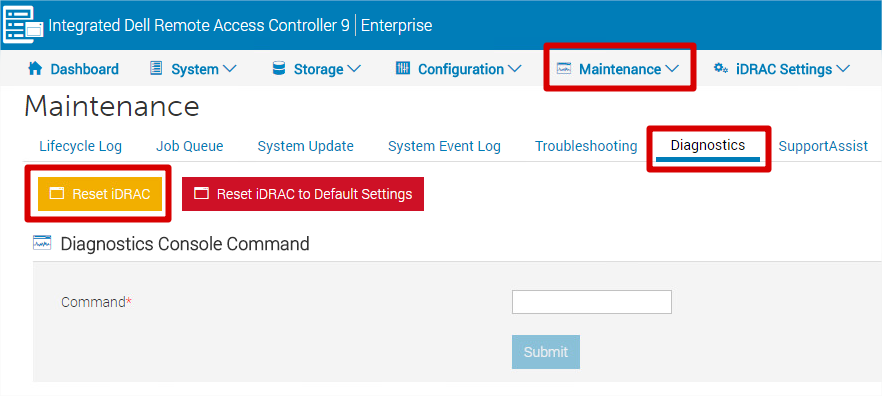
- Kontroler iDRAC będzie nieosiągalny przez kilka minut — nie ma to wpływu na wydajność systemu.
Uwaga: Nie wybieraj opcji "Reset iDRAC to Default Settings" , chyba że zamierzasz przywrócić wszystkie ustawienia (w tym adres IP, nazwę użytkownika i hasło) do domyślnych ustawień fabrycznych.
Produkty, których dotyczy problem
Data Domain, DD OS, DD2200 Appliance, DD2500 ApplianceWłaściwości artykułu
Numer artykułu: 000079739
Typ artykułu: Solution
Ostatnia modyfikacja: 18 kwi 2026
Wersja: 7
Znajdź odpowiedzi na swoje pytania u innych użytkowników produktów Dell
Usługi pomocy technicznej
Sprawdź, czy Twoje urządzenie jest objęte usługą pomocy technicznej.