SourceOne for File Systems: File activities cannot shortcut items
Podsumowanie: File activities don't getting permission issue when trying to shortcut files.
Ten artykuł dotyczy
Ten artykuł nie dotyczy
Ten artykuł nie jest powiązany z żadnym konkretnym produktem.
Nie wszystkie wersje produktu zostały zidentyfikowane w tym artykule.
Objawy
While running SourceOne File Archive Historical Shortcut activities, you may see that the items are not being processed. The processed counts will grow and failed counts will remain as zero.
When you open the Job Log you will see the below entry:
2020/06/09 11:34:41.558 *** Failed to create shortcut file ***
Name: File_to_be_shortcut.xls.url
File: \\?\UNC\share\folder_1\folder_2\folder_3\File_to_be_shortcut.xls
ID: 00000000D12A5D296B8C0D6AFF1A8ED7C3EFAB1383CE3EFF00
Reason: Access is denied. (-2147024891)
Source: ExDirectoryThread.cpp(5562): CExDirectoryThread::iCreateLinkFile:
Name: File_to_be_shortcut.xls.url
File: \\?\UNC\share\folder_1\folder_2\folder_3\File_to_be_shortcut.xls
ID: 00000000D12A5D296B8C0D6AFF1A8ED7C3EFAB1383CE3EFF00
Reason: Access is denied. (-2147024891)
Source: ExDirectoryThread.cpp(5562): CExDirectoryThread::iCreateLinkFile:
Przyczyna
Share permissions set for the root share are incorrect.
Rozwiązanie
In order to resolve this issue, you need to grant SourceOne account full access on the Security tab and also on the Sharing tab.
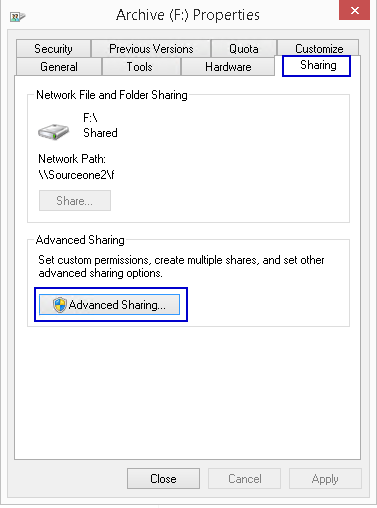
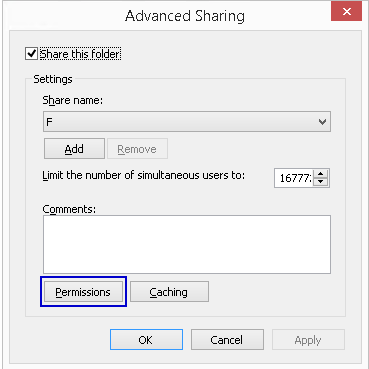
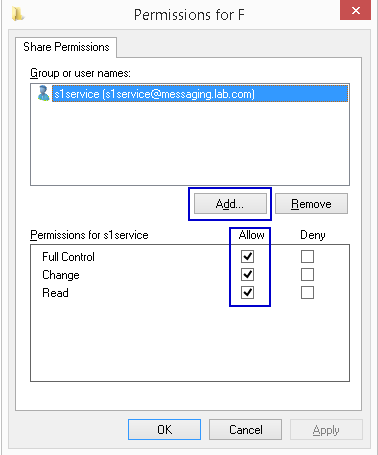
- Access the root share and open the Properties
- Select Sharing tab
- Open Advanced Sharing
- Open Permissions
- Add SourceOne service account with Full Control permissions
Produkty, których dotyczy problem
SourceOneProdukty
SourceOne, SourceOne for File SystemsWłaściwości artykułu
Numer artykułu: 000082343
Typ artykułu: Solution
Ostatnia modyfikacja: 18 kwi 2026
Wersja: 5
Znajdź odpowiedzi na swoje pytania u innych użytkowników produktów Dell
Usługi pomocy technicznej
Sprawdź, czy Twoje urządzenie jest objęte usługą pomocy technicznej.