如何运行 Dell Data Security 卸载程序
Podsumowanie: 了解如何使用 Dell Data Security 卸载程序卸载 Dell Data Security 和 Dell Data Protection 产品。
Ten artykuł dotyczy
Ten artykuł nie dotyczy
Ten artykuł nie jest powiązany z żadnym konkretnym produktem.
Nie wszystkie wersje produktu zostały zidentyfikowane w tym artykule.
Instrukcje
注:
- 受影响的产品中列出的产品可能未处于活动状态。有关产品支持的最新信息,请参阅 Dell Data Security 产品生命周期(结束支持/停售)政策。如果您对其他文章有任何疑问,请联系您的销售团队或联系 endpointsecurity@dell.com。
- 请参阅端点安全性,了解有关当前产品的其他信息。
Dell Data Security 卸载程序为列出的 Windows Dell Data Security(以前称为 Dell Data Protection)影响的产品提供简化的删除方法。
受影响的产品:
- Dell BitLocker Manager
- Dell Data Guardian
- Dell Data Protection | Enterprise Edition
- Dell Data Protection | Personal Edition
- Dell Data Protection | External Media Edition
- Dell Data Protection | Secure Lifecycle
- Dell Data Protection | Cloud Edition
- Dell Data Protection | Endpoint Security Suite Pro
- Dell Data Protection | Server Encryption
- Dell Data Protection | Security Tools
- Dell Encryption Enterprise
- Dell Encryption External Media
- Dell Encryption Personal
- Dell Endpoint Security Suite Enterprise
- Dell Full Disk Encryption
- Dell Threat Defense
受影响的版本:
- v8.0.0 及更高版本
受影响的操作系统:
- Windows
如何运行 Dell Data Security Uninstaller:https://www.dell.com/support/article/sln307791/。
时长:00:02:25 (hh:mm:ss)
如果有的话,可使用此视频播放器上的 CC 图标来选择字幕语言设置。
可以通过用户界面 (UI) 或命令行界面 (CLI) 开关运行 Dell Data Security 卸载程序。Dell Data Security 管理员还可以查看卸载日志记录。单击相应的选项卡以了解更多信息。
有关获取卸载程序的详细信息,请参阅如何下载 Dell Data Security 卸载程序。
UI
- 双击 DataSecurityUninstaller.exe 以启动应用程序。
 注意: DataSecurityUninstaller 需要
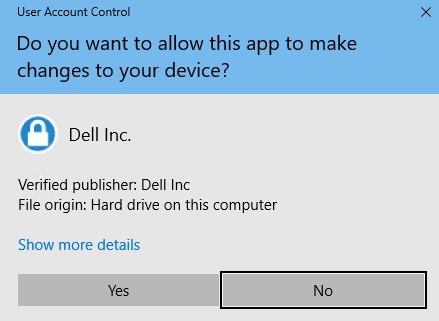
log4net.dllDataSecurityUninstaller 要求 log4net.dll 驻留在相同文件夹中才能成功运行。 - 如果用户帐户控制 (UAC) 已启用,则单击是,以提升到管理权限。否则,请转至步骤 3。
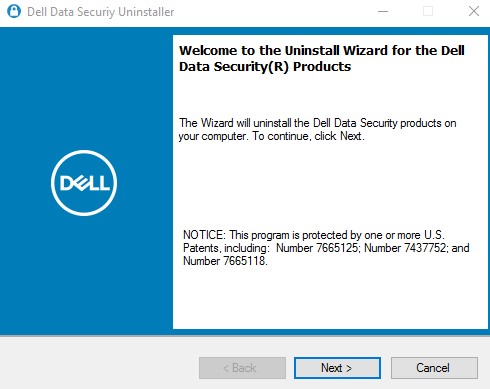
- 在 Dell Data Security 卸载程序用户界面 (UI) 中,单击下一步以继续操作。
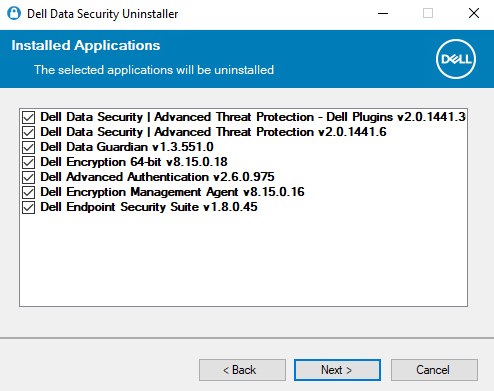
- (可选)清除任何应用程序的删除复选框,然后单击 Next。
 注:
注:- 将自动选择或清除所需的依赖关系。
- 端点上可用的应用程序可能与屏幕截图不同。
- 如果存在 Dell Personal Encryption(以前称为 Dell Data Protection | Personal Edition)或 Dell Enterprise Encryption(以前称为 Dell Data Protection | Enterprise Edition)基于策略的加密,请转至步骤 6。否则,请转至步骤 7。
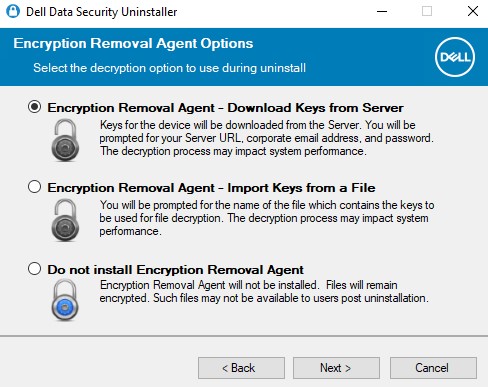
- 在加密代理程序选项 UI 中,选择以下任一项: 单击上面相应的链接,以了解特定的安装步骤。
加密删除代理程序 - 从服务器下载密钥
- 选择 Encryption Removal Agent - Download Keys from Server,然后单击 Next。
- 为列出的设备服务器填写取证管理员的凭据。填写后,单击 Next,并转至步骤 8。
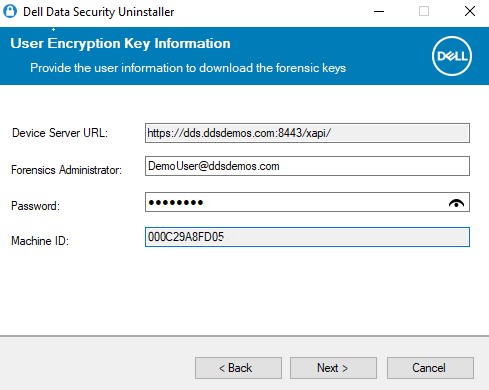 注:
注:- 设备服务器 URL 通过注册表查询提取到 。
HKLM\SYSTEM\CurrentControlSet\Services\CMGShield REG_SZ: ServletURL。 - 机器 ID 通过注册表查询提取到 。
HKLM\SYSTEM\CurrentControlSet\Services\CMGShield REG_SZ: MCID。 - 在您的环境中,Device Server 和 Forensic Administrator 将与上面的屏幕截图有所不同。
- Forensic Administrator 必须以通用主体名称 (UPN) 格式填充。例如,Jane_Doe@Dell.com 使用 UPN 格式。
- 设备服务器 URL 通过注册表查询提取到 。
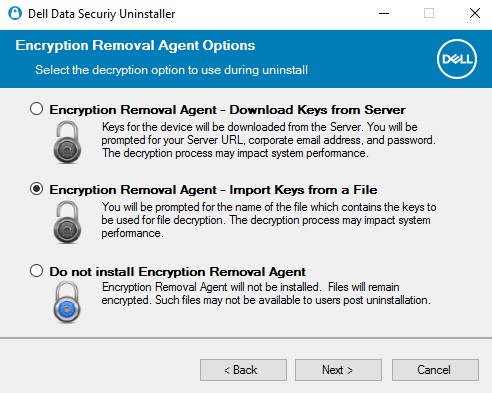
加密删除代理程序 - 从文件导入密钥
- 选择 Encryption Removal Agent - Import Keys from a File,然后单击 Next。
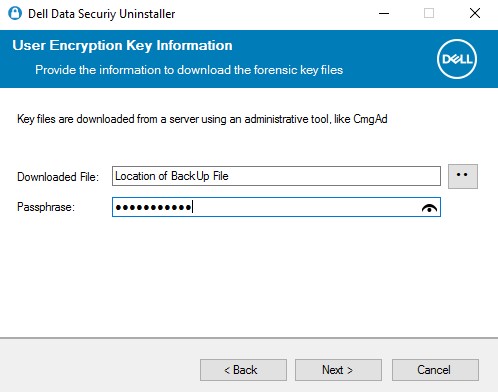
- 浏览至取证下载文件的位置,然后输入该文件的密码。填写后,单击 Next,并转至步骤 8。
不安装加密删除代理程序
- 选择 Do not Install Encryption Removal Agent,单击 Next,然后转至步骤 8。
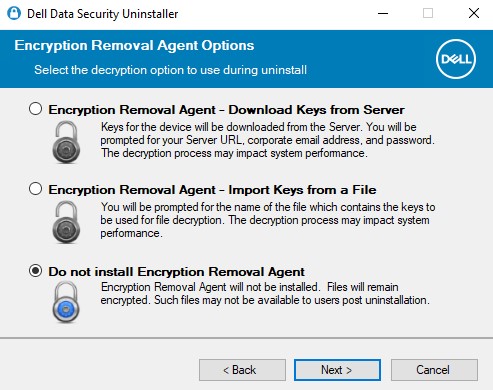 安装加密删除代理程序失败会阻止端点解密。受 SDE 密钥保护的数据仍可用。在安装加密删除代理程序之前,受公用密钥或用户密钥保护的数据在卸载后将无法访问。
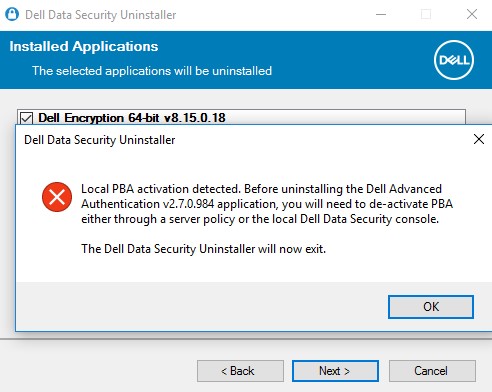
- 如果在端点上配置了自加密驱动器,则必须先将其停用,然后才能删除。单击确定以关闭 Dell Data Security 卸载程序。如果自加密驱动器已停用或未使用,请转至步骤 8。
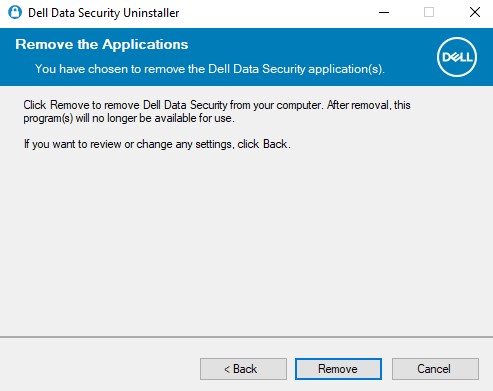
- 单击删除以便卸载步骤 4 中选定的应用程序。
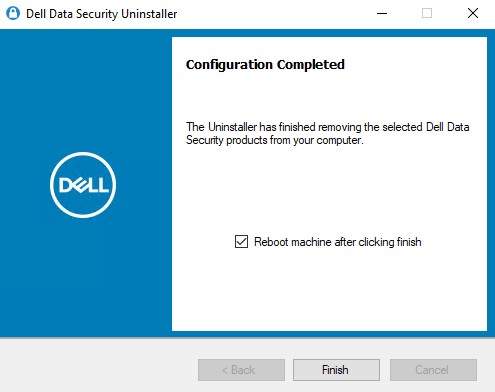
- 完成后,单击完成以重新启动计算机。
 注:
注:- 需要重新启动才能从启动周期中清除已卸载的应用程序。
- 如果任何应用程序卸载失败,则单击 Uninstall Logging 选项卡。
- 单击是以确认您要重新启动计算机。

CLI
Dell Data Security 卸载程序允许通过使用参数和数值灵活地删除命令行。
注:
- 参数区分大小写。
- DataSecurityUninstaller 需要
log4net.dllDataSecurityUninstaller 要求 log4net.dll 驻留在相同文件夹中才能成功运行。 - 设备服务器 URL 通过注册表查询提取到 。
HKLM\SYSTEM\CurrentControlSet\Services\CMGShield REG_SZ: ServletURL。 - 机器 ID 通过注册表查询提取到 。
HKLM\SYSTEM\CurrentControlSet\Services\CMGShield REG_SZ: MCID。
| 参数 | 数值 |
|---|---|
CMG_Decrypt= |
0 0(不安装加密删除代理程序) |
CMG_Decrypt= |
1 1(使用从 Dell Security Management Server 下载的密钥安装加密删除代理程序) |
CMG_Decrypt= |
2 2(使用企业版客户端的取证捆绑包中的密钥安装加密删除代理程序) |
CMG_Decrypt= |
3 3(使用个人版客户端的取证捆绑包中的密钥安装加密删除代理程序) |
FORENSIC_ADMIN= |
Dell Security Management Server 的取证管理员的用户名。如果出现以下情况,则此选项是必需的 CMG_Decrypt 选择值 1。值必须包含在引号 ("") 中。用户名必须以通用主体名称 (UPN) 格式填充。例如,Jane_Doe@Dell.com 使用 UPN 格式。 |
FORENSIC_PWD= |
Dell Security Management Server 的取证管理员的密码。如果出现以下情况,则此选项是必需的 CMG_Decrypt 选择值 1。值必须包含在引号 ("") 中。 |
DA_KM_Path= |
取证捆绑包的位置(如果) CMG_Decrypt 选择值 2(或 3)。数值必须包含在引号内。 |
DA_KM_PW= |
取证捆绑包的密码(如果) CMG_Decrypt 选择值 2(或 3)。数值必须包含在引号内。 |
/silent |
在无对话框的情况下运行 DataSecurityUninstaller。 CMG_Decrypt 如果未定义任何变量,则默认情况下将设置 CMG_Decrypt 值 3。此参数必须小写。 |
NOREBOOT |
在卸载后禁止重新启动。没有使用 NOREBOOT 标记所需的开关或修饰符。 NOREBOOT 标志 |
LOGFILE_PATH= |
为卸载日志设置文件路径的可选参数。如果未选择此选项,则将使用“Uninstall Logging”选项卡下列出的默认位置。值必须包含在引号 ("") 中。 |
LOGFILE_Name= |
在定义 LOGFILE_PATH 的情况下,用于设置卸载日志的名称。 LOGFILE_PATH 定义。值必须包含在引号 ("") 中。 |
CLI 卸载示例:
示例 1
以下示例在不使用 UI 的情况下运行 DataSecurityUninstaller,并使用取证管理员 (ExampleUser) 直接从 Dell Security Management Server 下载加密密钥。卸载后,将抑制重新启动要求。
卸载命令行示例:
DataSecurityUninstaller.exe CMG_DECRYPT=1 FORENSIC_ADMIN="ExampleUser" FORENSIC_PWD="Passw0rd" NOREBOOT /silent
示例 2
以下示例在没有 UI 的情况下运行 DataSecurityUninstaller,并使用通过 CMGAd 下载的 Dell Security Management Server 预下载的加密密钥。CMGAd 是 Dell Encryption Admin Utilities 中的实用程序,可在 Dell Encryption 上找到。卸载后,将抑制重新启动要求。
卸载命令行示例:
DataSecurityUninstaller.exe CMG_DECRYPT=2 DA_KM_PATH="C:\Dell\KeyBundle\DeviceName.Domain.com" DA_KM_PW="Passw0rd" NOREBOOT /silent
日志记录
默认情况下,Dell Data Security 卸载程序将卸载日志输出到 C:\ProgramData\Dell\Dell Data Protection)。为选择要删除的每个应用程序生成卸载日志。
DDP_AdvancedThreatProtection_Plugins_Uninstall_MSI.logDDP_AdvancedThreatProtection_Plugins_Uninstall_MSI.log - 包含有关卸载用于从高级威胁保护代理程序与 Dell Client Security Framework 通信的戴尔插件的信息。DDP_AdvancedThreatProtection_Uninstall_MSI.logDDP_AdvancedThreatProtection_Uninstall_MSI.log - 包含有关高级威胁保护代理程序卸载的信息。DDP_Authentication_Uninstall_MSI.logDDP_Authentication_Uninstall_MSI.log - 包含有关卸载高级身份验证组件的信息。DDP_ClientSecurityFramework_Uninstall_MSI.logDDP_ClientSecurityFramework_Uninstall_MSI.log - 包含有关删除 Dell Client Security Framework(加密管理代理程序)的信息。DDP_Data_Guardian_Uninstall_MSI.logDDP_Data_Guardian_Uninstall_MSI.log - 包含有关删除 Dell Data Guardian 的信息。DDP_Encryption_Uninstall_MSI.logDDP_Encryption_Uninstall_MSI.log - 包含有关删除戴尔基于策略的加密应用程序的信息。DDP_ESSE_Uninstall.logDDP_ESSE_Uninstall.log - 包含有关删除套件安装程序(如果已利用的话)的信息。DDP_ESSE_Uninstall_MSI.logDDP_ESSE_Uninstall.log - 包含有关删除套件安装程序(如果已利用的话)的信息。DDPUninstall_Main.logDDPUninstall_Main.log - 包含有关尝试利用 DDS 卸载程序的卸载的所有信息。DDP_McAfee_Endpoint_Security_Firewall_Uninstall_MSI.logDDP_McAfee_Endpoint_Security_Firewall_Uninstall_MSI.log - 包含有关为 Dell Endpoint Security Suite Pro 和 Endpoint Security Suite Enterprise 卸载防火墙组件的信息。DDP_McAfee_Endpoint_Security_Security_Platform_Uninstall_MSI.logDDP_McAfee_Endpoint_Security_Security_Platform_Uninstall_MSI.log - 包含有关为 Dell Endpoint Security Suite Pro 和 Endpoint Security Suite Enterprise 卸载基本 McAfee 组件的信息。DDP_McAfee_Endpoint_Security_Web_Control_Uninstall_MSI.logDDP_McAfee_Endpoint_Security_Web_Control_Uninstall_MSI.log - 包含有关为 Dell Endpoint Security Suite Pro 和 Endpoint Security Suite Enterprise 卸载 Web 控制组件的信息。DDP_ThreatProtection_Uninstall_MSI.logDDP_ThreatProtection_Uninstall_MSI.log - 包含有关在 Dell Endpoint Security Suite Pro 和 Endpoint Security Suite Enterprise 的 McAfee 以及 Dell 的客户端安全框架之间卸载插件的信息。
Dodatkowe informacje
Filmy
Produkty, których dotyczy problem
Dell Data Guardian, Dell Encryption, Dell Security Tools, Dell Threat Defense, Dell Endpoint Security Suite EnterpriseWłaściwości artykułu
Numer artykułu: 000125052
Typ artykułu: How To
Ostatnia modyfikacja: 06 sie 2026
Wersja: 22
Znajdź odpowiedzi na swoje pytania u innych użytkowników produktów Dell
Usługi pomocy technicznej
Sprawdź, czy Twoje urządzenie jest objęte usługą pomocy technicznej.