Latitude 5501: Guia de funções do teclado
Podsumowanie: Este guia lista os atalhos de teclado disponíveis e suas respectivas funções no notebook Dell Latitude 5501.
Ten artykuł dotyczy
Ten artykuł nie dotyczy
Ten artykuł nie jest powiązany z żadnym konkretnym produktem.
Nie wszystkie wersje produktu zostały zidentyfikowane w tym artykule.
Objawy
O guia a seguir lista os atalhos de teclado disponíveis e suas respectivas funções no notebook Dell Latitude 5501.
Funções das teclas de atalhos de teclado
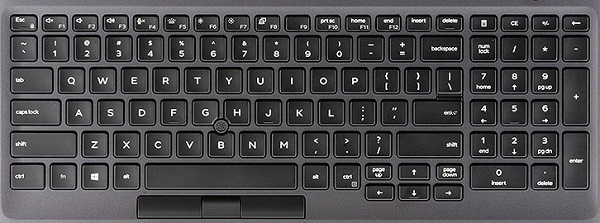
A tabela abaixo é uma lista das funções das teclas de atalho de combinação disponíveis no notebook Latitude 5501.
Przyczyna
| Combinação de teclas de função | Resultado |
|---|---|
| Fn + Esc | Alternância da tecla Fn |
| Fn + F1 | Silenciar o áudio |
| Fn + F2 | Diminuir volume |
| Fn + F3 | Aumentar volume |
| Fn + F4 | Silenciar o microfone |
| Fn + F5 | Alternar a luz de fundo do
teclado (peça opcional, necessidades adquiridas com o sistema no ponto de pedido) |
| Fn + F6 | Diminuir luminosidade |
| Fn + F7 | Aumentar luminosidade |
| Fn + F8 | Alternar tela (Win + P) |
| Fn + F10 | PrtScr |
| Fn + F11 | Home |
| Fn + F12 | End(Sair) |
| Fn + B | Pausa/interrupção |
| Fn + R | Solicitação do sistema |
| Fn + Ctrl | Abrir o menu de aplicativos |
Rozwiązanie
 Acesse a nossa base de conhecimento sobre teclado para obter mais recursos e informações.
 Para obter mais artigos e informações visite a nossa página de suporte do touchpad.
 Mais artigos e informações também podem ser encontrados em nossa página de suporte do mouse.
Produkty, których dotyczy problem
Latitude 5501Właściwości artykułu
Numer artykułu: 000135584
Typ artykułu: Solution
Ostatnia modyfikacja: 30 kwi 2026
Wersja: 5
Znajdź odpowiedzi na swoje pytania u innych użytkowników produktów Dell
Usługi pomocy technicznej
Sprawdź, czy Twoje urządzenie jest objęte usługą pomocy technicznej.