Avamar - FLR target guest login fails with VirtualMachine Interface is NULL assist_restore error. ret: 157. LoginGuest Failed. Ret: 67108908
Podsumowanie: Avamar - FLR fails: VirtualMachine Interface is NULL assist_restore error. ret: 157. LoginGuest Failed. Ret: 67108908, Reason: Failed to get a property on the Virtual Machine object ...
Ten artykuł dotyczy
Ten artykuł nie dotyczy
Ten artykuł nie jest powiązany z żadnym konkretnym produktem.
Nie wszystkie wersje produktu zostały zidentyfikowane w tym artykule.
Objawy
FLR fails: VirtualMachine Interface is NULL assist_restore error. ret: 157.
LoginGuest Failed. Ret: 67108908, Reason: Failed to get a property on the Virtual Machine object
On the proxy the following log can be see in: /usr/local/avamarclient/bin/logs/vSphereWebservices.log
LoginGuest Failed. Ret: 67108908, Reason: Failed to get a property on the Virtual Machine object
On the proxy the following log can be see in: /usr/local/avamarclient/bin/logs/vSphereWebservices.log
[VWS - DEBUG] 2022/05/23 19:40:28 TID=1914 MID=7514145: Parameter =  guest.guestId
...
[VWS - ERROR] 2022/04/25 18:34:24 TID=16205 MID=4721173: ReadVmVariable Failed
[VWS - FUNC] 2022/04/25 18:34:24 TID=16205 MID=4721174: VirtualMachineWs::ReadVmVariable LEAVE
[VWS - ERROR] 2022/04/25 18:34:24 TID=16205 MID=4721175: ReadVariable Failed
[VWS - FUNC] 2022/04/25 18:34:24 TID=16205 MID=4721176: VirtualMachineWs::ReadVariable LEAVE
[VWS - DEBUG] 2022/04/25 18:34:24 TID=16205 MID=4721177: ReadVariable Error. Ret: 67108908
[VWS - FUNC] 2022/04/25 18:34:24 TID=16205 MID=4721178: VirtualMachineWs::DetermineOS LEAVE
[VWS - ERROR] 2022/04/25 18:34:24 TID=16205 MID=4721179: IsWindowsVm Failed: 67108908
...
[VWS - DEBUG] 2022/04/25 18:34:24 TID=140320876543821 MID=4721188: VirtualMachine->LoginGuest Failed. Ret: 67108908, Reason: Failed to get a property on the Virtual Machine object
Przyczyna
The Target Virtual Machine configuration file (.VMX) has the following entry:
isolation.tools.setinfo.disable = "TRUE"
This optional security settings will prevent the informational messages from being sent to ESXi. When this feature is true the vm ip address, hostname will not be visible in vSphere client despite vm tools showing running with a vaild tool version .
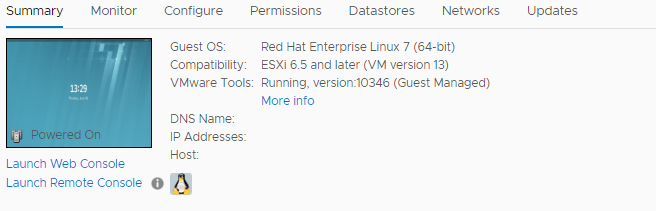
For more info see this page:
The VMware Tools setinfo variable is enabled for virtual machines. (stigviewer.com)
With this security setting the Avamar FLR code will not be able to read the varibile guestOS family. Additionally for faster FLR performance FLR code needs to obtain the VM Guest IP address which will be impossible with this security feature enabled.
isolation.tools.setinfo.disable = "TRUE"
This optional security settings will prevent the informational messages from being sent to ESXi. When this feature is true the vm ip address, hostname will not be visible in vSphere client despite vm tools showing running with a vaild tool version .
For more info see this page:
The VMware Tools setinfo variable is enabled for virtual machines. (stigviewer.com)
With this security setting the Avamar FLR code will not be able to read the varibile guestOS family. Additionally for faster FLR performance FLR code needs to obtain the VM Guest IP address which will be impossible with this security feature enabled.
Rozwiązanie
To confirm the entry exists in the target VM .VMX:
1. Login to VirtualCenter with the VI Client and select a virtual machine from the inventory panel.
The configuration page for the virtual machine appears with the Summary tab displayed.
3. Click Options > Advanced > Configuration Parameters to open the Configuration Parameters dialog box.
4. The result should appear as follows:
isolation.tools.setinfo.disable true
5. Change the "isolation.tools.setinfo.disable" = from true to false.
6. Reload or vmotion the VM so the change takes effect.
7. Do the FLR again.
Workaround:
Perform an FLR using a different target virtual machine that does NOT have the same optional security setting.
1. Login to VirtualCenter with the VI Client and select a virtual machine from the inventory panel.
The configuration page for the virtual machine appears with the Summary tab displayed.
3. Click Options > Advanced > Configuration Parameters to open the Configuration Parameters dialog box.
4. The result should appear as follows:
isolation.tools.setinfo.disable true
5. Change the "isolation.tools.setinfo.disable" = from true to false.
6. Reload or vmotion the VM so the change takes effect.
7. Do the FLR again.
Workaround:
Perform an FLR using a different target virtual machine that does NOT have the same optional security setting.
Produkty, których dotyczy problem
Data Backup & Protection Software, AvamarWłaściwości artykułu
Numer artykułu: 000199988
Typ artykułu: Solution
Ostatnia modyfikacja: 14 maj 2026
Wersja: 7
Znajdź odpowiedzi na swoje pytania u innych użytkowników produktów Dell
Usługi pomocy technicznej
Sprawdź, czy Twoje urządzenie jest objęte usługą pomocy technicznej.