PowerStore: Create clone of NAS server failing with error "The maximum number of file system has been reached. (0xE080100D0029)"
Podsumowanie: Create clone of NAS server may fail with error "The maximum number of file system has been reached. (0xE080100D0029)" even though limit is not reached. This article provides a workaround to create the NAS server. ...
Ten artykuł dotyczy
Ten artykuł nie dotyczy
Ten artykuł nie jest powiązany z żadnym konkretnym produktem.
Nie wszystkie wersje produktu zostały zidentyfikowane w tym artykule.
Objawy
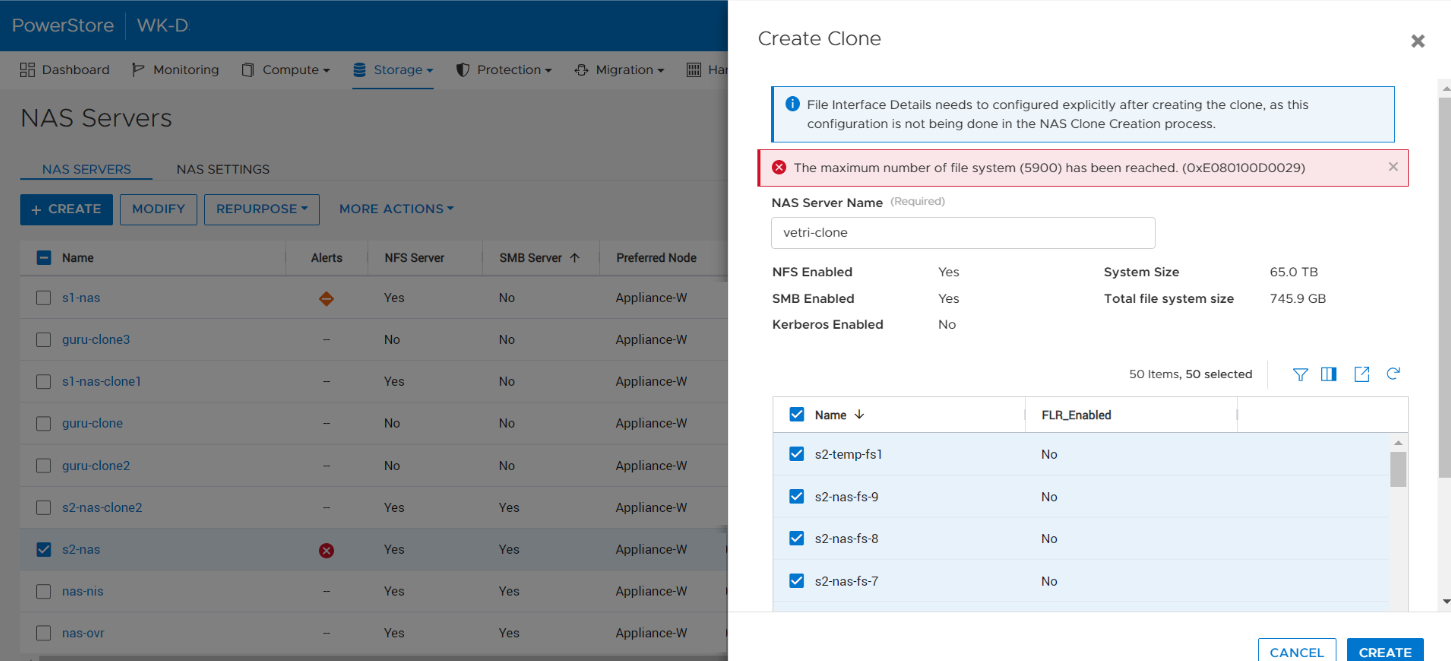
When a user tries to create the clone of a NAS server by selecting all the file systems within the PowerStore Manager NAS server or without specifying file_systems parameter (REST), the operation fails with the error The maximum number of file system (<file system limit value>) has been reached. (0xE080100D0029), even if the number of file systems in the appliance has not reached the limits.
Przyczyna
This issue occurs in certain situations where the source NAS server has a lot of snapshots created on the file systems and they are counted in the limit calculation.
Rozwiązanie
This issue is planned to be addressed in a future release of PowerStore.
In the meantime, use the following workarounds:
- Remove the unwanted snapshots from the NAS server reducing the overall count of snapshots within the NAS server.
- Select a subset of file systems within the NAS server while cloning the NAS server in the PowerStore UI.
- Explicitly specify the required file systems to be cloned with the NAS server in REST call.
Produkty, których dotyczy problem
PowerStoreWłaściwości artykułu
Numer artykułu: 000210996
Typ artykułu: Solution
Ostatnia modyfikacja: 13 cze 2025
Wersja: 5
Znajdź odpowiedzi na swoje pytania u innych użytkowników produktów Dell
Usługi pomocy technicznej
Sprawdź, czy Twoje urządzenie jest objęte usługą pomocy technicznej.