Wirtualizacja OpenShift: Nie udało się wykonać migawki maszyny wirtualnej z interfejsu użytkownika wirtualizacji OpenShift.
Podsumowanie: Wykonanie migawki maszyny wirtualnej za pośrednictwem interfejsu użytkownika wirtualizacji OpenShift kończy się niepowodzeniem, jeśli na maszynie wirtualnej w klastrze OCP jest uruchomiona operacja we/wy. ...
Ten artykuł dotyczy
Ten artykuł nie dotyczy
Ten artykuł nie jest powiązany z żadnym konkretnym produktem.
Nie wszystkie wersje produktu zostały zidentyfikowane w tym artykule.
Objawy
Wykonanie migawki maszyny wirtualnej za pośrednictwem interfejsu użytkownika wirtualizacji OpenShift nie powiodło się.
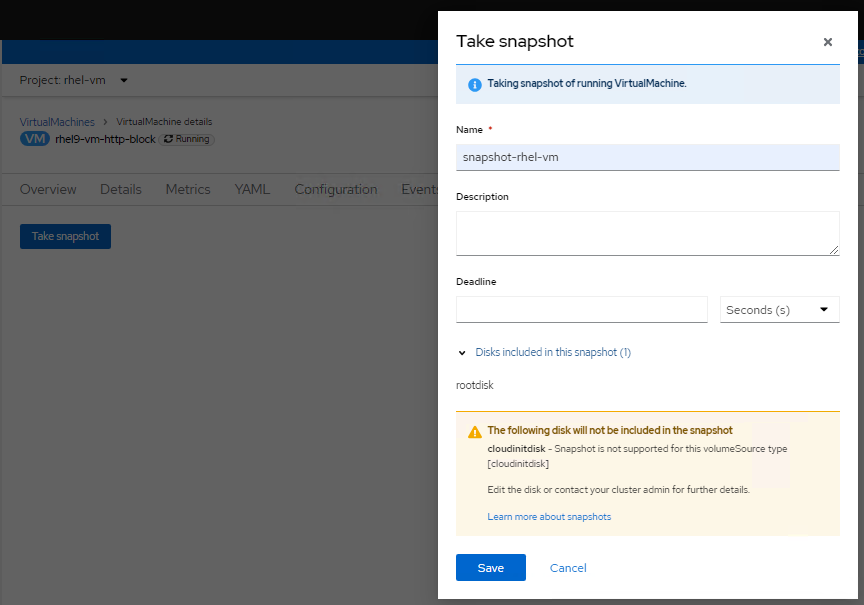
Sprawdzając dzienniki zasobnika virt-handler (przestrzeń nazw openshift-cnv), pokazuje błędy podobne do poniższych:
Sprawdzając dzienniki zasobnika virt-handler (przestrzeń nazw openshift-cnv), pokazuje błędy podobne do poniższych:
2023-08-14T02:23:33.722372232Z {"component":"virt-handler","kind":"","level":"error","msg":"Nie udało się zamrozić VMI","name":"rhel9-vm-http-block",
"namespace":"rhel-vm","pos":"lifecycle.go:124","reason":"błąd serwera.
Polecenie Zamrożenie nie powiodło się: \"LibvirtError(Code=1, Domain=10, Message='internal error: unable to execute QEMU agent command 'guest-fsfreeze-freeze':
failed to open /zoner/sda: failed to open /zoner/sda: Odmowa uprawnień')\"","timestamp":"2023-08-14T02:23:33.722321Z","uid":"c6894dc7-f29c-43e7-9817-3b12643040d1"}
"namespace":"rhel-vm","pos":"lifecycle.go:124","reason":"błąd serwera.
Polecenie Zamrożenie nie powiodło się: \"LibvirtError(Code=1, Domain=10, Message='internal error: unable to execute QEMU agent command 'guest-fsfreeze-freeze':
failed to open /zoner/sda: failed to open /zoner/sda: Odmowa uprawnień')\"","timestamp":"2023-08-14T02:23:33.722321Z","uid":"c6894dc7-f29c-43e7-9817-3b12643040d1"}
Przyczyna
W przypadku tworzenia maszyny wirtualnej za pomocą usługi OpenShift Virtualization punkt montowania z utworzonej jednostki LUN nie jest oznaczony jako zaufany. Tak więc podczas procesu migawki maszyny wirtualnej agent QEMU nie może otworzyć punktu montowania (w tej bazie wiedzy punktem montowania jest /zoner/sda) i otrzymuje odmowę uprawnień podczas próby wykonania fsfreeze.
Rozwiązanie
Poniższe kroki rozwiązania zakładają, że punktem montowania jest "/zoner/sda".
Użyj polecenia "df -h" i sprawdź w dziennikach błędów, aby potwierdzić rzeczywisty punkt montowania raportowania błędów maszyny wirtualnej.
1. Potwierdź, że kontekst SELinux punktu montowania wyświetla "unlabeled_t", używając poniższego polecenia:
# ls -lZd /zoner/sda/
2. Jeśli pojawi się komunikat "unlabeled_t", istnieją dwie opcje rozwiązania problemu.
- Opcja 1: Aby umożliwić agentowi QEMU odczytywanie plików bez etykiet.
# setsebool -P virt_qemu_ga_read_nonsecurity_files 1
- Opcja 2: Aby oznaczyć punkt montowania.
# restorecon -v /zoner/sda/
Produkty, których dotyczy problem
APEX Cloud Platform for Red Hat OpenShiftWłaściwości artykułu
Numer artykułu: 000217270
Typ artykułu: Solution
Ostatnia modyfikacja: 18 wrz 2026
Wersja: 4
Znajdź odpowiedzi na swoje pytania u innych użytkowników produktów Dell
Usługi pomocy technicznej
Sprawdź, czy Twoje urządzenie jest objęte usługą pomocy technicznej.