Openshift: Some hardware information is missing on the Red Hat Web Console Node Details view page
Podsumowanie: Add worker nodes via Dell APEX Cloud Platform node addition function, the newly added nodes hardware information is missing on the Red Hat Web Console Node Details view page.
Ten artykuł dotyczy
Ten artykuł nie dotyczy
Ten artykuł nie jest powiązany z żadnym konkretnym produktem.
Nie wszystkie wersje produktu zostały zidentyfikowane w tym artykule.
Objawy
Login to Red Hat OpenShift web console, navigate to Compute menu clicks the Nodes item, select one of the listed worker nodes.
On the Node detail view page, the information for CPU, Disks and NICs are missing and shows 0 CPUs, 0 Disks and 0 NICs.
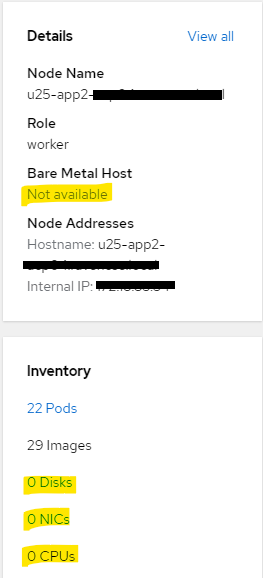
On the Node detail view page, the information for CPU, Disks and NICs are missing and shows 0 CPUs, 0 Disks and 0 NICs.
Przyczyna
In order to enforce the security in customer's environment, accessing to iDRAC network from management network is not allowed in current release of Dell APEX Cloud Platform for Redhat Openshift.
So after adding a worker node via Dell APEX Cloud Platform node addition function, the newly added node management network will not have permission to access the node iDRAC network and causes hardware information missing on the node view page.
This issue only impacts worker node that is added via Dell APEX Cloud Platform node addition function.
Control plane node is not impacted.
This issue will be fixed in future release of Dell APEX Cloud Platform for Redhat Openshift.
So after adding a worker node via Dell APEX Cloud Platform node addition function, the newly added node management network will not have permission to access the node iDRAC network and causes hardware information missing on the node view page.
This issue only impacts worker node that is added via Dell APEX Cloud Platform node addition function.
Control plane node is not impacted.
This issue will be fixed in future release of Dell APEX Cloud Platform for Redhat Openshift.
Rozwiązanie
For the missing hardware information, user can navigate to Inventory view of the Dell APEX Cloud Platform web console plugin, the CPU numbers can be found from node details view, the NIC details can be found from the back view of the node. Currently the disks are not displayed on Inventory view for Compute Cluster Nodes.
Produkty, których dotyczy problem
APEX Cloud Platform for Red Hat OpenShiftWłaściwości artykułu
Numer artykułu: 000217296
Typ artykułu: Solution
Ostatnia modyfikacja: 19 lut 2026
Wersja: 4
Znajdź odpowiedzi na swoje pytania u innych użytkowników produktów Dell
Usługi pomocy technicznej
Sprawdź, czy Twoje urządzenie jest objęte usługą pomocy technicznej.