Avamar: Manage SSH connection timeout
Podsumowanie: This article shows how to manage the Avamar SSH timeout.
Ten artykuł dotyczy
Ten artykuł nie dotyczy
Ten artykuł nie jest powiązany z żadnym konkretnym produktem.
Nie wszystkie wersje produktu zostały zidentyfikowane w tym artykule.
Instrukcje
WARNING: Changing the timeout configuration on Avamar is not recommended as it will not meet STIG compliance and leave sessions active longer.
In Avamar version 19.3 and later, the default configuration for Avamar SSH timeout is to be STIG-compliant.
There are three pieces to configuring an SSH timeout.
- SSH Daemon (SSHD) configuration
- Bash profile timeout environment variable
- SSH Client keep-alive configuration
SSHD Configuration
The Secure Shell Daemon application (SSH daemon or sshd) is the daemon program for ssh.
The following two options in the SSHD configuration file can be used to manage the ssh timeout.
ClientAliveInterval
ClientAliveCountMax
The default values used for Avamar are STIG compliant as part of Avamar hardening are below:
ClientAliveInterval 600
ClientAliveCountMax 1
This means, every ten minutes SSHD sends a request to the SSH client to provide any sort of keep-alive.
Since the "ClientAliveCountMax" is set to one, there is only one chance for the client to respond before SSHD terminates the ssh connection with a timeout.
To change this behavior, follow the steps below.
Edit the SSHD configuration file as root user:
/etc/ssh/sshd_config
Change the values as an example below:
ClientAliveInterval 7200
ClientAliveCountMax 4
With the example above, this means that every two hours, SSHD sends a request to the SSH client to provide any sort of keep-alive. Since the "ClientAliveCountMax" is set to four, the client has four chances to respond before SSHD terminates the connection.
Save the SSHD configuration file.
Test the configuration before restarting the service.
sshd -t
If there are no issues returned, restart the service.
service sshd restart
Bash Profile Timeout
Avamar sets the "TMOUT" environment variable in the bash profile used by both admin and root users.
This timeout is applied to the shell itself, separate from SSHD.
This is set in the following file:
/etc/profile
The variable is set to default below towards the bottom of the file:
TMOUT=900
The default value of 900 is in seconds, which is 15 minutes.
To change this behavior, edit the timeout variable:
TMOUT=7200
Save the bash profile file.
After changing the bash profile file, in order for the change to take effect, restart the ssh session.
SSH Client Keep-Alive Configuration
There are many different SSH clients that can be used.
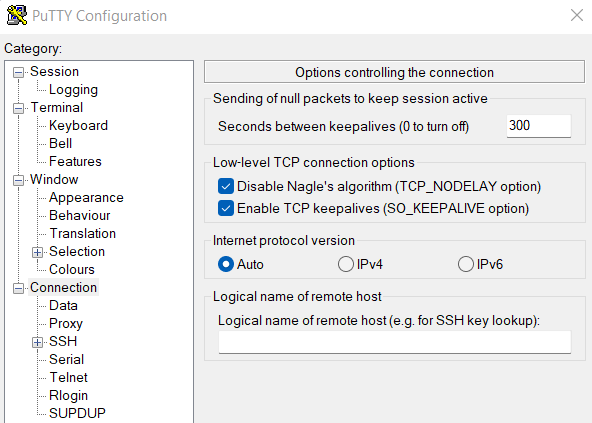
The following example is taken from PuTTY.
The SSH client can be configured to send ssh keep-alive packets to keep the connection open and satisfy the "ClientAlive*" options applied in the SSHD configuration file.
Set the seconds between keepalives, meaning every 300 seconds PuTTY sends an ssh keepalive packet to the server.
Also, select the checkbox to enable TCP keepalives in general.
Produkty, których dotyczy problem
AvamarWłaściwości artykułu
Numer artykułu: 000223301
Typ artykułu: How To
Ostatnia modyfikacja: 08 sty 2026
Wersja: 4
Znajdź odpowiedzi na swoje pytania u innych użytkowników produktów Dell
Usługi pomocy technicznej
Sprawdź, czy Twoje urządzenie jest objęte usługą pomocy technicznej.