PowerEdge: UEFI Error in POST, HWC8010 or HWC8011
Podsumowanie: HWC8010 or HWC8011 UEFI errors in POST for iDRAC Hardware Configuration Validation typically occur due to firmware updates or the addition or removal of hardware components. Review system logs and investigate any recent changes before applying this solution. ...
Ten artykuł dotyczy
Ten artykuł nie dotyczy
Ten artykuł nie jest powiązany z żadnym konkretnym produktem.
Nie wszystkie wersje produktu zostały zidentyfikowane w tym artykule.
Objawy
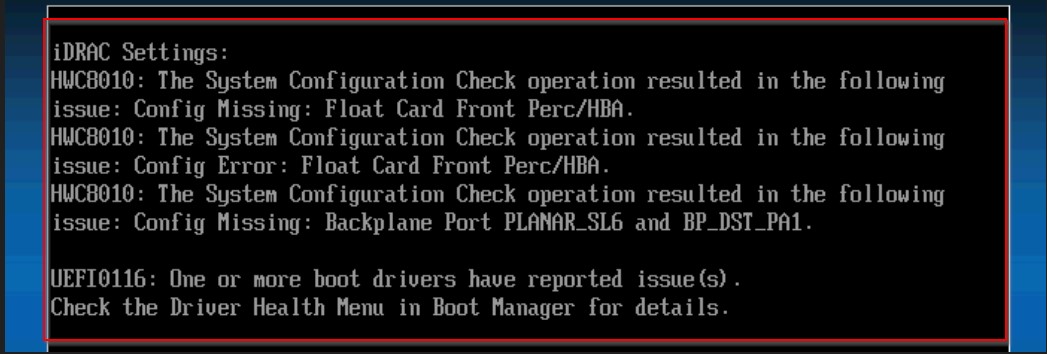
- HWC8010 or HWC8011 UEFI errors appear during POST, related to iDRAC Hardware Configuration Validation.
- The system is unable to boot and displays the HWC8010 error code.
- The error occurs after a firmware update or after adding or removing hardware components.
- The error persists after rebooting the system.
Przyczyna
- Changes in the system's hardware or firmware configuration primarily cause the HWC8010 or HWC8011 UEFI error.
- External factors such as environmental conditions or user actions can also contribute. For example, an interrupted firmware update or unauthorized hardware modifications can trigger the error.
- Related HWC8010 or HWC8011 entries are recorded in the system event log and can help identify the cause.
- The error frequently results from a firmware update alone, with no hardware changes made to the system.
Rozwiązanie
- Review the system logs to identify any recent firmware updates, hardware changes, or chassis openings.
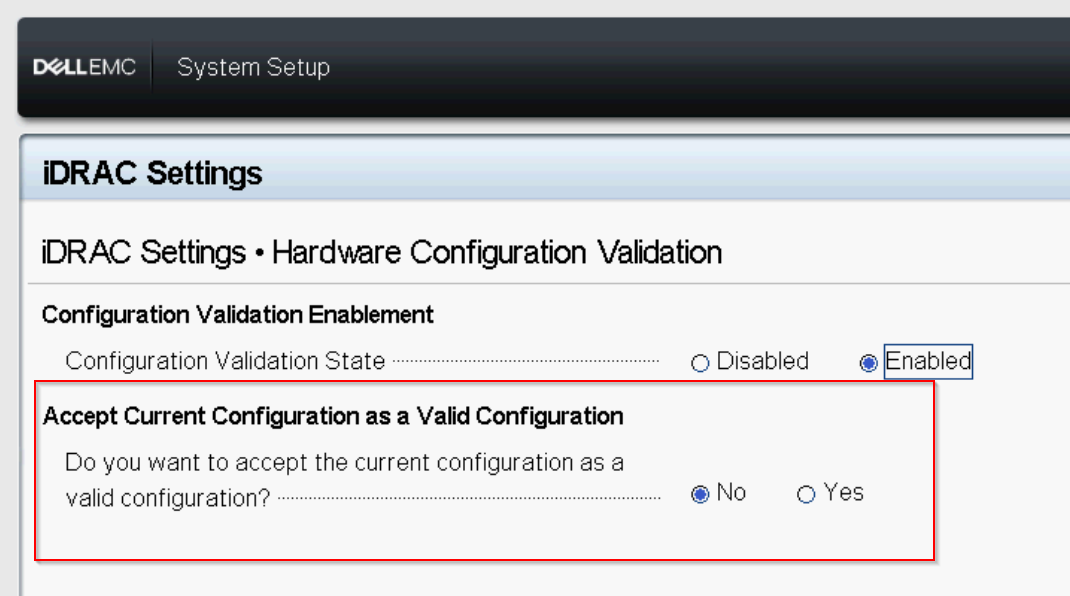
- If a firmware update was initiated prior to the error, reboot to F2 > iDRAC Settings > Hardware Configuration Validation and change the option to Yes to accept the current configuration as valid, select Save and Exit.
- If the issue persists, contact Dell Support for further assistance.
UEFI Error HWC8010 or HWC8011 on POST
Duration: 0:43 (hh:mm:ss)
When available, closed caption (subtitles) language settings can be chosen using the CC icon on this video player.
Produkty, których dotyczy problem
iDRAC9, Events and Error Codes, iDRAC9 - 6.xx Series, iDRAC9 - 7.xx Series, PowerEdge XR2, Poweredge C4140, PowerEdge C6420, PowerEdge C6520, PowerEdge C6525, PowerEdge C6615, PowerEdge C6620, PowerEdge FC640, PowerEdge M640
, PowerEdge M640 (for PE VRTX), PowerEdge MX750c, PowerEdge MX760c, PowerEdge R450, PowerEdge R550, PowerEdge R650, PowerEdge R650xs, PowerEdge R6515, PowerEdge R6525, PowerEdge R660, PowerEdge R660xs, PowerEdge R6615, PowerEdge R6625, PowerEdge R740, PowerEdge R740XD, PowerEdge R740XD2, PowerEdge R7415, PowerEdge R7425, PowerEdge R750, PowerEdge R750XA, PowerEdge R750xs, PowerEdge R7515, PowerEdge R7525, PowerEdge R760, PowerEdge R760XA, PowerEdge R760xd2, PowerEdge R760xs, PowerEdge R7615, PowerEdge R7625, PowerEdge R840, PowerEdge R860, PowerEdge R940, PowerEdge R940xa, PowerEdge R960, PowerEdge T150, PowerEdge T340, PowerEdge T350, PowerEdge T360, PowerEdge T440, PowerEdge T550, PowerEdge T560, PowerEdge T640, PowerEdge XR11, PowerEdge XR12, PowerEdge XR4510c, PowerEdge XR4520c, PowerEdge XR5610, PowerEdge XR7620, PowerEdge XR8610t, PowerEdge XR8620t
...
Właściwości artykułu
Numer artykułu: 000228171
Typ artykułu: Solution
Ostatnia modyfikacja: 27 sie 2026
Wersja: 8
Znajdź odpowiedzi na swoje pytania u innych użytkowników produktów Dell
Usługi pomocy technicznej
Sprawdź, czy Twoje urządzenie jest objęte usługą pomocy technicznej.