Installera Dell Client Device Manager
Podsumowanie: Den här artikeln innehåller information om hur du installerar Dell Client Device Manager (DCDM).
Ten artykuł dotyczy
Ten artykuł nie dotyczy
Ten artykuł nie jest powiązany z żadnym konkretnym produktem.
Nie wszystkie wersje produktu zostały zidentyfikowane w tym artykule.
Instrukcje
Berörda produkter:
- Dells enhetshanterare för klienter
- Ladda ner och packa upp:
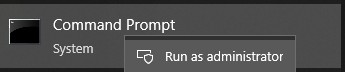
- Kör kommandotolken som administratör.
- Ändra katalog (cd) till den plats där DCDM packades upp.

- Kör PowerShell script med hjälp av parametrarna eller exemplen nedan baserat på dina behov
powershell.exe -executionpolicy Bypass -windowstyle hidden -noninteractive -nologo -file "dcdm_deployment.ps1" -action -modules

| Parameter | Beskrivning |
|---|---|
| -Hjälp | Valfritt: Visar en beskrivning av parametrar |
| -handling | Obligatoriskt Anger vilken åtgärd som ska utföras (installera eller avinstallera) |
| -Modules | Valfritt: Anger vilka moduler som ska ingå. Standard (DCDMCS, DCDMU, DCDMS) |
| -logsökväg | Valfritt: Standardvärdet är C:ProgramData\Dell\ClientDeviceManager. Anger sökvägen för loggfiler |
| -utförlig | Valfritt: Aktiverar loggvisning i konsolen (sant eller falskt) |
| -debuglevel | Optional Standard är all. Anger nivån på felsökningsinformationen |
| -telemetryconsent | Optional Standard är true. Anger telemetrimedgivande |
| Modul | Beskrivning | Modulen beror på |
|---|---|---|
| DCDMCS | Dell Client Device Manager Core Services (tidigare känd som Dell Core Service (DCS)) | N/A kärnkomponent krävs |
| DCDMS | Dell Client Device Manager Security (tidigare känt som Dell Trusted Device (DTD)) | DCDMCS |
| DCDMU (på engelska) | Dell Client Device Manager Update (tidigare kallad Dell Command Update (DCU)) | DCDMCS, DCDMS |
Exempel:
Installera eller uppdatera alla moduler och skicka telemetri för DCDMU
powershell.exe -executionpolicy Bypass -windowstyle hidden -noninteractive -nologo -file "dcdm_deployment.ps1" -action "install"
Installera eller uppdatera alla moduler utan telemetri
powershell.exe -executionpolicy Bypass -windowstyle hidden -noninteractive -nologo -file "dcdm_deployment.ps1" -action "install" -telemetryconsent "false"
Installera eller uppdatera Dell Client Device Manager | Säkerhet (DCDMS)
powershell.exe -executionpolicy Bypass -windowstyle hidden -noninteractive -nologo -file "dcdm_deployment.ps1" -action "install" -modules "DCDMS"
Avinstallera Dell Client Device Manager | Säkerhet (DCDMS)
powershell.exe -executionpolicy Bypass -windowstyle hidden -noninteractive -nologo -file "dcdm_deployment.ps1" -action "uninstall" -modules "DCDMS"
Avinstallera alla moduler
powershell.exe -executionpolicy Bypass -windowstyle hidden -noninteractive -nologo -file "dcdm_deployment.ps1" -action "uninstall"
Produkty, których dotyczy problem
Dell Client Device ManagerWłaściwości artykułu
Numer artykułu: 000299185
Typ artykułu: How To
Ostatnia modyfikacja: 22 maj 2026
Wersja: 3
Znajdź odpowiedzi na swoje pytania u innych użytkowników produktów Dell
Usługi pomocy technicznej
Sprawdź, czy Twoje urządzenie jest objęte usługą pomocy technicznej.