Alienware Command Center Automatically Installs on a Non-Alienware Computer
Podsumowanie: The following article provides information about the Alienware Command Center (AWCC) installation process once an Alienware peripheral is installed on a Non-Alienware device.
Instrukcje
Alienware Command Center application automatic installation
This article covers why the AWCC application installs on a non-Alienware device.
This article supports the following peripherals:
- Alienware Pro Wireless Game Keyboard
- Alienware Pro Wireless Gaming Mouse
- Alienware TKL Gaming Keyboard (AW420K)
- Alienware Wireless Gaming Headset (AW920H)
- Alienware Dual-Mode Wireless Gaming Headset (AW720H)
- Alienware Wireless Gaming Mouse (AW720M)
- Alienware Wired Gaming Mouse (AW320M)
- Alienware Wired or Wireless Gaming Mouse (AW610M)
- Alienware Low-Profile RGB Mechanical Gaming Keyboard (AW510K)
- Alienware RGB Mechanical Gaming Keyboard (AW410K)
- Alienware Wireless Gaming Mouse (AW310M)
- Alienware Gaming Mouse (AW510M)
- Alienware Mechanical Gaming Keyboard (AW310K)
- Alienware Tri-Mode Wireless Gaming Keyboard (AW920K)
- Alienware Gaming Headset (AW520H)
- Alienware Tri-Mode Wireless Gaming Headset (AW725H)
- Alienware Pro Wireless Gaming Headset
- Alienware Wireless Gaming Mouse (AW620M)
This article supports the following monitors:
- Alienware 27" Gaming Monitor (AW2725DM)
- Alienware 32" Gaming Monitor (AW3225DM)
- Alienware 34" Gaming Monitor (AW3425DWM)
- Alienware 27" Gaming Monitor (AW2720HFA)
- Alienware 27" Gaming Monitor (AW2720HF)
- Alienware 34" Curved Gaming Monitor (AW3420DW)
- Alienware 55" OLED Monitor (AW5520QF)
- Alienware 25" Gaming Monitor (Dark side of the moon) (AW2521HF)
- Alienware 25" Gaming Monitor (Lunar Light) (AW2521HFL)
- Alienware 25" Gaming Monitor (Lunar Light) (AW2521HFLA)
- Alienware 25" Gaming Monitor (AW2521H)
- Alienware 25" Gaming Monitor (Lunar Light) (AW2521HFA)
- Alienware 38" Curved Gaming Monitor (AW3821DW)
- Alienware 27" Gaming Monitor (AW2721D)
- Alienware 34" Curved OLED Gaming Monitor (AW3423DWF)
- Alienware 25" Gaming Monitor (AW2523HF)
- Alienware 27" Gaming Monitor (AW2723DF)
- Alienware 34" Curved OLED Gaming Monitor (AW3423DW)
- Alienware 25" Gaming Monitor (AW2524H)
- Alienware 27" Gaming Monitor (AW2724DM)
- Alienware 27" Gaming Monitor (AW2724HF)
- Alienware 25" Gaming Monitor (AW2524HF)
- Alienware 32" Curved Gaming Monitor (AW3225QF)
- Alienware 27" Gaming Monitor (AW2725DF)
- Alienware 27" Gaming Monitor (AW2725QF)
- Alienware 34" 240 Hz QD-OLED Gaming Monitor (AW3425DW)
Alienware peripherals and monitors are used with Alienware computers as well as with other Dell products and third-party devices. To help use the full potential of your purchased hardware, Windows installs AWCC once it identifies Alienware peripherals and/or monitors. The AWCC application contains additional features that the Alienware hardware can use. (For example: RGB color control, profiles, macros, and so on)
AWCC is automatically installed on the computer once Alienware hardware is identified for the smoother experience it provides.
Dell added a message on-screen where it asks if the AWCC application should be installed on your operating system or not.
Dell made the addition with AWCC version 6.6.x.x.
Now that Windows is pushing the latest version of the AWCC application, you can choose whether or not to install the application.
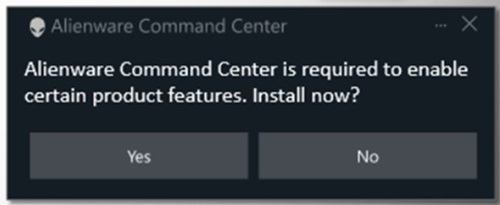
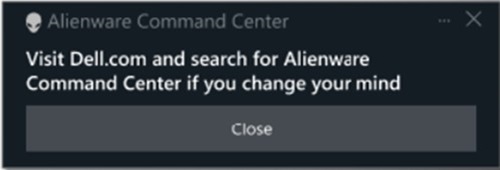
Choosing No displays another on-screen message that advises visiting Dell.com if you change your mind.
The Alienware team is constantly working to improve the new AWCC application and is working to implement the latest AWCC application on older devices.
For more information, check out the following guide:
- Dell documents and manuals: Alienware Command Center User Guide