Código de erro de ativação do Windows 10 0xC004C008
Resumo: Problema com o código de erro de ativação do Windows 10 0xC004C008 em um novo sistema recebido da Dell
Este artigo aplica-se a
Este artigo não se aplica a
Este artigo não está vinculado a nenhum produto específico.
Nem todas as versões do produto estão identificadas neste artigo.
Sintomas
N/D
Causa
N/D
Resolução
Siga as diretrizes fornecidas neste artigo para solucionar um código de erro de ativação do Windows 10 0xC004C008 (chave do produto já em uso) na ativação do sistema para fora da caixa (OOB).
Código de erro 0xC004C008
Você pode encontrar um problema de ativação do Windows 10 em um novo sistema recebido da Dell. Na inicialização do sistema inicial, você pode ver o seguinte erro (Figura 1):
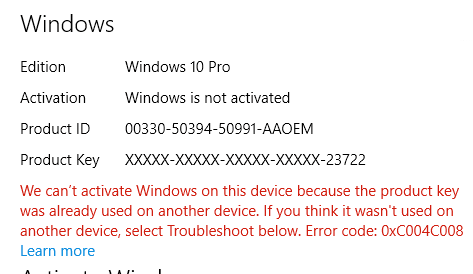
Figura 1: Erro de ativação do Windows 10 informando que a chave do produto já está em uso
Esse erro ocorre quando o servidor de ativação descobre que a chave do produto (Product Key) do Windows 10 pode ter sido usada em vários computadores pessoais. Quando você instala o produto do sistema operacional Windows 8.1 ou Windows 10 um número específico de vezes, o código de erro 0xC004C008 aparece porque a licença do Windows 8.1 ou Windows 10 só pode ser instalada em um único dispositivo.
Solução
 NOTA: Alguns erros de ativação são resolvidos executando algumas reinicializações do sistema e, em seguida, repetindo a sequência de ativação. Referência: Artigo do Centro de TI do Microsoft Windows: Atualização da edição do Windows 10
Você também pode ver a Solução de problemas de ativação para tentar resolver esse problema. A solução de problemas acelera o download de uma atualização necessária para o OA3 (Processo de Ativação OEM 3.0).
Se o problema persistir, entre em contato com a Microsoft discando o número de suporte listado na tela de ativação ("nos Estados Unidos e Canadá, por exemplo: 1-800-936-5700") e explique que a mensagem de erro que você está recebendo é em um novo computador Dell.
A Microsoft pode fornecer a ativação por telefone.
Produtos afetados
Alienware, Inspiron, Legacy Desktop Models, OptiPlex, Vostro, XPS, G Series, G Series, Alienware, Inspiron, Latitude, Vostro, XPS, Legacy Laptop Models, Fixed Workstations, Mobile WorkstationsPropriedades do artigo
Número do artigo: 000130292
Tipo de artigo: Solution
Último modificado: 19 abr. 2026
Versão: 7
Encontre as respostas de outros usuários da Dell para suas perguntas.
Serviços de suporte
Verifique se o dispositivo está coberto pelos serviços de suporte.