Dell Latitude E6530 Visual Guide to Your Computer
Resumo: This article gives a visual guide of your Dell Latitude E6530.
Este artigo aplica-se a
Este artigo não se aplica a
Este artigo não está vinculado a nenhum produto específico.
Nem todas as versões do produto estão identificadas neste artigo.
Instruções
Table of Contents:
Note: For a more detailed description about each location, go to the manuals at Dell Support Manuals.
1. Front View
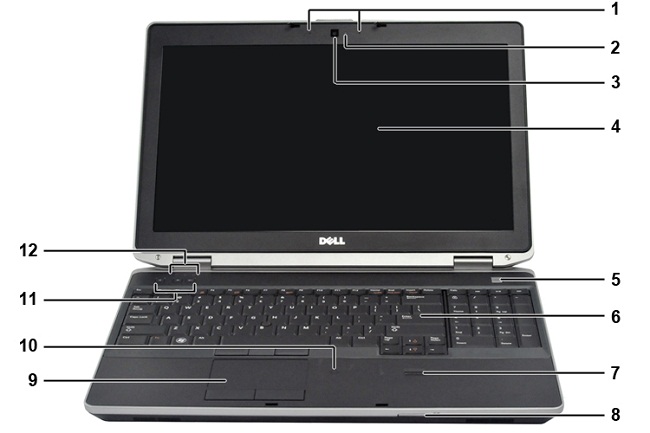
| 1 | Stereo microphones |
|---|---|
| 2 | Camera status light |
| 3 | Camera |
| 4 | Display |
| 5 | Power button |
| 6 | Keyboard |
| 7 | Fingerprint reader |
| 8 | SD card reader |
| 9 | Touchpad |
| 10 | Contactless smart card reader |
| 11 | Volume controls |
| 12 | Device status LEDs |
2. Rear View
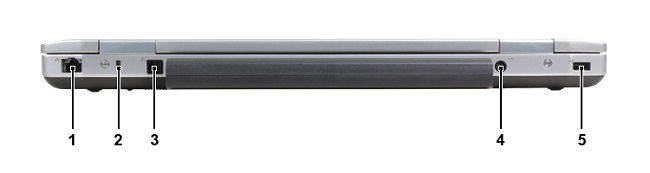
| 1 | Network port (RJ45) |
|---|---|
| 2 | Kensington lock slot |
| 3 | Modem port (RJ11) |
| 4 | AC adapter socket |
| 5 | USB 2.0 port |
3. Bottom View
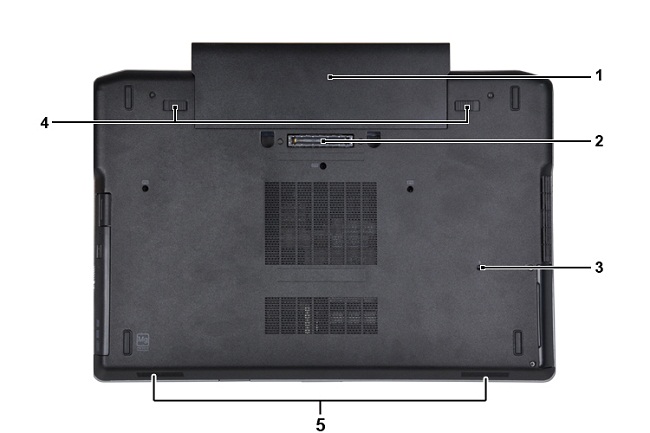
| 1 | Battery |
|---|---|
| 2 | Docking connector |
| 3 | Water drainage slot |
| 4 | Battery release latches |
| 5 | Audio speakers |
4. Left View
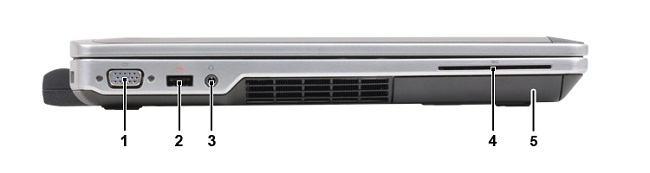
| 1 | VGA external monitor connector |
|---|---|
| 2 | USB 3.0 port |
| 3 | Headphone and mic combo jack |
| 4 | Smart card slot |
| 5 | Hard drive |
5. Right View
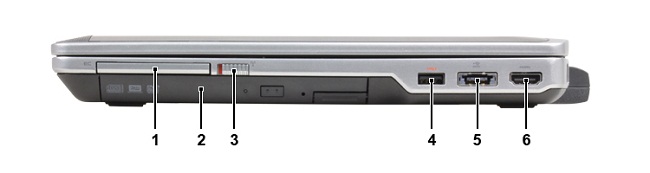
| 1 | ExpressCard slot |
|---|---|
| 2 | Optical drive |
| 3 | Wireless switch |
| 4 | PowerShare USB 3.0 connector |
| 5 | eSATA and USB 2.0 connector |
| 6 | HDMI port |
6. Top View
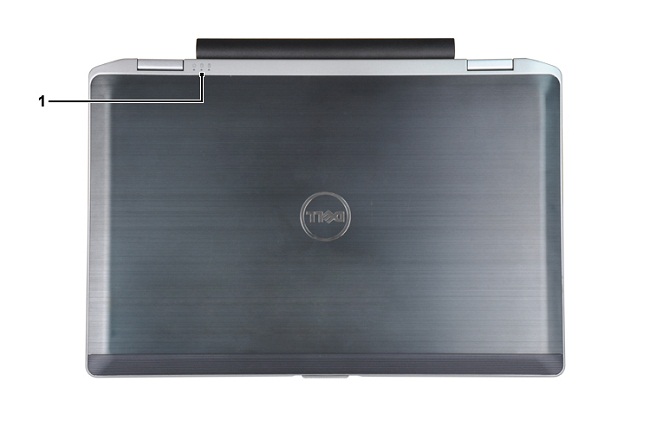
| 1 | Power, hard drive, and battery status LEDs |
|---|
Produtos afetados
Latitude E6530Propriedades do artigo
Número do artigo: 000132933
Tipo de artigo: How To
Último modificado: 19 abr. 2026
Versão: 5
Encontre as respostas de outros usuários da Dell para suas perguntas.
Serviços de suporte
Verifique se o dispositivo está coberto pelos serviços de suporte.