Dell Client Device Manager installeren
Resumo: Dit artikel bevat informatie over het installeren van Dell Client Device Manager (DCDM).
Este artigo aplica-se a
Este artigo não se aplica a
Este artigo não está vinculado a nenhum produto específico.
Nem todas as versões do produto estão identificadas neste artigo.
Instruções
Betreffende producten:
- Dell Client Device Manager
- Downloaden en uitpakken:
- Raadpleeg Dell Client Device Manager downloaden
- Raadpleeg Dell Client Device Manager uitpakken.
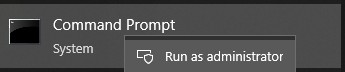
- Voer de opdrachtprompt uit als administrator.
- Wijzig de directory (cd) in de locatie waar DCDM is uitgepakt.

- Voer de PowerShell script uit met behulp van de parameters of voorbeelden hieronder op basis van uw behoeften
powershell.exe -executionpolicy Bypass -windowstyle hidden -noninteractive -nologo -file "dcdm_deployment.ps1" -action -modules

| Parameter | Beschrijving |
|---|---|
| -Help | Optioneel Geeft een beschrijving van parameters weer |
| -actie | Verplicht Specificeert de actie die moet worden uitgevoerd (installeren of verwijderen) |
| -Modules | Optioneel Specificeert de modules die moeten worden opgenomen. Standaard (DCDMCS,DCDMU,DCDMS) |
| -logpath | Optioneel De standaardinstelling is C:ProgramData\Dell\ClientDeviceManager. Geeft het pad voor logbestanden aan |
| -verboselog | Optioneel Schakelt logboekweergave in de console in (waar of onwaar) |
| ·foutopsporing niveau | Optioneel Standaard is alles. Specificeert het niveau van foutopsporingsinformatie |
| -telemetrie toestemming | Optioneel: Standaardwaarde is waar. Geeft toestemming voor telemetrie aan |
| Module | Beschrijving | Module is afhankelijk van |
|---|---|---|
| DCDMCS | Dell Client Device Manager Core Services (voorheen Dell Core Service (DCS)) | N.v.t. kerncomponent vereist |
| DCDMS | Dell Client Device Manager Security (voorheen bekend als Dell Trusted Device (DTD)) | DCDMCS |
| DCDMU | Dell Client Device Manager Update (voorheen Dell Command Update (DCU)) | DCDMCS, DCDMS |
Voorbeelden:
Installeer of update alle modules en verzend telemetrie voor DCDMU
powershell.exe -executionpolicy Bypass -windowstyle hidden -noninteractive -nologo -file "dcdm_deployment.ps1" -action "install"
Alle modules installeren of bijwerken zonder telemetrie
powershell.exe -executionpolicy Bypass -windowstyle hidden -noninteractive -nologo -file "dcdm_deployment.ps1" -action "install" -telemetryconsent "false"
Dell Client Device Manager installeren of bijwerken | Beveiliging (DCDMS)
powershell.exe -executionpolicy Bypass -windowstyle hidden -noninteractive -nologo -file "dcdm_deployment.ps1" -action "install" -modules "DCDMS"
Dell Client Device Manager verwijderen | Beveiliging (DCDMS)
powershell.exe -executionpolicy Bypass -windowstyle hidden -noninteractive -nologo -file "dcdm_deployment.ps1" -action "uninstall" -modules "DCDMS"
Verwijder alle modules
powershell.exe -executionpolicy Bypass -windowstyle hidden -noninteractive -nologo -file "dcdm_deployment.ps1" -action "uninstall"
Produtos afetados
Dell Client Device ManagerPropriedades do artigo
Número do artigo: 000299185
Tipo de artigo: How To
Último modificado: 22 mai. 2026
Versão: 3
Encontre as respostas de outros usuários da Dell para suas perguntas.
Serviços de suporte
Verifique se o dispositivo está coberto pelos serviços de suporte.