PowerEdge 17th Generation Servers with Delta Power Supplies may not show correctly in iDRAC UI and SEL logging after AC cycle
Resumo: PowerEdge 17th Generation Servers with Delta Power Supplies may not show correctly in iDRAC UI and SEL logging after AC cycle.
Este artigo aplica-se a
Este artigo não se aplica a
Este artigo não está vinculado a nenhum produto específico.
Nem todas as versões do produto estão identificadas neste artigo.
Sintomas
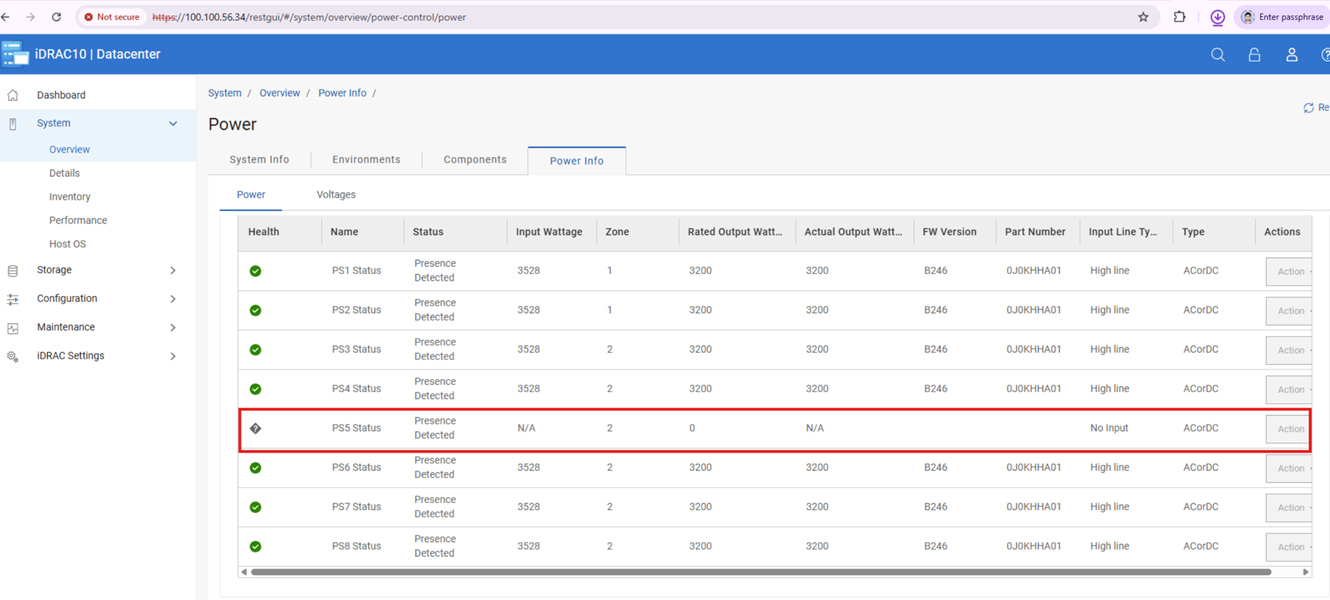
Post-AC cycle affected Delta 17G Power Supplies may function but display blank iDRAC telemetry, firmware, and Dell Part numbers of fields. However, performing another AC or virtual AC cycle after this state occurs triggers incorrect configuration or capacity mismatch errors in the SEL.
Causa
After an AC or virtual AC cycle, iDRAC UI may miss power supply info and SEL may log PSU configuration or capacity mismatches (PWR2265/PWR2267/UEFI0059).
We identified that is Power Supplies limitation caused the loss of communication in a corner case, leading to the bus hang.
Resolução
Do not replace any hardware, this issue is not a hardware failure and can be resolved with Power Supply firmware updates.
Note: If a PSU mismatch occurs, unplug AC power and reseat the PSU after 2 minutes. Once remediated, update PSU firmware in line with the following information.
The following chart lists the Dell Part Numbers (DPN) and Firmware Version required to resolve this issue.
| Vendor | Wattage | Dell Part Number | Firmware Version |
| Delta | 3200 W | JNF12 | 1916 |
| J0KHH | BC46 | ||
| Y9NXM | C021 | ||
| 2400 W | 9KK0M | BC2B | |
| 1800 W | GF1GT | 192A | |
| 1500 W | GRD17 | BC31 | |
| DM12N | BC36 | ||
| 1400 W | 8HCRH | BC28 | |
| 1100 W | KMJFC | BC35 | |
| 49FWD | BC2C | ||
| 800 W | 8YNWG | BC2D | |
| R98X5 | BC2E |
The above firmware versions are available on each system model’s download page from the Dell Support site.
Produtos afetados
Rack Servers, XE Servers, XR ServersPropriedades do artigo
Número do artigo: 000471893
Tipo de artigo: Solution
Último modificado: 05 jun. 2026
Versão: 1
Encontre as respostas de outros usuários da Dell para suas perguntas.
Serviços de suporte
Verifique se o dispositivo está coberto pelos serviços de suporte.