Deployment KB: How to validate vSan encryption for Cloudlink.
Summary: This article explains how to validate vSan encryption for Cloudlink.
Acest articol se aplică pentru
Acest articol nu se aplică pentru
Acest articol nu este legat de un produs specific.
Acest articol nu acoperă toate versiunile de produs existente.
Instructions
How to monitor vSAN encryption using vCenter:
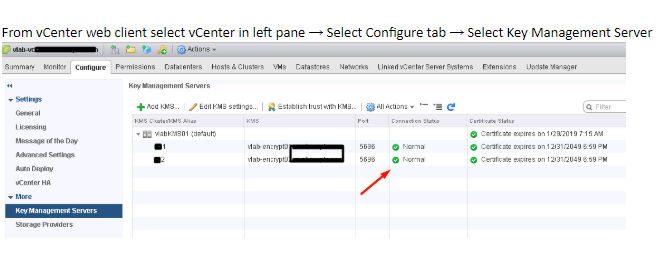
- Check vCenter and KMS server s connection status.
If connection statue is not Normal, make sure vCenter is connected to KMS and there are no trust related issues.
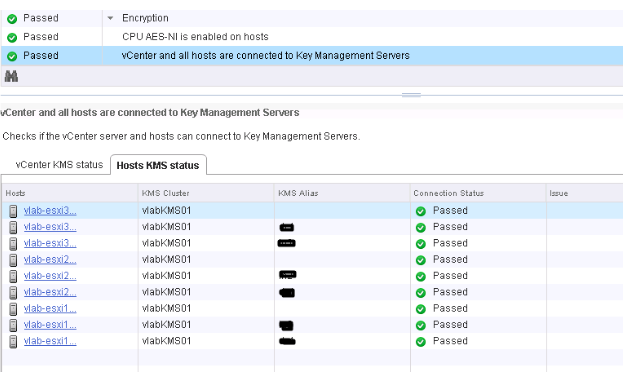
- Select ESXi Cluster where you have enabled vSAN Encryption. vSAN Health plugin see the KMS connectivity status and Disk Encryption status. If you have enabled Encryption then Encryption links are displayed in vSAN Health plugin.
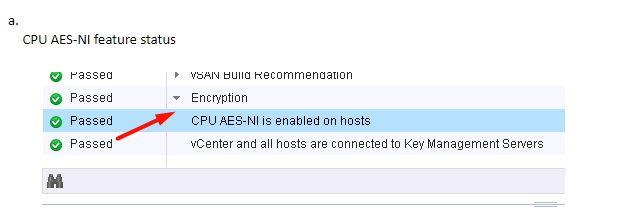
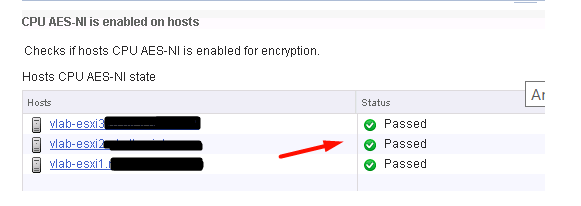
b. Check KMS and vCenter status
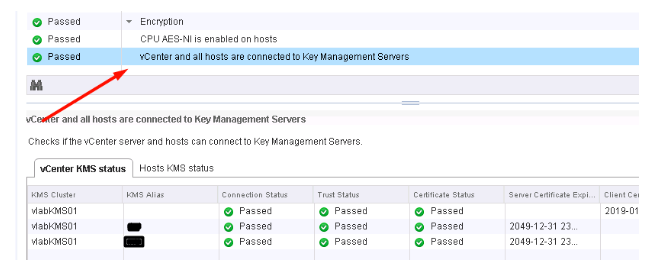
c. Check KMS and ESXi Host Connection Status
Additional Information
It is recommended to watch the VMworld session below if you are looking to Implement VM Encryption or vSAN Encryption:
VMworld 2017 - SER1392BU - Honey, Where Are My Keys? Understanding and Avoiding Common Issues with Virtual Machine Encryption
https://www.youtube.com/watch?v=I5gR_dVqfz0&feature=youtu.be
VMworld 2017 - SER1392BU - Honey, Where Are My Keys? Understanding and Avoiding Common Issues with Virtual Machine Encryption
https://www.youtube.com/watch?v=I5gR_dVqfz0&feature=youtu.be
Produse afectate
CloudLinkProduse
CloudLinkProprietăți articol
Article Number: 000022200
Article Type: How To
Ultima modificare: 17 Apr 2026
Version: 4
Găsiți răspunsuri la întrebările dvs. de la alți utilizatori Dell
Servicii de asistență
Verificați dacă dispozitivul dvs. este acoperit de serviciile de asistență.