Understanding Driver Pack Delta Report
Summary: The Driver Packs are updated based on the release schedule and in response to customer requirements.
Instructions
The Driver Packs are updated based on the release schedule and in response to customer requirements. You can compare the previous and current versions of a Driver Pack and identify the change using a Delta Report. For example, you can verify if the current Driver Pack contains all the applicable latest drivers.
Delta Report is created by Dell Engineers and it is used as a source for finding applicable, new, and updated driver candidates for releasing a Driver pack.
A Delta Report contains the following information:
- Current Driver Pack details and a download link
- Device drivers that are part of the previous version of the Driver Pack.
- Device drivers that are part of the current version of the Driver Pack.
- Status of the driver compared to the previous version of the Driver Pack.
Note: Device driver support of a Driver Pack release is decided on various factors such as applicability of a device to model, readiness of the driver operating system deployment, and so on. Like Driver Pack releases, Delta Report release aligns with the release schedule. Customers can go to Delta Report by accessing links that are associated to a Driver Pack on the Driver Pack home page.
Understanding a Delta Report
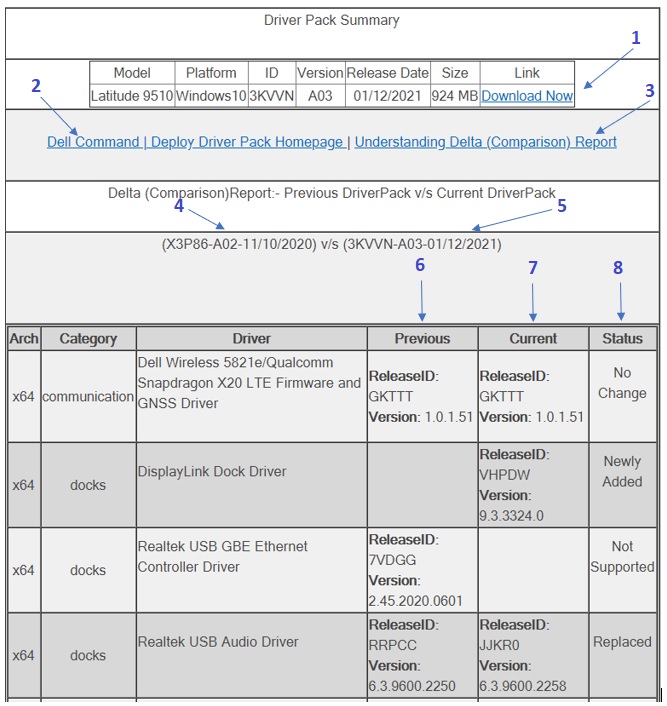
Figure-1 Sample Delta Report highlighting key components/sections:
Description:
- Download link for the current version of the Driver Pack.
- Link to the Driver Pack Home Page
- Link to Understanding the Delta Report
- Previous version of the Driver Pack.
- Current version of the Driver Pack.
- Device drivers that are part of the previous version of the Driver Pack.
- Device drivers that are part of the current version of the Driver Pack.
- Status of the driver compared to the previous version of the Driver Pack
The incremental status changes are categorized as the following:
No Change : Indicates that the device continues to support the current version of the Driver Pack and no updates were available for the device driver while building the current version of the Driver Pack.Replaced : Indicates that driver has been updated in the current version of the Driver Pack.
Newly Added : Indicates a new device driver is added in the current version of the Driver Pack.
Not Supported : Indicates that device is not included because,
• The device is no longer supported by the current version of the Driver Pack.
• The driver is not compatible for operating system deployment in either the previous or the current version of the Driver Pack.