Dell Data Protection Encryption Message is Displayed "Encryption Administrator Password"
Summary: Customer may report an "Encryption Administrator Password" message occurs on every startup or reboot on computers with Dell Encryption (formerly Dell Data Protection | Encryption) installed. ...
Acest articol se aplică pentru
Acest articol nu se aplică pentru
Acest articol nu este legat de un produs specific.
Acest articol nu acoperă toate versiunile de produs existente.
Symptoms
Affected Products:
- Dell Encryption
- Dell Data Protection | Encryption
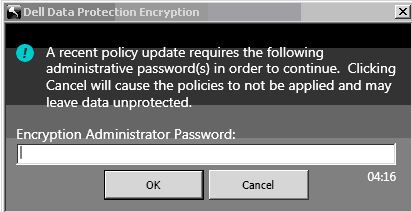
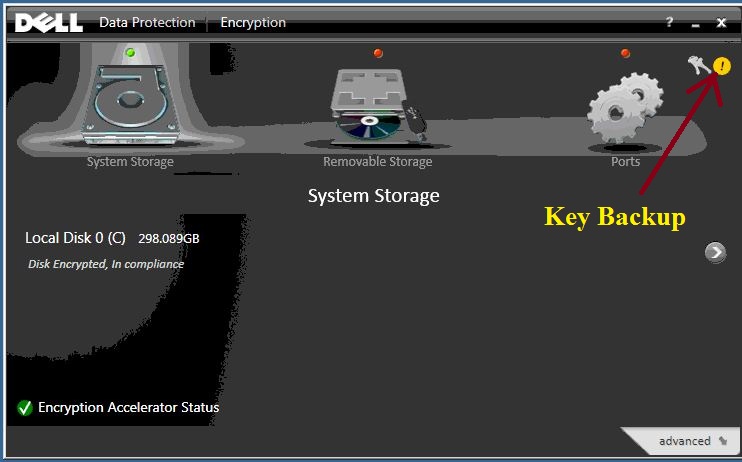
This issue occurs after changing any policy, password, or client user changes including adding a client user. Next to the Key Backup icon within the UI a yellow circle with an exclamation appears indicating that the Key Backup is required.
Cause
Not Applicable
Resolution
To eliminate the persistent message from being displayed, double-click the Key Backup icon and follow the on-screen instructions through completion.
To contact support, reference Dell Data Security International Support Phone Numbers.
Go to TechDirect to generate a technical support request online.
For additional insights and resources, join the Dell Security Community Forum.
Produse afectate
Dell EncryptionProprietăți articol
Article Number: 000124865
Article Type: Solution
Ultima modificare: 15 Jun 2026
Version: 10
Găsiți răspunsuri la întrebările dvs. de la alți utilizatori Dell
Servicii de asistență
Verificați dacă dispozitivul dvs. este acoperit de serviciile de asistență.