OptiPlex 5080: Visual Guide to your computer
Summary: The following article provides a visual guide to your OptiPlex 5080 Computer and lists the external ports and features of your PC.
Acest articol se aplică pentru
Acest articol nu se aplică pentru
Acest articol nu este legat de un produs specific.
Acest articol nu acoperă toate versiunile de produs existente.
Symptoms
Note: For a more detailed description about each location, please go to the system manuals at www.dell.com/support
Table of Contents:
- Mini Tower (MT) Front View
- Mini Tower (MT) Rear View
- Small Form Factor (SFF) Front View
- Small Form Factor (SFF) Rear View
- Micro Form Factor (MFF) Front View
- Micro Form Factor (MFF) Rear View
- Additional Info:
Mini Tower (MT) Front View
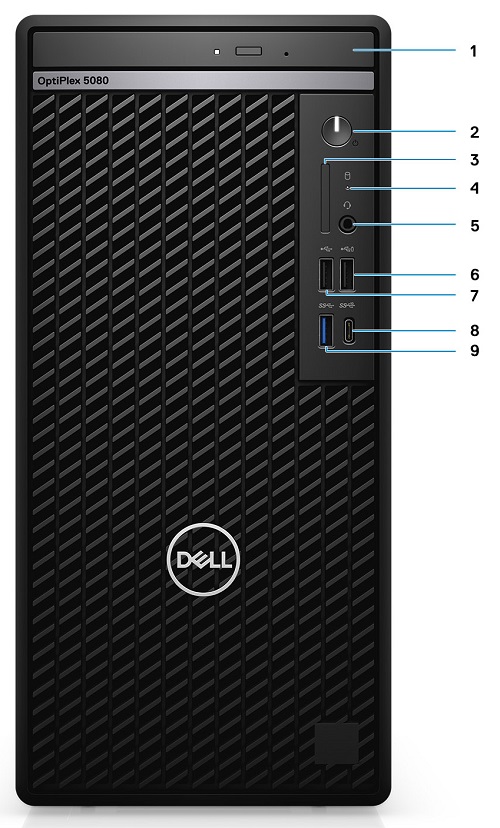
(Figure.1 MT Front View)
| 1 | Optical Disc Drive (Optional) | 2 | Power Button with Diagnostic LED Indicator |
| 3 | SD 4.0 Card Reader (Optional) | 4 | Hard Disk Drive Activity LED Indicator |
| 5 | Universal Audio Jack Connector | 6 | USB 2.0 Connector w/PowerShare |
| 7 | USB 2.0 Connector | 8 | USB 3.2 Gen2 Type-C Connector |
| 9 | USB 3.2 Gen2 Type-A Connector |
Cause
N/A
Resolution
Mini Tower (MT) Rear View
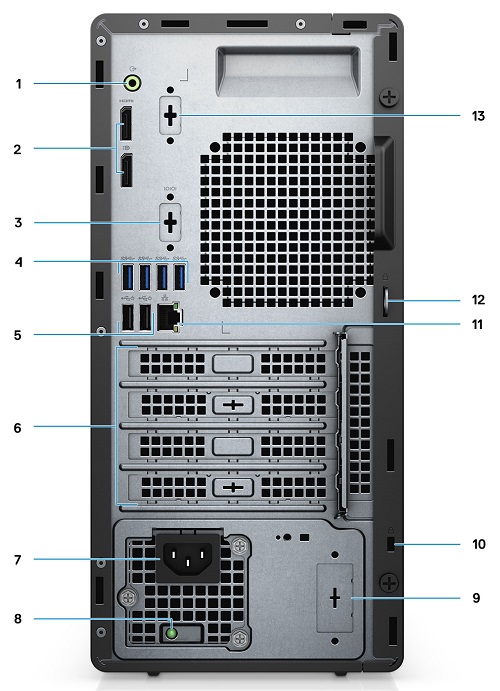
(Figure.2 MT Rear View)
| 1 | Line-Out Re-tasking Line-In Audio Connector | 2 | DisplayPort 1.4 Connector x2 |
| 3 | Knock Out slot Video Port (Optional) | 4 | USB 3.2 Gen2 Type-A Connector x4 |
| 5 | USB 2.0 Connector w/Smart Power On x2 | 6 | Expansion Card Slots x4 |
| 7 | Power Connector | 8 | Power Supply Diagnostic LED Indicator |
| 9 | Knock out slot (Optional SMA Connector) | 10 | Kensington Security-Cable Slot |
| 11 | Ethernet (NIC) Connector (10/100/1000 Mbps) | 12 | Padlock Loop |
| 13 | Knock out slot Serial/PS2 (Optional) |
Small Form Factor (SFF) Front View

(Figure.3 SFF Front View)
| 1 | Power Button w/Diagnostic LED Indicator | 2 | SD 4.0 Card Reader (Optional) |
| 3 | Hard Drive Activity LED Indicator | 4 | Universal Audio Jack Connector |
| 5 | USB 2.0 Type-A Connector w/PowerShare | 6 | USB 2.0 Type-A Connector |
| 7 | USB 3.2 Gen2 Type-C Connector | 8 | USB 3.2 Gen2 Type-A Connector |
| 9 | Optical Disc Drive (Optional) |
Small Form Factor (SFF) Rear View
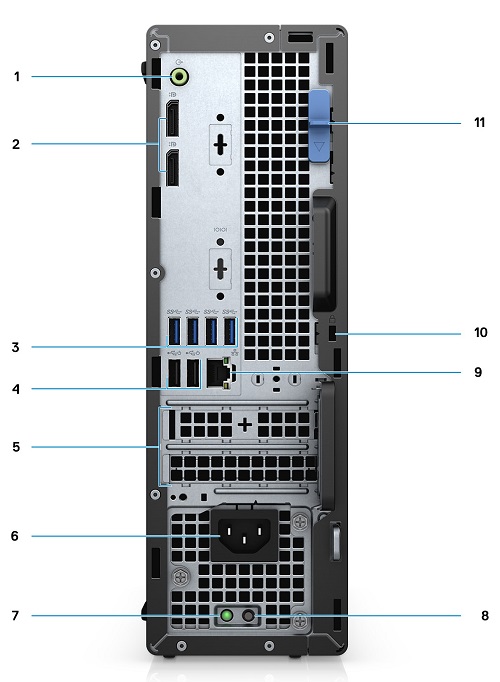
(Figure.4 SFF Rear View)
| 1 | Audio Line-Out/In Connector (Re-tasking) | 2 | DisplayPort 1.4 Connector x2 |
| 3 | USB 3.2 Gen2 Type-A Connector x4 | 4 | USB 2.0 Connector w/Smart Power On x2 |
| 5 | Half Height Expansion Slot x2 | 6 | Power Connector |
| 7 | Power Supply Diagnostic LED Indicator | 8 | Power Supply BIST |
| 9 | Ethernet (NIC) Connector | 10 | Kensington Security-Cable Slot |
| 11 | Release Latch |
Micro Form Factor (MFF) Front View
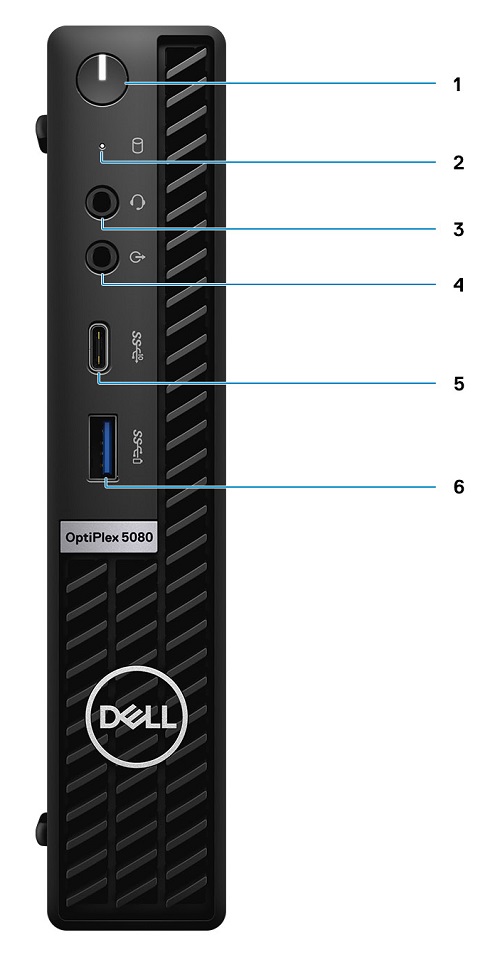
(Figure.5 MFF Front View)
| 1 | Power Button w/Diagnostic LED Indicator | 2 | Hard Disk Drive Activity LED Indicator |
| 3 | Universal Audio Jack Connector | 4 | Line-Out Connector (Re-taskable Line-In) |
| 5 | USB 3.2 Gen2 Type-C Connector | 6 | USB 3.2 Gen1 Type-A Connector w/PowerShare |
Micro Form Factor (MFF) Rear View

(Figure.6 MFF Rear View)
| 1 | External Antenna Connectors | 2 | Serial/Video Port (Serial/PS2/DP 1.4/HDMI 2.0/VGA/USB 3.2 Gen 2 Type-C with DP Alt Mode) (optional) |
| 3 | USB 3.2 Gen1 Type-A Connector w/Power On | 4 | USB 3.2 Gen1 Type-A Connector x2 |
| 5 | Cable Holder | 6 | Thumbscrew |
| 7 | Padlock Ring | 8 | Power Connector |
| 9 | DisplayPort 1.4 Connector x2 | 10 | Kensington Security-Cable Slot |
| 11 | USB 3.2 Gen2 Type-A Connector | 12 | Ethernet (NIC) Connector (10/100/1000 Mbps) |
Additional Info:
- OptiPlex 5080 Customer replaceable unit (CRU) teardown index
- Micro Form Factor Mounting Options and installation methods
- OptiPlex 5080 Documentation Support site page
Additional Information
Videos
Produse afectate
OptiPlex 5080 Tower, OptiPlex 5080 Micro, OptiPlex 5080 Small Form FactorProprietăți articol
Article Number: 000126230
Article Type: Solution
Ultima modificare: 12 Jun 2025
Version: 8
Găsiți răspunsuri la întrebările dvs. de la alți utilizatori Dell
Servicii de asistență
Verificați dacă dispozitivul dvs. este acoperit de serviciile de asistență.